
Roblox skins
Bedrock skin pack listed for Minecraft 1.20–26.x. File opened and checked on 31 Oct 2026; installs from the MC Skins app on Android.
Roblox Pack brings fun blocky Minecraft skins with classic noob vibes, colorful outfits, and cool multiplayer style. 😄
⬇ Download on CurseForge
Bring classic blocky fun into Minecraft with Roblox Pack, a colorful Minecraft Bedrock skin pack inspired by simple, funny, and iconic noob-style characters.
This pack includes fun outfits, bright colors, classic faces, and playful skins that are perfect for survival, roleplay, multiplayer worlds, and funny moments with friends.
Perfect for players who like simple blocky characters, colorful skins, and classic noob vibes. 😄
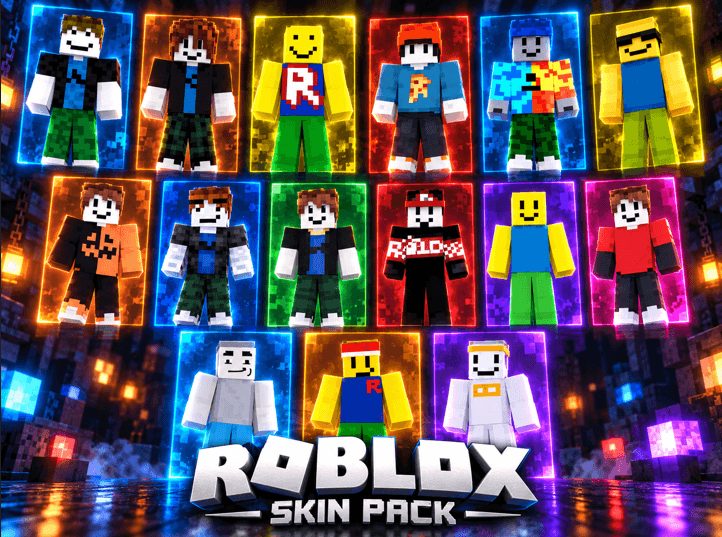
- Edition: Minecraft Bedrock
- File type: .mcpack
- Minecraft versions listed: 1.21.81, 1.21.93, 1.21.73
- How to install: Download the .mcpack skin pack. → Open it — Minecraft imports it. → Open the Dressing Room and select the skin.
- Where to get it: Opens on CurseForge — not every file is mirrored on our own servers.
Install steps are the general flow for this file type — How to apply a custom Minecraft skin walks through it step by step.
- Pack type: .mcpack — a single pack
- Manifest requires Minecraft 1.20.0 or newer
- Complete pack — everything it depends on is inside the file
- Download size: 30 KB
- Download link checked 24 Oct 2026 — working
These come from our own check of the pack file, not from the source page.