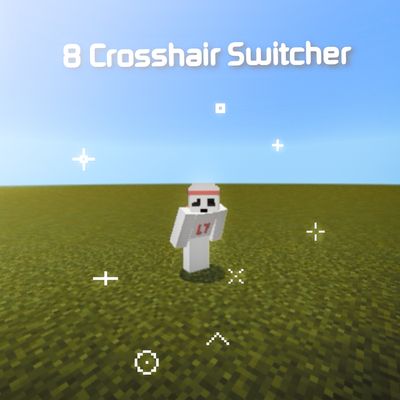


- Looking for a fresh look for your HUD? This pack adds 8 unique crosshair styles ranging from minimal dots to classic pluses and tactical V-shapes!.Perfect for PvP, building, or just refreshing your gameplay experience. Give your screen a new vibe with these clean, pixel-perfect designs!Just activate this pack in both Global Resources and your world, then hit the gear icon to customize your crosshair.This pack only changes your crosshair.
- Head to the settings and open the customization menu. The options are ordered from left to right, exactly matching the order of the images in the preview gallery, so you can easily pick and tweak your favorite crosshair!
- Thank you for taking the time to explore my work.Please do not re-upload my packs to other
sites without my permission.
Quick facts
- Edition: Minecraft Bedrock
- File type: .mcpack
- Minecraft versions listed: 26.0.02, 26.0, 26.3
- How to install: Download the .mcpack. → Open it — Minecraft imports it under Resource Packs. → Activate it in Global Resources, or for one world under Resource Packs → Available.
- Where to get it: Opens on CurseForge — not every file is mirrored on our own servers.
Install steps are the general flow for this file type — How to install Minecraft Bedrock texture packs walks through it step by step.
Verified by MCModsHub
- Pack type: .mcpack — a single pack
- Manifest requires Minecraft 1.14.0 or newer
- Complete pack — everything it depends on is inside the file
- Download size: 496 KB
- Download link checked 31 Aug 2026 — working
These come from our own check of the pack file, not from the source page.