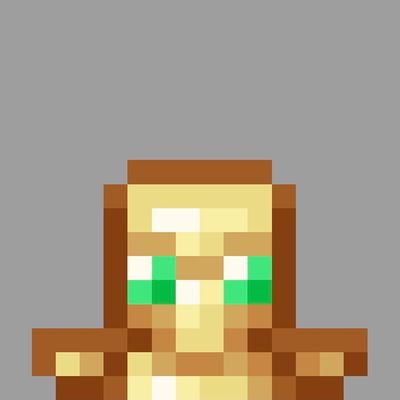

your totem texture will be reduced like in the photo
It looks super good and you will have more visibility
---------- How to use -----------
You can use it in your worlds and servers
- Go to settings
- Go to resource packs
- Enable reduced totem Totem pack
- done!
if you want this in your world you should enable the pack from the world settings resource packs
and if your friends join the world they will also see the texture!
you can still earn achievements because it's only a resource pack
if you like this texture, i have a couple more cool resource packs/maps on my curseforge profile @SnowPlor
Quick facts
- Edition: Minecraft Bedrock
- File type: .mcpack
- Minecraft versions listed: 1.20.40, 1.21.30, 1.21.50
- How to install: Download the .mcpack. → Open it — Minecraft imports it under Resource Packs. → Activate it in Global Resources, or for one world under Resource Packs → Available.
- Where to get it: Opens on CurseForge — not every file is mirrored on our own servers.
Install steps are the general flow for this file type — How to install Minecraft Bedrock texture packs walks through it step by step.
Verified by MCModsHub
- Pack type: .mcpack — a single pack
- Manifest requires Minecraft 1.17.0 or newer
- Complete pack — everything it depends on is inside the file
- Download size: 10 KB
- Download link checked 7 Sept 2026 — working
These come from our own check of the pack file, not from the source page.