
Coordinates HUD Bedrock
Bedrock texture pack listed for Minecraft 26.x. Download on the author's site.
⬇ Download on CurseForge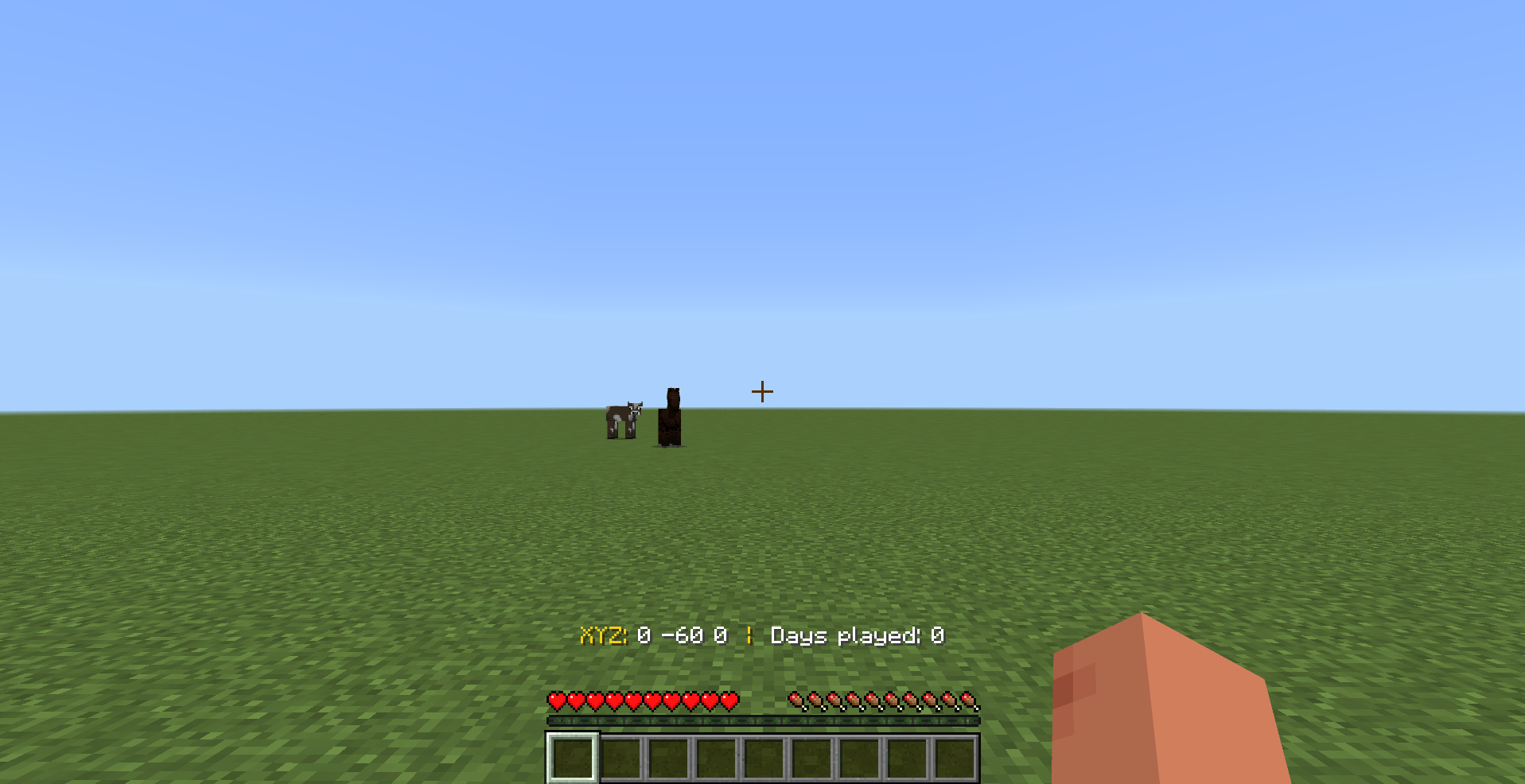
This resource pack moves the world coordinates (XYZ) and the Days Played counter to the exact center above the hotbar, giving your HUD a clean, cinematic look.
✨ Features
-
Floating Text with No Background: Removes the long black background, leaving only clean floating text with a subtle shadow.
-
Professional Color Scheme: The
XYZ:label is displayed in gold, while the coordinate values remain white with no separators, matching a polished and professional HUD style. -
Perfect Compatibility: Designed to work seamlessly with the hotbar, hearts, and hunger bar without overlapping or interfering with any UI elements.
-
No Duplication or Disappearing Text: Uses a reverse-positioning technique to relocate the coordinates from the top of the screen to above the hotbar, ensuring smooth, continuous updates without flickering or disappearing.
📥 Installation
-
Download Coordinates HUD Bedrock Pack.
-
Double-click the file to import it into Minecraft Bedrock Edition.
-
Enable the resource pack in your world, and make sure Show Coordinates is turned on in the world settings.
-
Enjoy!
- Edition: Minecraft Bedrock
- File type: .mcpack
- Minecraft version listed: 26.30
- How to install: Download the .mcpack. → Open it — Minecraft imports it under Resource Packs. → Activate it in Global Resources, or for one world under Resource Packs → Available.
- Where to get it: Opens on CurseForge — not every file is mirrored on our own servers.
Install steps are the general flow for this file type — How to install Minecraft Bedrock texture packs walks through it step by step.
Coordinates HUD Bedrock is a free Minecraft Bedrock texture pack. Compatible with Minecraft 26.30. Downloaded 1,713 times (via CurseForge). Download it and open it directly in the game.