Anime Girl Animated UI Texture Pack for MCPE 26.50
Transform your Minecraft Bedrock menu with a fully animated anime UI, custom fonts, and smooth performance optimized for modern Bedrock clients.
⬇ Download on Modbay🌸 Anime Girl Animated UI V2 (Bedrock Edition)
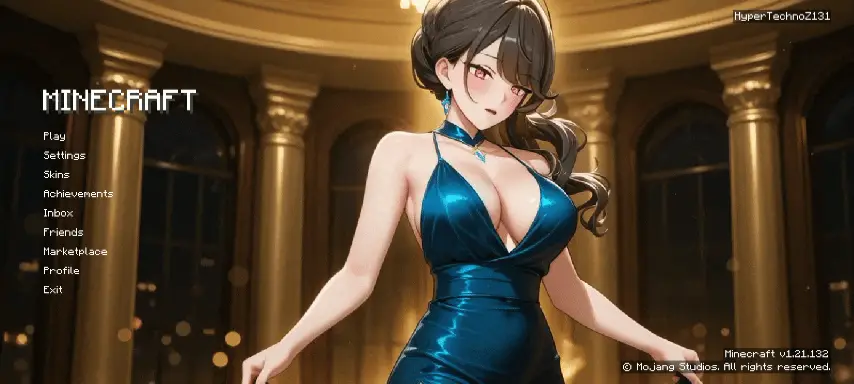
Transform your Minecraft Bedrock main menu into a luxurious, high-end anime experience. Anime Girl Animated UI V2 replaces the standard panoramic background with a sleek, fully animated anime masterpiece, combined with a customized font overlay designed specifically for Bedrock players.
🌟 Key Features
- Fluid Visuals: A fully animated, high-definition anime background with dynamic lighting elements for a smooth, cinematic menu experience.

- Elegant Aesthetic: Showcases a stylized anime character in a shimmering teal dress set against a grand, golden ballroom.
- Classic Typography: Retains the authentic, pixelated Minecraft title font seamlessly overlaid onto modern visuals.
- Full Menu Overhaul: Complete replacement for standard Bedrock UI text paths including Play, Settings, Skins, and Marketplace.
- Version Compatibility: Fully optimized to run smoothly on modern Bedrock clients (v1.21+).
- Watermark Protected: Officially designed by HyperTechnoZ131.
🛠️ Technical Specifications & Details
- Supported Platforms: Windows 10/11, Android, iOS, and consoles supporting custom resource packs.
- File Format: Distributed as a .mcpack file for easy, one-click installation.
- Performance Optimization: Engineered with lightweight rendering loops to prevent menu lag or frame drops on mobile devices.
📥 Installation
- Download the .mcpack file directly to your device.
- Double-click or tap the file to open it automatically with Minecraft.
- Navigate to Settings > Global Resources.
- Activate Anime Girl Animated UI V2 under your "My Packs" tab.
- Restart your game or let the resources load to enjoy your brand-new main menu.
Designed and released by HyperTechnoZ131. If you experience performance issues, try disabling other heavy resource packs or lowering device graphics settings.
- Edition: Minecraft Bedrock
- File type: .mcpack
- How to install: Download the .mcpack. → Open it — Minecraft imports it under Resource Packs. → Activate it in Global Resources, or for one world under Resource Packs → Available.
- Where to get it: Opens on Modbay — not every file is mirrored on our own servers.
Install steps are the general flow for this file type — How to install Minecraft Bedrock texture packs walks through it step by step.
Anime Girl Animated UI Texture Pack for MCPE 26.50 is a free Minecraft Bedrock texture pack. Available via Modbay. Download it and open it directly in the game.