Home›Bedrock›Skins›Shading Template #2 - Add shading to your skin in one easy step (hat layer & alex model)
SkinsBedrock
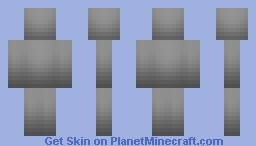
Shading Template #2 - Add shading to your skin in one easy step (hat layer & alex model)
Minecraft Bedrock skin pack. Download on the author's site.
⬇ DownloadThis the shading template #2 from the Instant Shading Tutorial.
Shade your skins with one easy step. No skill required.
More Template downloads:
(right click image and "save as")
 1.8 with Hat Layer
 Alex(3 pixel arms) no Hat Layer
 Alex(3 pixel arms) with Hat Layer
 Original no Hat Layer
 Original with Hat Layer
If you create a skin using this template, it is against the rules to post it on PMC because the skin would no longer be created 100% by you. So only use this template for your own personal skins and do not post it on this site.
Shade your skins with one easy step. No skill required.
More Template downloads:
(right click image and "save as")
1.8 with Hat LayerAlex(3 pixel arms) no Hat Layer Alex(3 pixel arms) with Hat LayerOriginal no Hat LayerOriginal with Hat LayerIf you create a skin using this template, it is against the rules to post it on PMC because the skin would no longer be created 100% by you. So only use this template for your own personal skins and do not post it on this site.
Quick facts
- Edition: Minecraft Bedrock
- File type: .mcpack
- How to install: Download the .mcpack skin pack. → Open it — Minecraft imports it. → Open the Dressing Room and select the skin.
- Where to get it: Opens on the file's original source — not every file is mirrored on our own servers.
Install steps are the general flow for this file type — How to apply a custom Minecraft skin walks through it step by step.
Shading Template #2 - Add shading to your skin in one easy step (hat layer & alex model) is a free Minecraft Bedrock skin. Downloaded 23,100 times. Download it and open it directly in the game.