
SkinsBedrock
All Your Blocks' Minecraft Skin
Minecraft Bedrock skin pack. Download on the author's site.
⬇ DownloadI made this skin while trying to come up with a logo for my All Your Blocks YouTube channel. I've been playing around with vanilla Minecraft textures and colours to try and generate an idea which has the look and feel of different blocks.
By using the textures for inspiration and trying to reproduce them in smaller 8x8 and 4x4 pixel versions I hoped to create an image that would be instantly recognisable as Minecraft-related.

Download original file with no transparency - v1 Vanilla Textures Concept
While experimenting with this technique I made several versions of different mini-blocks and thought it might be fun to apply them to a skin. The result is what you see above - a collection of various thoughts, processes and ideas to create an experimental but eye-catching skin.
After this first attempt I looked around at other images and ideas that I associate with Minecraft. I play almost exclusively in the Default Texture Pack, but occasionally I'll use disco's oCd pack, which you can get from here. I turned to this for further inspiration and adapted my original skin to create a disco-inspired version.
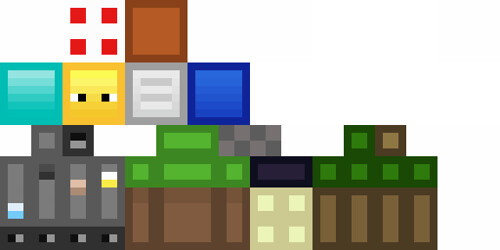
Download original file with no transparency v2 - Vanilla Textures Concept (disco-inspired)
I did most of the work for both of these skins offline in Microsoft Paint before saving them as .png files and uploading to an online editor to add in the transparency.
Both of these skins and the logo are still works in progress as I'm trying out the different techniques and block types, but I thought I'd share them with the wider community now to get some feedback on my first Minecraft skin, I hope you like it!
2020 refresh

Download original file with no transparency v3 - 2020 Remodelled Colours and Textures
By using the textures for inspiration and trying to reproduce them in smaller 8x8 and 4x4 pixel versions I hoped to create an image that would be instantly recognisable as Minecraft-related.
Download original file with no transparency - v1 Vanilla Textures Concept
While experimenting with this technique I made several versions of different mini-blocks and thought it might be fun to apply them to a skin. The result is what you see above - a collection of various thoughts, processes and ideas to create an experimental but eye-catching skin.
After this first attempt I looked around at other images and ideas that I associate with Minecraft. I play almost exclusively in the Default Texture Pack, but occasionally I'll use disco's oCd pack, which you can get from here. I turned to this for further inspiration and adapted my original skin to create a disco-inspired version.
Download original file with no transparency v2 - Vanilla Textures Concept (disco-inspired)
I did most of the work for both of these skins offline in Microsoft Paint before saving them as .png files and uploading to an online editor to add in the transparency.
Both of these skins and the logo are still works in progress as I'm trying out the different techniques and block types, but I thought I'd share them with the wider community now to get some feedback on my first Minecraft skin, I hope you like it!
2020 refresh
Download original file with no transparency v3 - 2020 Remodelled Colours and Textures
Quick facts
- Edition: Minecraft Bedrock
- File type: .mcpack
- How to install: Download the .mcpack skin pack. → Open it — Minecraft imports it. → Open the Dressing Room and select the skin.
- Where to get it: Opens on the file's original source — not every file is mirrored on our own servers.
Install steps are the general flow for this file type — How to apply a custom Minecraft skin walks through it step by step.
All Your Blocks' Minecraft Skin is a free Minecraft Bedrock skin. Downloaded 4,600 times. Download it and open it directly in the game.