![noahcdn's Tweaked Textures (Connected Textures) [16x16]](https://static.planetminecraft.com/files/image/minecraft/texture-pack/2020/673/12948936-screenshot_m.jpg)
Texture packsBedrock
noahcdn's Tweaked Textures (Connected Textures) [16x16]
Bedrock texture pack listed for Minecraft 1.2. File opened and checked on 21 Aug 2026; installs from the MC Bedrock Mods app on Android.
⬇ DownloadFans of the Minecraft: Java Edition may often use the Connected Textures option on Optifine. Since there is no version of Optifine for Bedrock Edition, I decided to make my take on connecting the textures.
I've done it by removing and blending the borders of various blocks so, when placed in a group, they appear to connect.
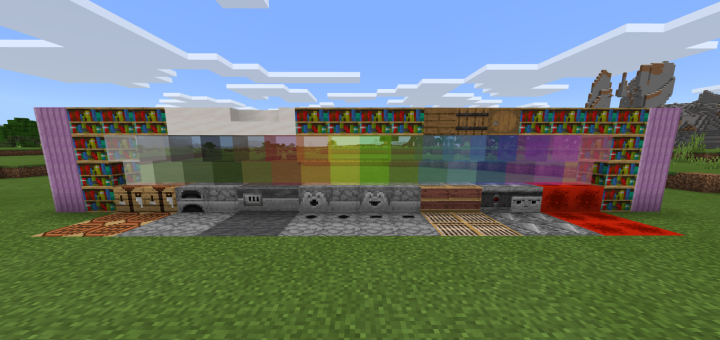
This is great for builders on the Bedrock Edition as it can be used to make your builds blend well together, better than the default textures.
![noahcdn's Tweaked Textures (Connected Textures) [16x16] Minecraft Texture Pack](https://i.imgur.com/UN9opo9.png)
![noahcdn's Tweaked Textures (Connected Textures) [16x16] Minecraft Texture Pack](https://i.imgur.com/jZGC9xz.png)
![noahcdn's Tweaked Textures (Connected Textures) [16x16] — Minecraft Bedrock texture pack, screenshot 1](https://i.imgur.com/HrqGkNc.png)
![noahcdn's Tweaked Textures (Connected Textures) [16x16] — Minecraft Bedrock texture pack, screenshot 2](https://i.imgur.com/pTiaG6I.png)
I've done it by removing and blending the borders of various blocks so, when placed in a group, they appear to connect.
This is great for builders on the Bedrock Edition as it can be used to make your builds blend well together, better than the default textures.
Quick facts
- Edition: Minecraft Bedrock
- File type: .mcpack
- How to install: Download the .mcpack. → Open it — Minecraft imports it under Resource Packs. → Activate it in Global Resources, or for one world under Resource Packs → Available.
- Where to get it: In MCModsHub, or directly above on this page.
Install steps are the general flow for this file type — How to install Minecraft Bedrock texture packs walks through it step by step.
File checked by MCModsHub
- Save it as 477418.mcaddon before opening — it downloads as .mcpack, but it is a .mcaddon pack
- Manifest requires Minecraft 1.2.6 or newer
- Complete pack — everything it depends on is inside the file
- Download size: 305 KB
- Download link checked 21 Aug 2026 — working
- Mirrored on our own servers — the download does not depend on the original host
These come from our own check of the pack file, not from the source page.