Button in Disguise
Bedrock texture pack listed for Minecraft 1.15–1.21. File opened and checked on 21 Aug 2026; installs from the MC Bedrock Mods app on Android.
I don't know my version
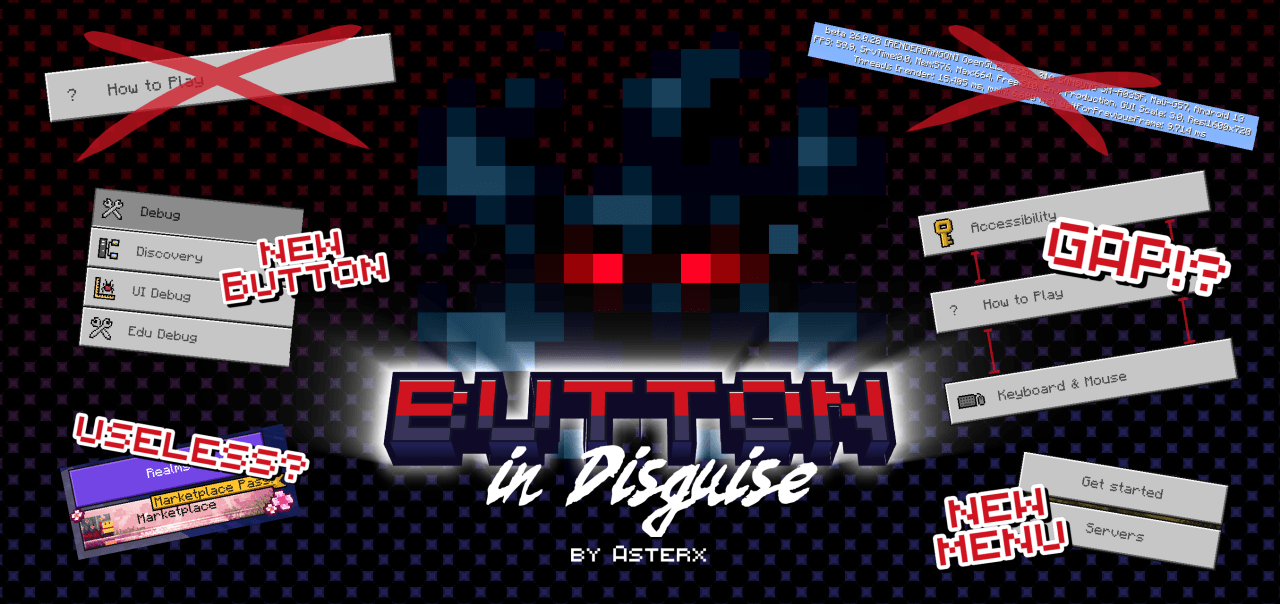

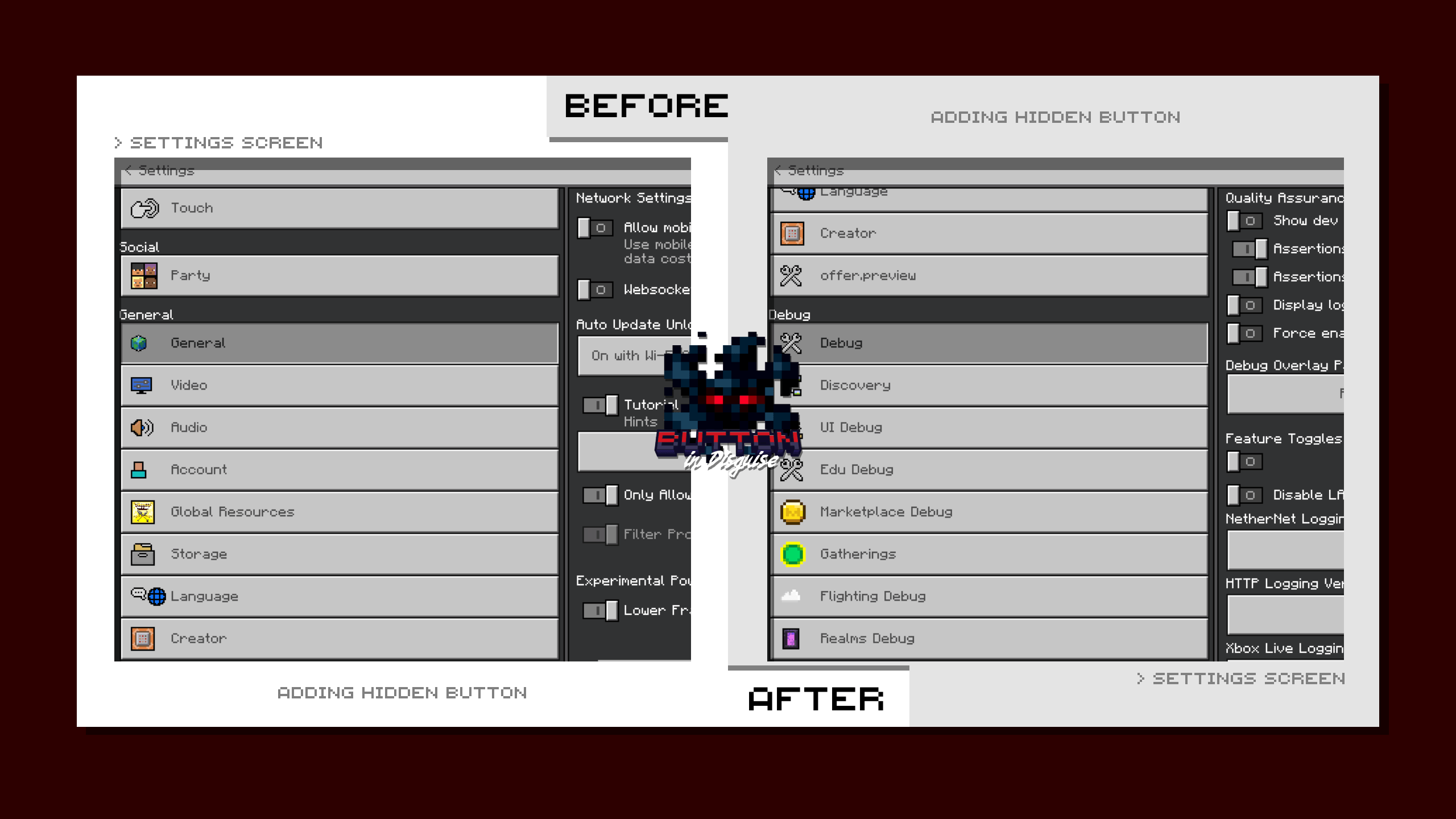
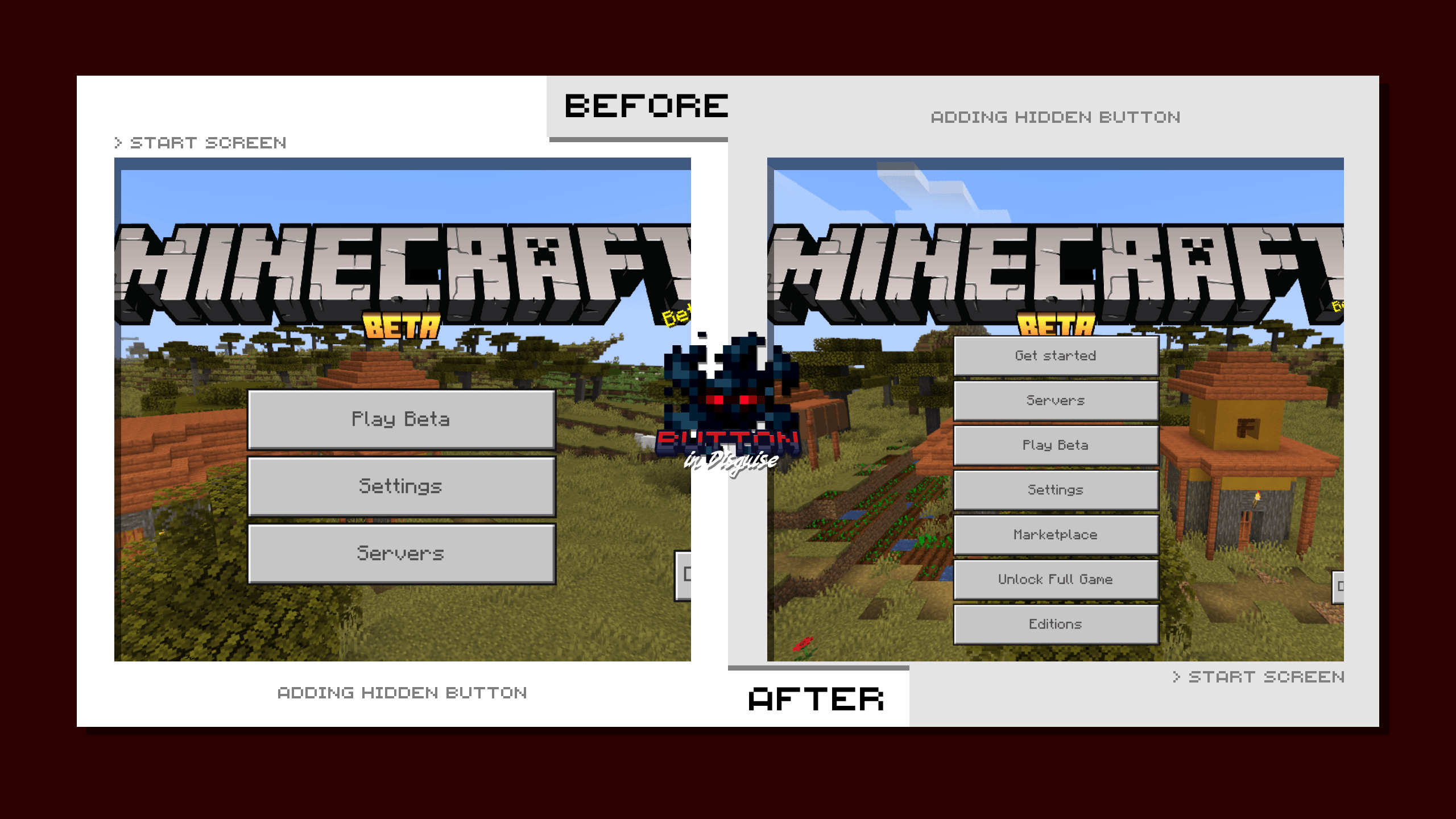
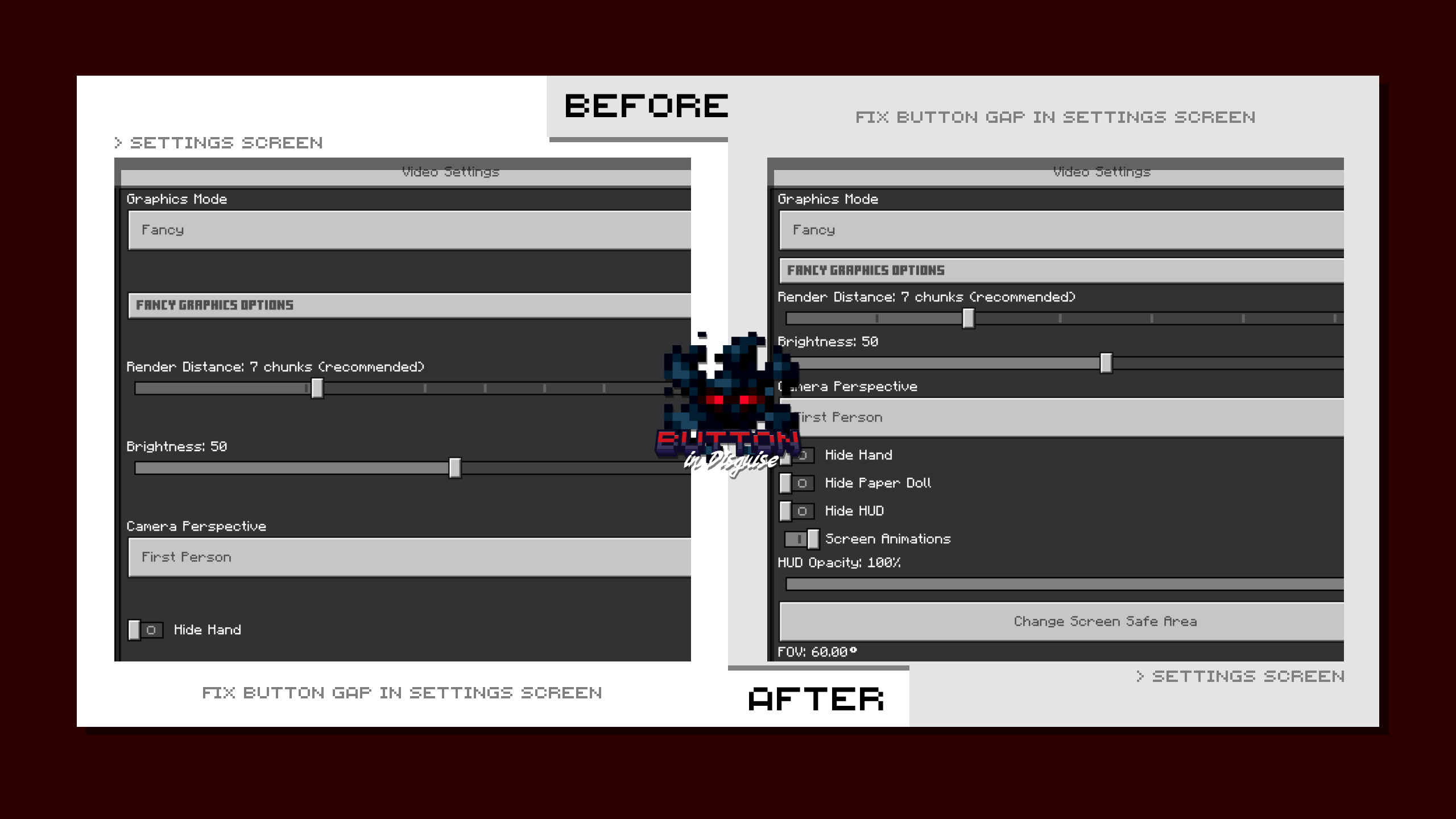
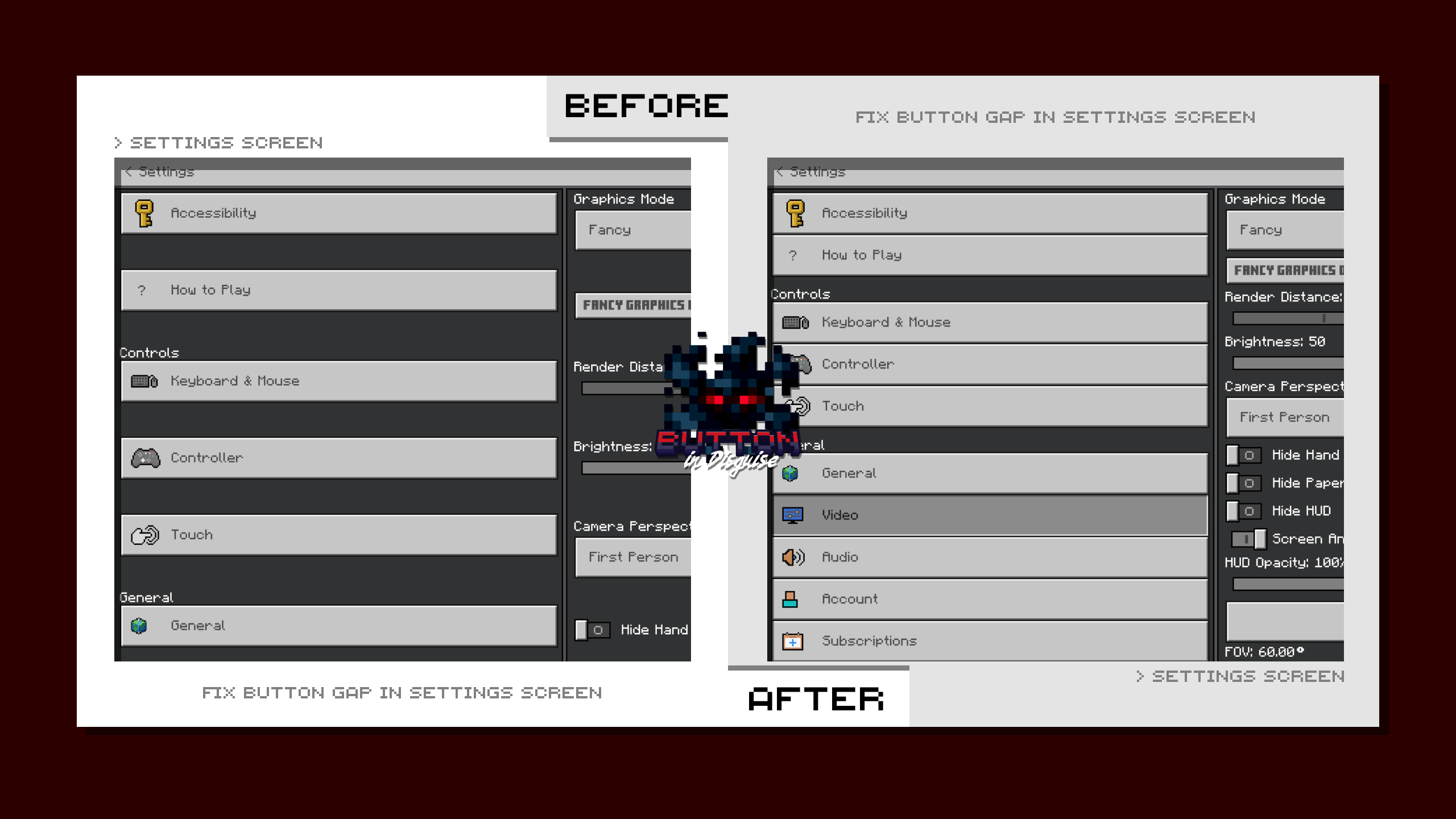

this page will not only focusing in one specific content, but it covers everything related to buttons UI.
as we already know that there are some buttons that's kinda unnecessary to have in the game, especially for user that's already knew or don't want to use it. Also the buttons that the game have been hiding from us all this time.
So, i make a packs that'll be separated from each other based on their functionality, i know i can make them being one with subpacks, but less size the better :)
◉ OLD UI SETTINGS
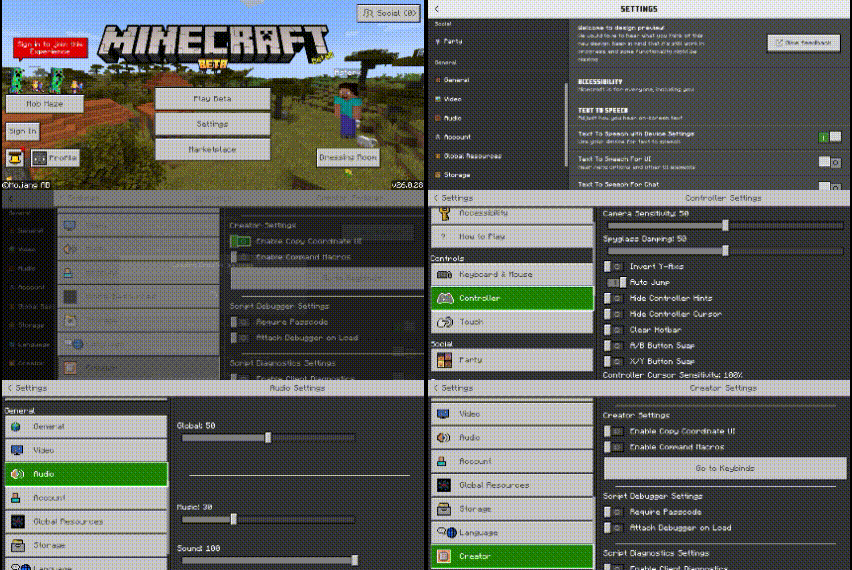
Mojang decided to change the whole game ui one by one to Ore-Ui (new ui). some user like it and some don't, yet they don't have any choices to get back to the old one.
even though they're already change settings Ui, but some are still in the old version, waiting they turn.
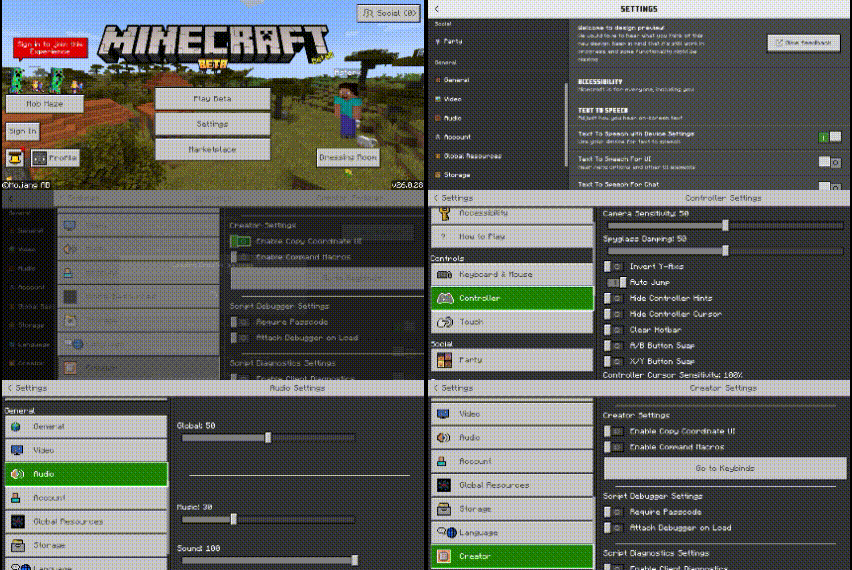
With those last buttons, i can make them to show the old version.
just click any of these buttons :
- Controllers
- Touch
- Party
- Global Resources
- Storage
- Creator
you'll be moved to old ui, here's how:
◉ SETTING BUTTONS GAP
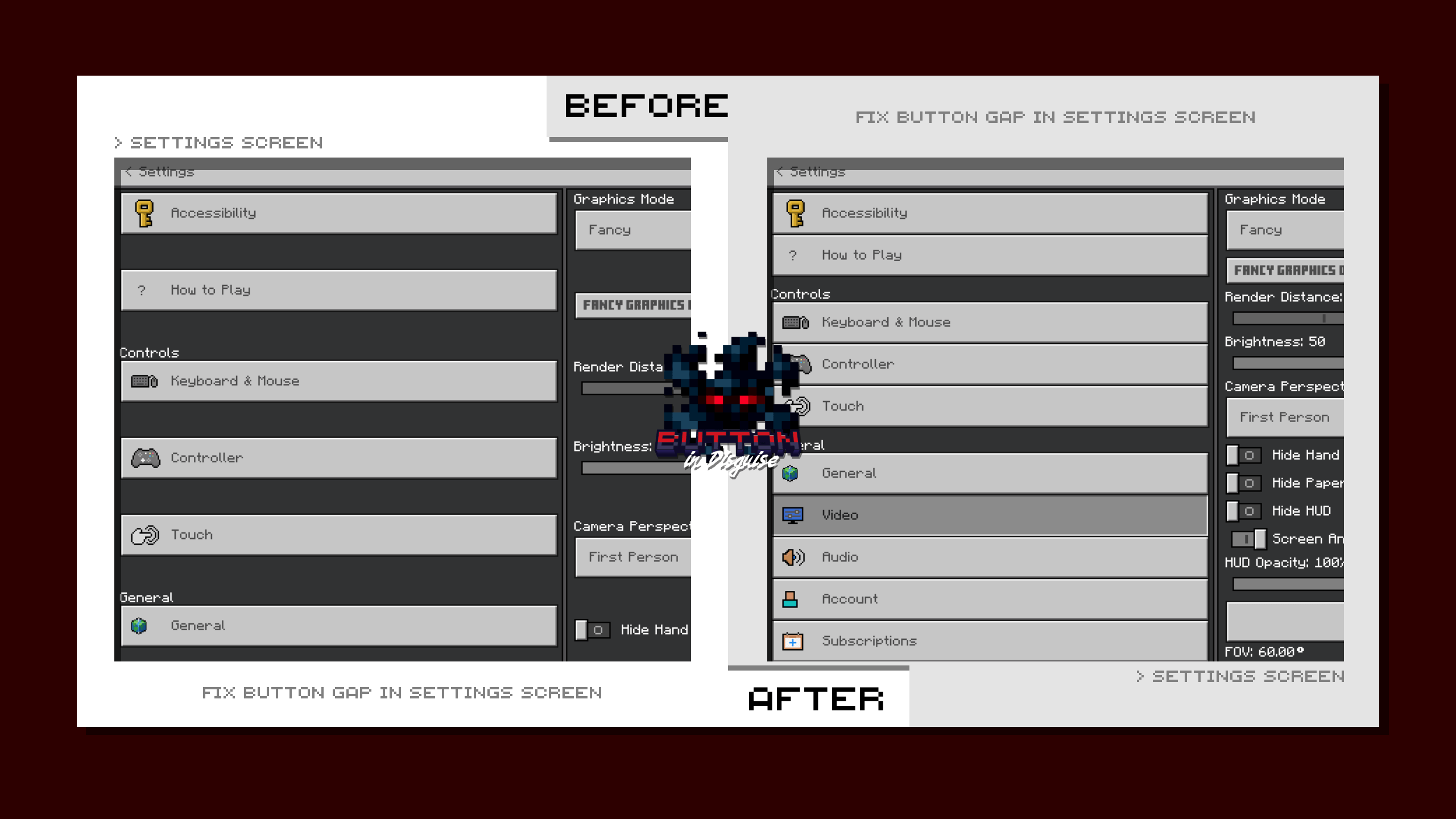
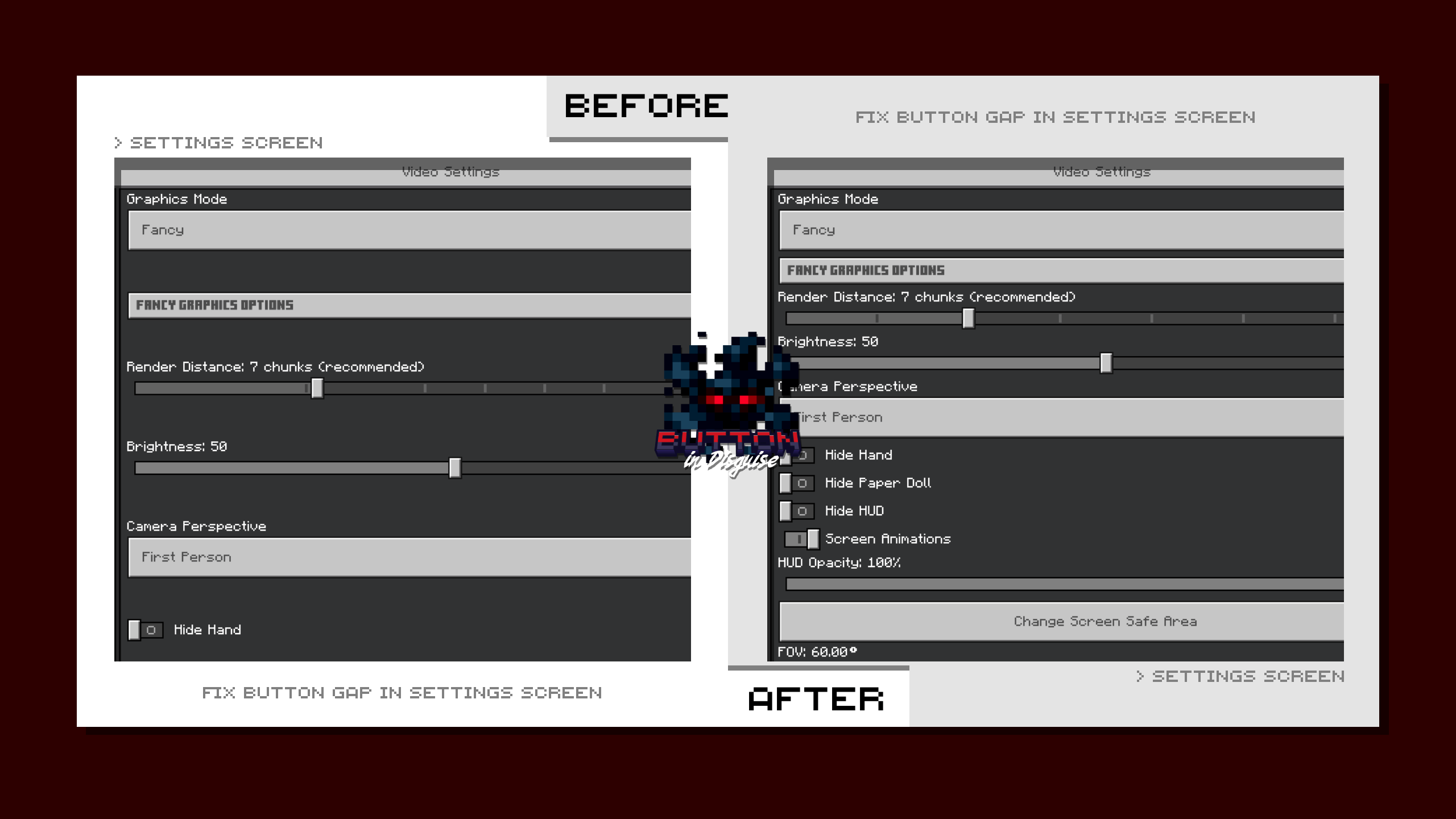
it's been a while mojang letting that wide gap in the game. So, i fix it :)
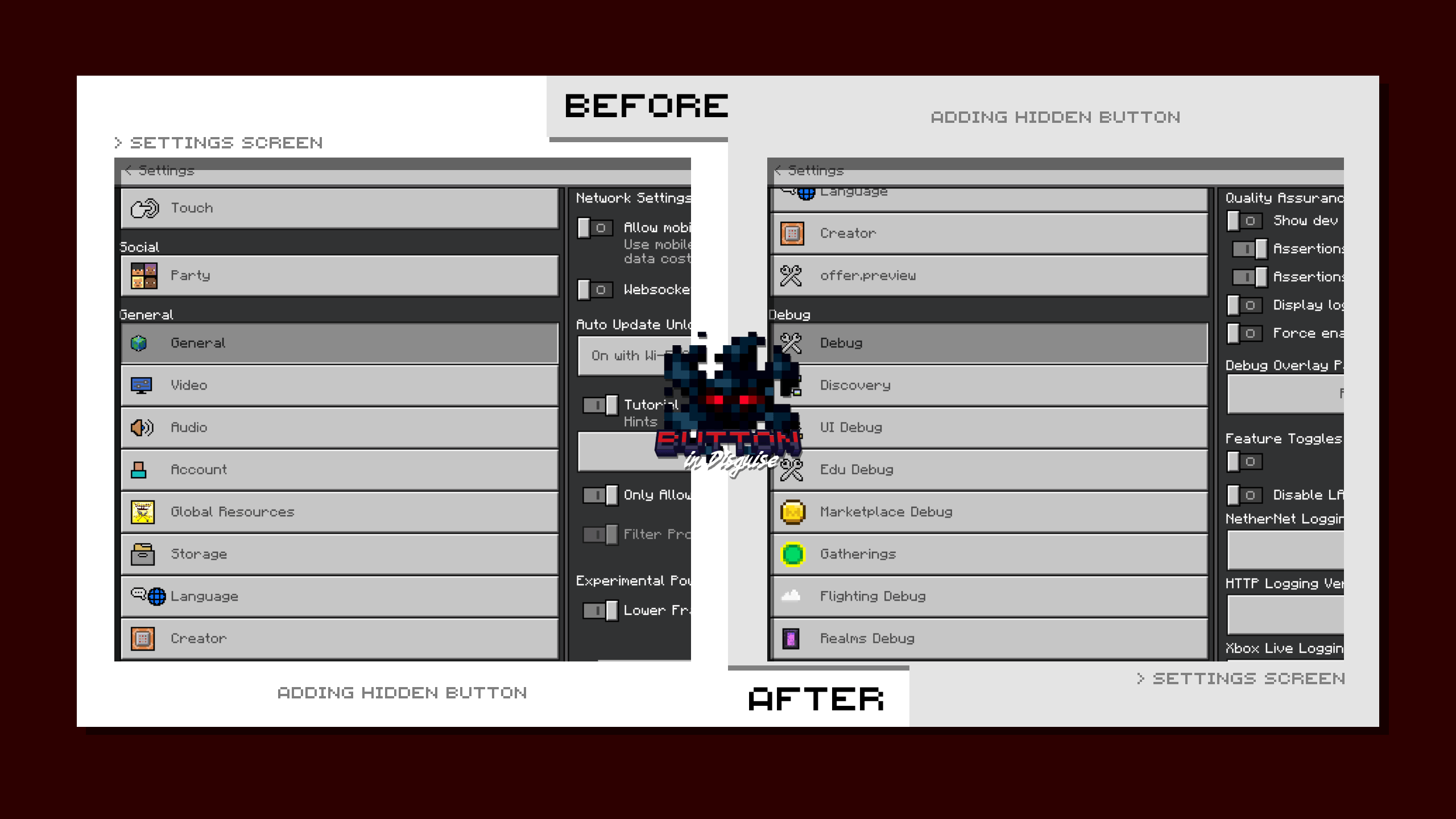
◉ HIDDEN UI BUTTONS
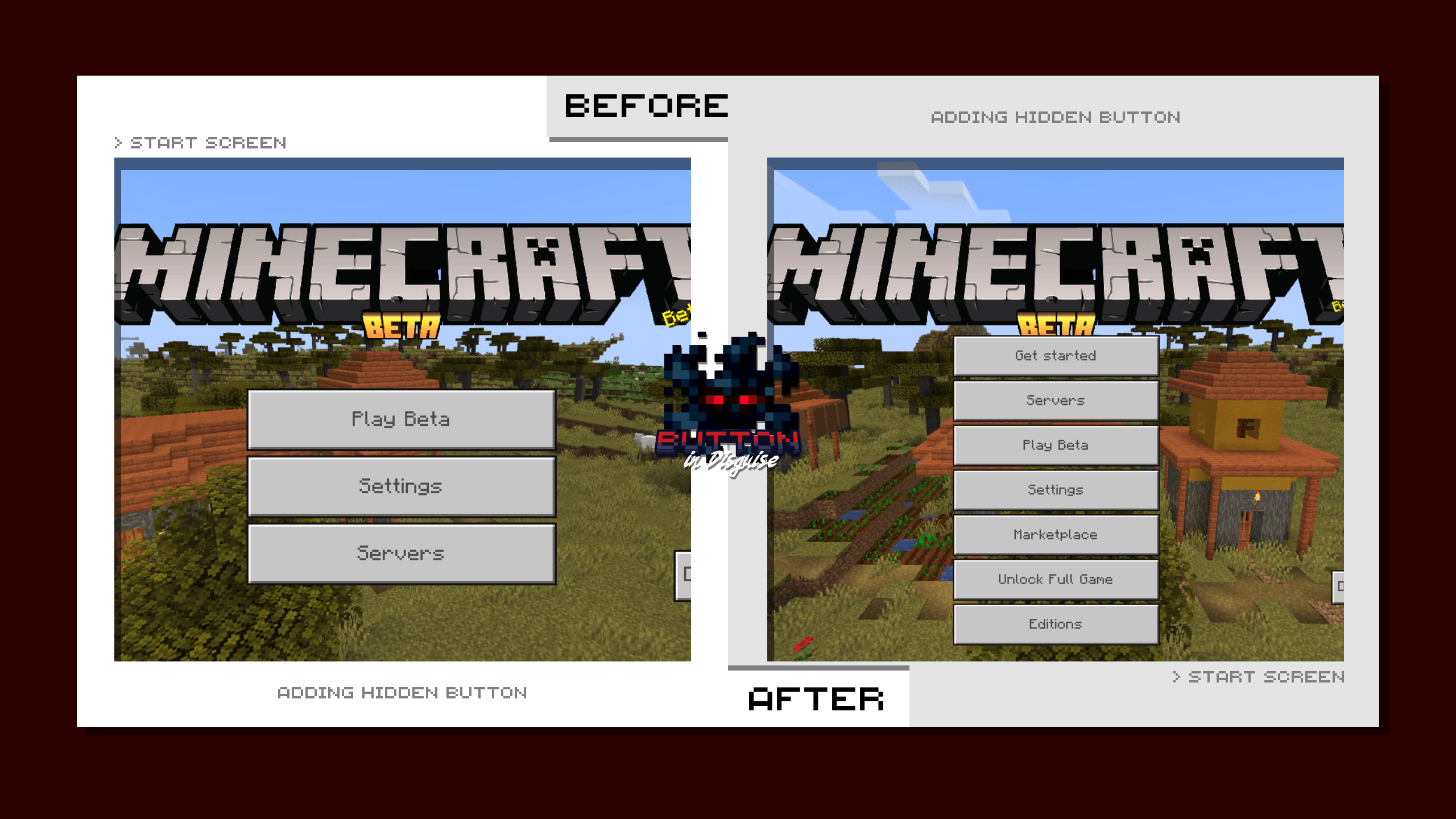
Did you know that there are soooo many buttons that the game hides from us?
yeah, it's because they don't have any functionality. Also, it's only work in just some special version of the game.
But, it's interesting to know
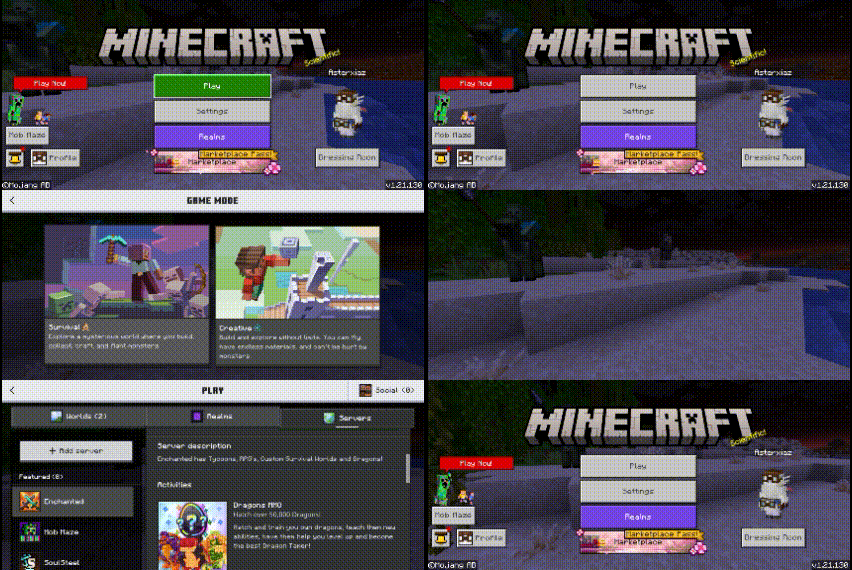
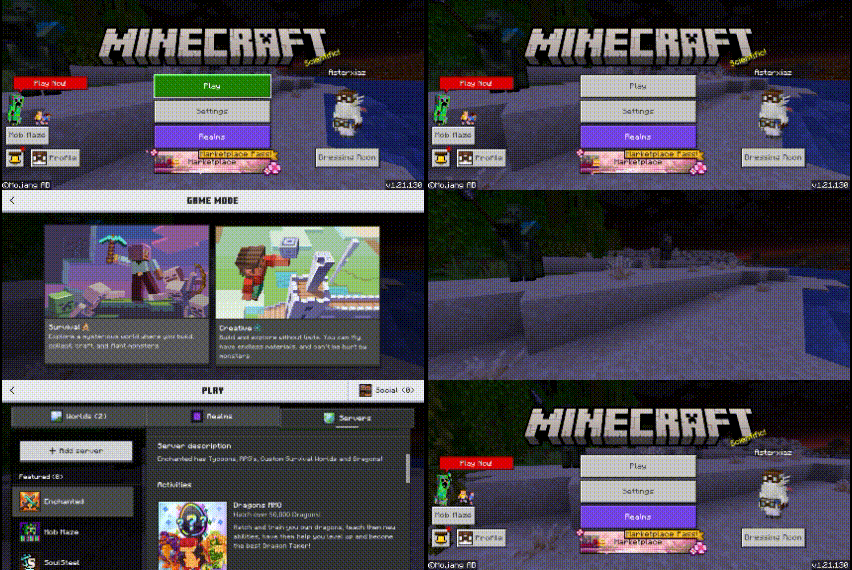
◉ REPLACING REALMS & MARKETPLACE BUTTON
WE'RE BROKE, the button is so unnecessary :p
◉ HIDE/REMOVE HOW TO PLAY BUTTON
It's kinda annoying when you miss clicked close button with how to play button and moved to another screen
LIMITATION
◉ CONTENT LIMITATION
- OLD UI : Since Mojang haven't allowing us to modify Ore Ui (new ui), it's gonna be hard to get back to the old one. From v26.0.28 they're starting to change the whole settings to Ore Ui. Even tho there's a few left that's still in Old one, they'll gonna change it later in the next update. Until then, when the entire ui already got the update. this pack (Button in Disguise [Old Ui]) will not working anymore. maybe when the time comes, i can finally change the code, i'll update it soon.
- HIDDEN BUTTON : hidden button are intended to be hidden. So, there's gonna be a chance the game will crash or bugged when you click/open it. As far as i tried, i can only view it, alot of them not working because they need some permission to work, like only work in Dev Version, Education edition or Legacy version
- HOW TO PLAY BUTTON : yeah i already know that the background/panel is missing too in few screen (in Loom & Smithing Table) but that's fine i guess. if you encounter any issues with other pack or the game, please let me know
- MARTKETPLACE & REALMS BUTTON : the ui and text still the same, but if you click it, it's working, i just don't want wasting my time and file size to change the code deeper
◉ YOU'RE ALLOWED TO
- Edit this pack for your private/personal use
- Make videos & media content with this pack as long as you leave a link to my CurseForge or MCPEDL page
- Distribute the pack using your own or new download link (this pack already using direct link that's safe)
◉ YOU'RE NOT ALLOWED TO
- Monetise the pack download. Doing so will result in a copyright takedown.
FEEDBACK & SUPPORT
if you have any issues with this pack, please consider to tell me either on web comment or my discord server here
it'll be very helpful reading all of your feedback, so i can be better and better next time.
You can also follow me on another social media here <strong><span style="color: #f1c40f;">IG : 4sterx_</span></strong> | YT : Asterx
CHANGELOG
- Button in Disguise v1
- add subpacks
- All changes - covering all the feature in this pack
- Debug - remove only debug text
- Market Settings - Replace Marketplace button in Settings Screen
- Market - Replace All Marketplace button in the game
- Hidden Button - Show hidden button that's in Start & Settings Screen
- New OldUi - Bring Old Ui in Minecraft v26.0.28+ up
- OldUi - Bring Old Ui in Minecraft v1.16.0.100+ up
- Settings Gap - Fix Settings Button Gap
- add subpacks
- Button in Disguise [Debug] v1
- Remove Debug text on the top of the screen
- Button in Disguise [How To] v1
- Remove How To Play or Help Button
- Button in Disguise [Old Ui] v1
- add subpacks
- New OldUi - Bring Old Ui in Minecraft v26.0.28+ up
- OldUi - Bring Old Ui in Minecraft v1.16.0.100+ up
- Settings Gap - Fix Settings Button Gap``
- add subpacks
| Global Resources Pack | Local Packs | ||
| Game settings |
|
||
| can be use everywhere in the game [both local world & server] |
|
||
| Support achievement |
|
||
| only you and anyone who activate the pack that can see the modification |
|
[i made this tutorial for user that's on mobile. if you have no idea about this at all, i recommend you to install zArchiver app first].
Sometimes i made a pack that have a lot of variation, that i don't think making them to be in a subpacks is not a good idea.

So, in some files i told you to change it's extension name to a .zip. here's how :
- First, open zArchiver or something similar
- Find the pack file
- Long press and choose 'Change Name'

- at the end of it's name you'll find one of the words '.Mcpack/.Mcaddon/.Skinpack/.mctemplate/.mcworld'

- Change it to .Zip [don't forget to add the .period] After you Rename it. Tap again the file.

- choose 'Extract' or 'Extract to <archive name…>'

- either all of the files inside it pops up in your current folder, or it'll make a new folder with it's file name.

→ 
- there you have it. just install it as usual.
→ 
-
Adding 2 or more Packswhen you're put 2 or more packs that requires to change .entity, .animation, .geo, .render_controllers.json file, having a high risk for not working as intended.
because, they'll overlapping to each other, where the last pack you add will be the most functional pack in the game. -
ACTION & STUFF [AnS]
nowadays it's really hard to make a texture pack that's also support AnS. they obfuscate the code making it even harder to read h4h4.
if something related to any variations of entity animation, model and texture that requires to change entity file, it's hard to change.
yet you can still use any pack that only change the textures that doesn't require any .entity, .geo, .render_controllers file modification.
-
Pack Order
when you add 2 or more packs, the game will read or use the most top order. as example, you add 2 packs that'll change the grass texture. call it Pack A [that turn grass to bread] and Pack B [that turn the grass to a ball].
if you put Pack A [bread] on top of Pack B, the game will choose Pack A texture. so either the other way.
but then, if you add more pack [Pack C that'll change grass to a Car] on top of pack B and pack A. the game will choose Pack C [car].
so, the game will only read or use the most top pack.
note that this might will makes any other stuff from pack B and pack A being glitched, not working or disappear. defend of the pack order.
so, choose wisely of your pack order :p
- As far as i know, in MCPEDL all of the files located at the bottom of the pack page description. i don't really know if its having all of the pack version or not
- So, I recommend you to go to CurseForge web. if you're currently in MCPEDL, you can scroll at the top, there's a CurseForge button of this pack.
- if you've already in Curseforge page. at the top of the page, there's a tab called 'Files'.
- there you can find another version or Variations of the pack
 hehe hehe
- Edition: Minecraft Bedrock
- File type: .mcpack
- Minecraft versions listed: 1.15, 1.18, 1.19
- How to install: Download the .mcpack. → Open it — Minecraft imports it under Resource Packs. → Activate it in Global Resources, or for one world under Resource Packs → Available.
- Where to get it: Opens on CurseForge — not every file is mirrored on our own servers.
Install steps are the general flow for this file type — How to install Minecraft Bedrock texture packs walks through it step by step.
- Pack type: .mcpack — a single pack
- Manifest requires Minecraft 1.16.100 or newer
- Complete pack — everything it depends on is inside the file
- Download size: 68 KB
- Download link checked 2 Oct 2026 — working
These come from our own check of the pack file, not from the source page.