Dream HUD - Coordinates, FPS, and Yaw
Java mod listed for Minecraft 1.21. Download on the author's site.
⬇ Download on CurseForgeDream HUD
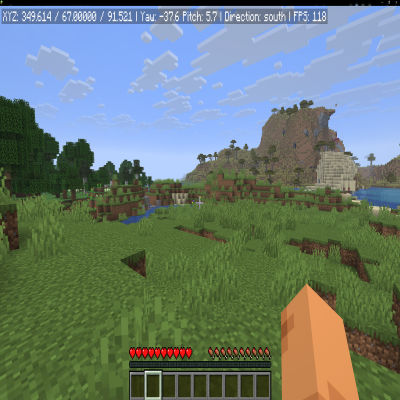
A lightweight, clean, and fully customizable HUD inspired by the private mod used by Dream in his Manhunt videos.
This mod adds a simple, non-intrusive information display to the top-left of your screen, allowing you to track your location and performance without needing to keep the massive F3 debug menu open. Perfect for speed runners, survival players, or anyone who wants a cleaner interface.
🌟 Features
-
Customizable Modules: Toggle every element individually (XYZ, FPS, Biome, etc.) via the new Settings Menu.
-
Adjustable Scale: Resize the HUD from 50% to 200% to fit your screen perfectly.
-
Real-Time Coordinates: Shows precise X, Y, and Z coordinates (3 decimal precision).
-
Direction & Rotation: Displays your Yaw/Pitch and cardinal direction (North, South, East, West).
-
Biome & Chunk Info: View your current Biome and Chunk coordinates.
-
Performance: Shows your current FPS.
-
Clean Visuals: White text on a translucent black background for easy reading in any biome.
🎮 Controls
-
H: Toggle the entire HUD on/off.
-
J: Toggle "Detailed Mode" (Biome, Chunk, and Nether/Overworld coords).
-
Note: These keys can be rebound in the standard Minecraft Controls menu.
🛠️ Requirements
-
Minecraft 1.21+
-
Fabric Loader
-
Fabric API (Required)
-
Cloth Config API (Required for the Settings Menu)
-
Mod Menu (Recommended accessing the settings screen)
📦 Installation
-
Download the .jar file.
-
Make sure you have Fabric installed.
-
Download Fabric API and Cloth Config and place them in your mods folder.
-
Drop the
dream-hudfile into your.minecraft/modsfolder. -
Launch the game!
❓ FAQ
Q: Is this Client-Side only? A: Yes! You can use this on any server (multiplayer compatible) without the server needing to install it.
Q: How do I change the settings? A: Install Mod Menu, click the "Mods" button on the title screen, find Dream HUD, and click the generic Settings (Gear) icon. You can adjust the size and toggle specific lines there.
Q: Does it work without Cloth Config? A: No, Cloth Config is required for the mod to load. Mod Menu is optional but highly recommended for easy configuration.
- Edition: Minecraft Java
- File type: .jar
- Minecraft version listed: 1.21.11
- How to install: Install the matching mod loader (Forge, Fabric or NeoForge) for your Minecraft version. → Download the .jar. → Put it in the .minecraft/mods folder and launch that loader profile.
- Where to get it: Opens on CurseForge — not every file is mirrored on our own servers.
Install steps are the general flow for this file type — How to install Minecraft Java mods & modpacks walks through it step by step.
Dream HUD - Coordinates, FPS, and Yaw is a free Minecraft Java mod. Compatible with Minecraft 1.21.11. Downloaded 1,581 times (via CurseForge). Download it and open it directly in the game.
Related Java mods
Coordinates HUD
HUD Coordinates

Coordinate HUD
Day counter and coordinates

Better Coordinates HUD
