Someone's Night Vision Plus
Bedrock texture pack listed for Minecraft 26.x. File opened and checked on 10 Oct 2026; installs from the MC Bedrock Mods app on Android.
A lightweight, achievement-safe Bedrock resource pack that maximises ambient cave lighting and removes fog — so every dark cave, mine, and night is…
⬇ Download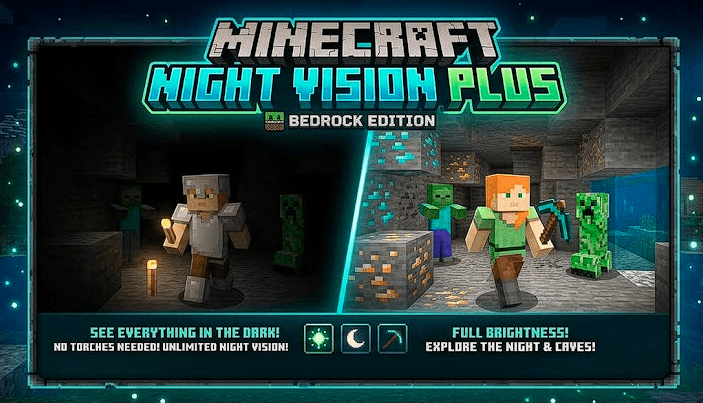
Night Vision Plus is a pure resource pack designed to make dark environments completely readable without touching gameplay mechanics. It uses a fullbright lighting preset to push ambient cave and night brightness to its maximum, so torches, glowstone, and sea lanterns are optional rather than essential. Cave fog — the pitch-black obscuring effect that limits vision underground — is removed entirely, giving clear long-distance sight lines through any mine or cavern. The vignette overlay is also disabled for a wider, cleaner view.
When Vibrant Visuals is active in Minecraft Video Settings, the fullbright lighting preset reaches its full effect and caves become as bright as the open surface. Without Vibrant Visuals the pack still provides fog removal and vignette clearing.
Night Vision Plus contains no behavior pack, JavaScript, commands, functions, or gameplay scripting. It does not intentionally disable achievements.
💡 Features ☀️ Fullbright Lighting: Ambient cave and night brightness maximised — no more dark corners. 🌫️ Clear Fog: Pitch-black underground fog removed for clear long-distance visibility. 🖼️ No Vignette: Dark screen edges removed for a wider, cleaner view. 🛡️ Achievement Safe: Pure resource pack — no scripts, commands, or behavior pack. 🌍 Global Resource: Apply once in main menu settings to use on every world, Realm, and server. ⚡ Ultra Lightweight: Tiny file size — absolute zero performance impact. 🤝 Stack Friendly: Combines cleanly with Xray Plus, Glowing Ores, and any other resource pack. ⚙️ Requirements Enable Vibrant Visuals in Minecraft Video Settings for the fullbright lighting effect.
📦 Installation Download and double-click Night Vision Plus.mcpack. Go to Settings > Global Resources and activate Night Vision Plus, or add it in your world settings. (Recommended) Enable Vibrant Visuals in Video Settings for the full fullbright effect. Enter any cave or dark area — it will be clearly lit.
- Edition: Minecraft Bedrock
- File type: .mcpack
- Minecraft versions listed: 26.20, 26.30, 26.40
- How to install: Download the .mcpack. → Open it — Minecraft imports it under Resource Packs. → Activate it in Global Resources, or for one world under Resource Packs → Available.
- Where to get it: In MCModsHub, or directly above on this page.
Install steps are the general flow for this file type — How to install Minecraft Bedrock texture packs walks through it step by step.
- Pack type: .mcpack — a single pack
- Complete pack — everything it depends on is inside the file
- Download size: 469 KB
- Download link checked 10 Oct 2026 — working
These come from our own check of the pack file, not from the source page.