
WhoCaresMC Main Ui | Animated Menu
Bedrock texture pack listed for Minecraft 1.17–26.x. File opened and checked on 28 Sep 2026; installs from the MC Bedrock Mods app on Android.
WhoCaresMC Main UI is the core Minecraft Bedrock interface and base pack for compatible WhoCaresMC UI add-ons. It also delivers a clean custom main menu…
⬇ Download on CurseForge
WhoCaresMC Main UI
The Core UI for WhoCaresMC Add-On Packs
WhoCaresMC Main UI is a custom Minecraft Bedrock interface designed to work as the main foundation for compatible WhoCaresMC UI packs.
Its most important purpose is to provide the base interface system required by supported Anime UI, Animated Menu UI, character-themed UI, and other WhoCaresMC interface add-ons.
Instead of rebuilding the entire interface separately for every theme, compatible UI packs can use WhoCaresMC Main UI as their foundation. This makes switching between different character and visual themes much easier while keeping the same core menu structure underneath.
WhoCaresMC Main UI is the central base pack that powers compatible custom UI themes while also providing a complete interface of its own.
Built to Run Compatible Custom UI Packs
The main feature of WhoCaresMC Main UI is its role as a base UI for other compatible interface packs.
When a supported UI add-on requires WhoCaresMC Main UI, this pack provides the underlying menu structure and interface components needed for that theme to work correctly.
This makes it especially useful for players who regularly switch between Anime UI packs, animated menu packs, character interfaces, aesthetic GUIs, and other custom Minecraft Bedrock themes.
Compatible add-ons are generally placed above WhoCaresMC Main UI in Global Resources so their custom artwork and theme can work on top of the base interface.
A Complete Custom Interface on Its Own
WhoCaresMC Main UI is not only a dependency for other packs.
It also provides its own redesigned Minecraft Bedrock interface with a cleaner, more modern presentation that can be used by itself.
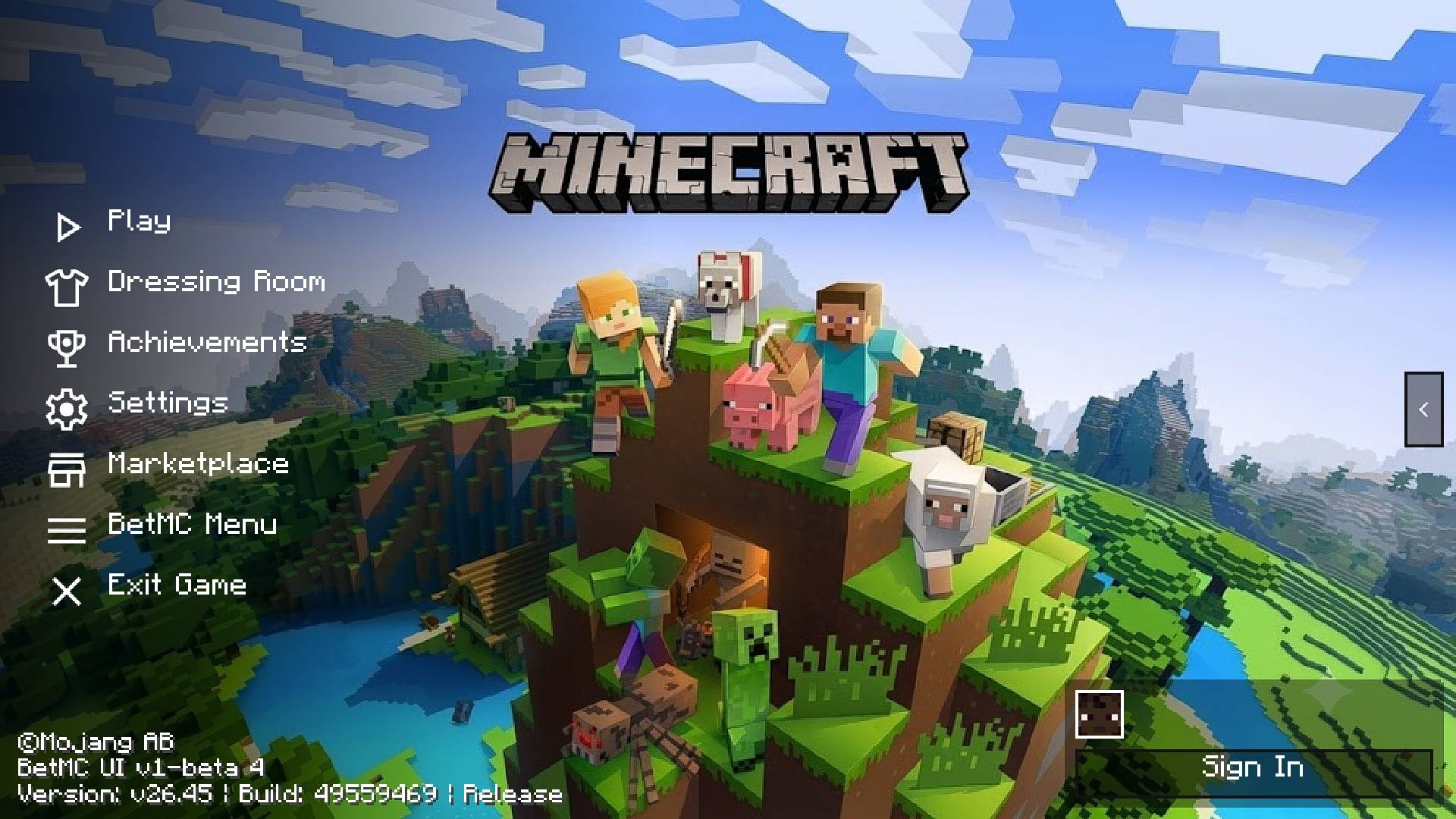
The main menu shown in the pack uses a streamlined left-side navigation layout that keeps important Minecraft options easy to access while giving significantly more space to the background and visual presentation.
Custom Main Menu Experience
Play
Dressing Room
Achievements
Settings
Marketplace
WhoCaresMC Menu
Exit Game
Custom Profile Area
Modern Menu Icons
Clean Side Navigation
Custom Minecraft GUI Layout
Minecraft Bedrock and MCPE Support
Clean and Practical Navigation
The interface is designed to look noticeably different from the default Minecraft Bedrock UI without making basic navigation difficult.
Large menu labels, recognizable icons, organized spacing, and a simple vertical layout make important options easy to find.
At the same time, the reduced menu clutter leaves more room for custom backgrounds, animated menu artwork, anime themes, scenic visuals, and other UI add-ons to become the main visual focus.
This balance makes WhoCaresMC Main UI useful both as a standalone interface and as the foundation of a larger custom UI setup.
Designed for Animated & Anime UI Add-Ons
Many character-themed interface packs depend on a consistent underlying menu system.
WhoCaresMC Main UI provides that foundation, allowing compatible packs to focus on their own artwork, animated backgrounds, colors, character themes, and visual identity while using the same core interface structure.
This makes it especially suitable for collections containing Anime Girl UI, Animated Minecraft Menu, Genshin Impact UI, Blue Archive UI, Honkai: Star Rail UI, character-themed GUI packs, and other Minecraft Bedrock interface add-ons.
WhoCaresMC Menu
The interface also includes a dedicated WhoCaresMC Menu, giving the pack its own recognizable identity beyond the standard Minecraft navigation options.
Combined with its custom icons, side-menu layout, profile section, and spacious background presentation, the interface is designed to provide a cleaner foundation for both everyday gameplay and heavily customized Minecraft setups.
Made for Minecraft Bedrock & MCPE
WhoCaresMC Main UI is aimed at Minecraft Bedrock and Minecraft PE players who want more control over how their game interface looks.
It can serve as the centerpiece of a custom resource pack setup, allowing compatible UI themes to be changed while retaining the same underlying interface system.
Whether you use it by itself or as the required base for another compatible UI pack, the goal remains the same: provide a clean, flexible, and recognizable Minecraft interface.
Minecraft Bedrock Custom UI
WhoCaresMC Main UI naturally fits searches for WhoCaresMC Main UI, Minecraft Bedrock UI, MCPE UI Pack, Minecraft Main Menu, Custom Minecraft GUI, Minecraft Bedrock Interface, Minecraft UI Texture Pack, Anime UI Base Pack, Animated Menu Base UI, Custom Menu Pack, Minecraft PE GUI, and Bedrock UI Resource Pack.
These terms directly reflect what the pack provides: a custom Minecraft Bedrock interface that works both as a standalone UI and as the base framework for compatible WhoCaresMC UI add-ons.
The Foundation for Your Custom Minecraft Interface
WhoCaresMC Main UI is designed for players who want one reliable core interface that can support multiple compatible visual themes instead of treating every UI pack as an entirely separate setup.
Use it as a clean standalone Minecraft UI or as the foundation for compatible Anime UI, Animated Menu, and character-themed interface packs built around the WhoCaresMC system.
- Edition: Minecraft Bedrock
- File type: .mcpack
- Minecraft versions listed: 26.0.02, 26.0, 26.3
- How to install: Download the .mcpack. → Open it — Minecraft imports it under Resource Packs. → Activate it in Global Resources, or for one world under Resource Packs → Available.
- Where to get it: Opens on CurseForge — not every file is mirrored on our own servers.
Install steps are the general flow for this file type — How to install Minecraft Bedrock texture packs walks through it step by step.
- Pack type: .mcpack — a single pack
- Manifest requires Minecraft 1.17.0 or newer
- Complete pack — everything it depends on is inside the file
- Download size: 2.3 MB
- Download link checked 14 Oct 2026 — working
These come from our own check of the pack file, not from the source page.