Hotbar Size Increaser
Bedrock texture pack listed for Minecraft 1.0–26.x. File opened and checked on 4 Sep 2026; installs from the MC Bedrock Mods app on Android.
Instantly resize your hotbar in-game! Choose from 6 sizes (x0.5–x3.0) via easy subpacks — perfect for mobile players who want bigger, easier-to-tap slots
⬇ Download on CurseForge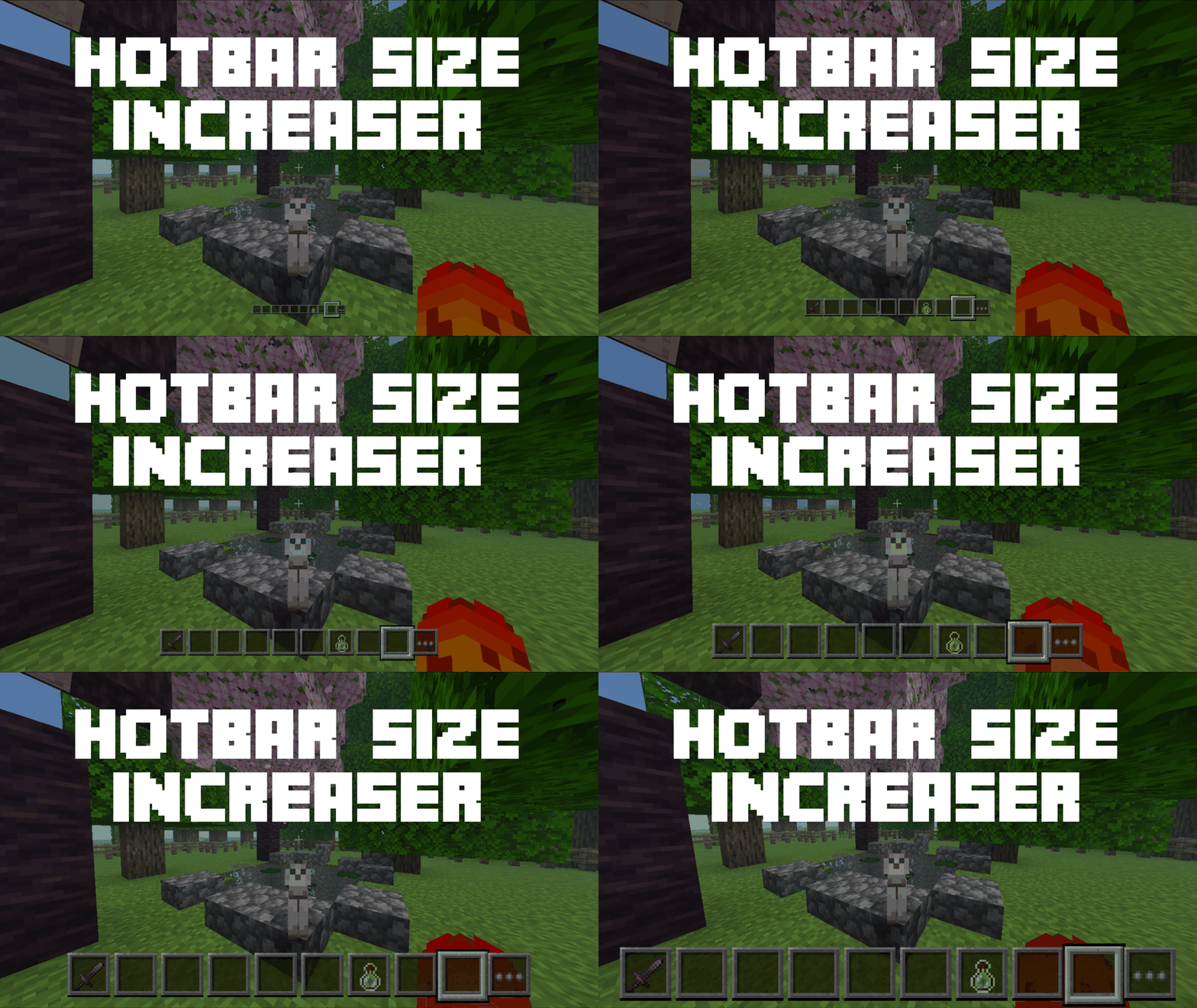
🎯 HotBar Scale Increaser
Tired of squinting at a tiny hotbar on your phone or tablet? HotBar Scale Increaser lets you resize the Minecraft Bedrock hotbar to whatever feels right for you — from a sleek, minimal bar to a huge, easy-to-tap layout built for touchscreens.
No config files, no editing anything yourself — just enable the pack, pick a size from the built-in options, and you're set.
✨ Features
6 ready-to-use sizes, all bundled in a single pack — switch anytime without re-downloading
Sizes ranging from x0.5 (compact) up to x3.0 (extra large)
Hotbar stays correctly anchored and centered at the bottom of the screen at every size — no clipping, no drifting off-screen
Selection highlight, item icons, stack counts, durability bars, and the inventory/ellipsis button all scale together, so nothing looks mismatched
Purely a resource pack — no behavior pack, no data pack, no gameplay changes. Just visuals.
Lightweight and simple to install
📏 Available Sizes
Size
Description
x0.5
Compact hotbar — not recommended for touch controls, better suited for keyboard/mouse or controller
x1.0
Default vanilla size
x1.5
Slightly larger, a comfortable middle ground
x2.0
Noticeably bigger, easier to see and tap
x2.5
Large, great for tablets
x3.0
Extra large — ideal for phones and touch-first players
🔧 How to Install & Use
Download the .mcpack file and open it (or import it manually into Minecraft)
In-game, go to Settings → Global Resources
Activate HotBar Scale Increaser
Tap the gear / "..." icon next to the pack
Choose your preferred hotbar size from the list of options
Enjoy your new hotbar!
You can switch sizes at any time from the same menu — no need to restart the world.
📋 Requirements
Minecraft Bedrock Edition 1.21.0 or higher
Works on mobile, tablet, console, and PC versions of Bedrock
❓ FAQ
Does this change gameplay or give any advantage?
No — it's purely cosmetic/visual. It only changes how the hotbar looks, not how the game plays.
Can I use this alongside other resource packs?
Yes, as long as the other pack doesn't also modify the HUD/hotbar UI, in which case you may see conflicts depending on pack order.
Will more sizes be added?
Possibly! This is an actively maintained pack — feedback and size requests are welcome.
I found a visual bug at a specific size — what do I do?
Please report it (with a screenshot if possible) so it can be looked at and fixed in a future update.
📄 License
See the included LICENSE.txt. Personal use is welcome, and you're free to feature this pack in videos/streams/showcases with credit. Redistribution, re-uploading, or claiming this pack (or its code/assets) as your own is not permitted. For anything beyond that, reach out to oSkullo.
👤 Credits
Created by oSkullo
- Edition: Minecraft Bedrock
- File type: .mcpack
- Minecraft versions listed: 1.20.40, 1.21.30, 0.16.2
- How to install: Download the .mcpack. → Open it — Minecraft imports it under Resource Packs. → Activate it in Global Resources, or for one world under Resource Packs → Available.
- Where to get it: Opens on CurseForge — not every file is mirrored on our own servers.
Install steps are the general flow for this file type — How to install Minecraft Bedrock texture packs walks through it step by step.
- Pack type: .mcpack — a single pack
- Manifest requires Minecraft 1.21.0 or newer
- Complete pack — everything it depends on is inside the file
- Download size: 1.0 MB
- Download link checked 15 Oct 2026 — working
These come from our own check of the pack file, not from the source page.