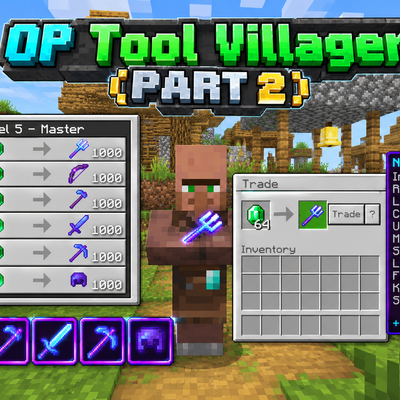
OP Tool Villager - PART 2
OP Tool Villager - PART 2 is an advanced Minecraft Bedrock behavior pack that adds a specialized villager NPC trading extremely overpowered weapons and…
⬇ Download on CurseForge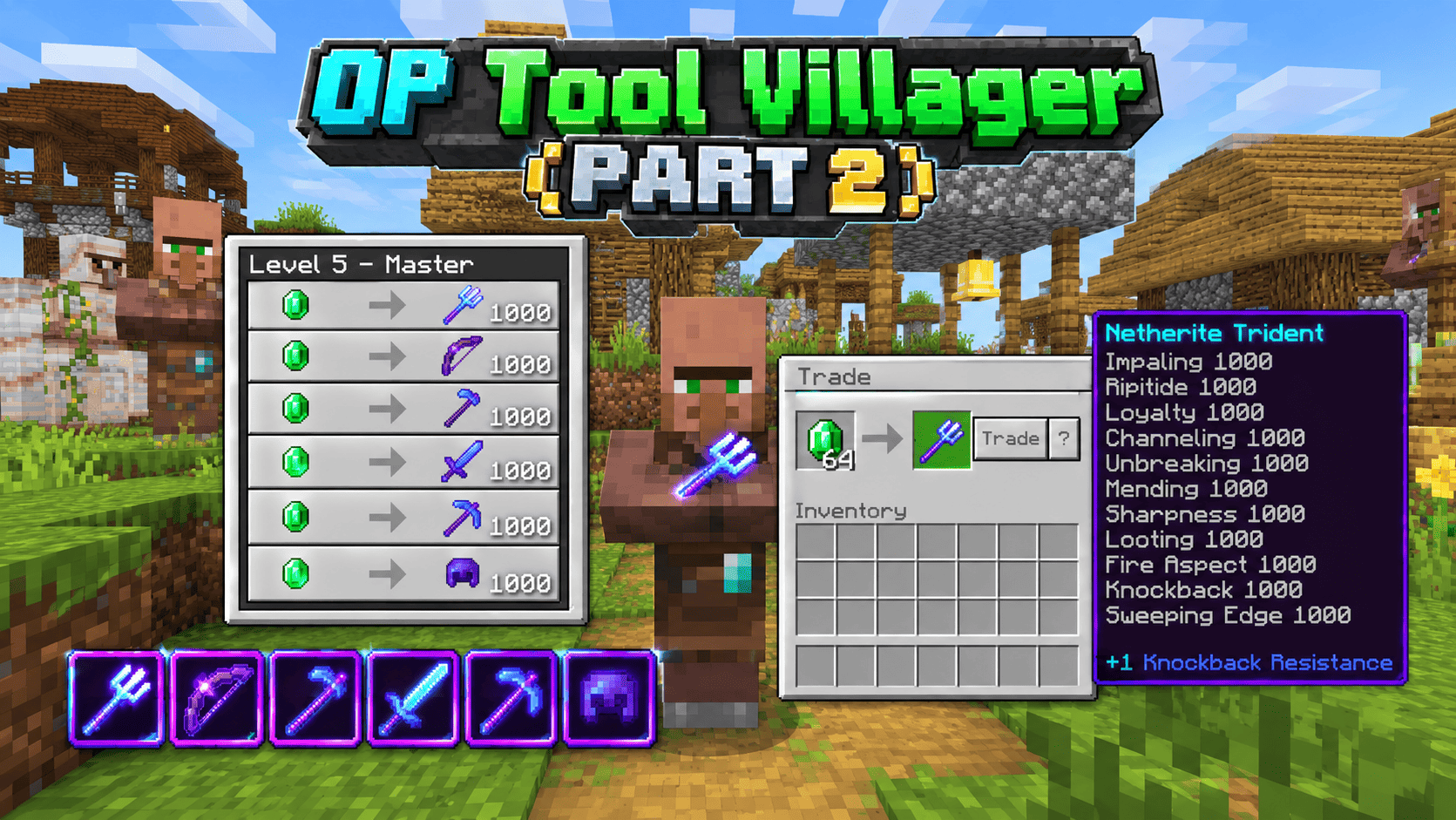
OP Tool Villager - PART 2 [1000] is an enhanced behavior pack for Minecraft Bedrock Edition and Pocket Edition that extends the OP Tool series with advanced weapons and farming tools. This addon introduces a unique NPC villager who trades the most powerful items in the game—all enchanted to level 1000.
What You Get:
This addon spawns a Tool Smith villager with exclusive trades featuring devastating weapons and tools:
Melee Combat Tools:
- Netherite Sword with Sharpness 1000, Smite 1000, Bane of Arthropods 1000, Fire Aspect 1000, Looting 1000, Unbreaking 1000, Knockback 1000, and Mending—one-shot kills on most mobs
- Netherite Pickaxe with Efficiency 1000, Fortune 12, Unbreaking 1000, and Mending—instant mining with massive ore drops
- Netherite Hoe with Efficiency 1000, Fortune 12, Unbreaking 1000, and Mending—farm at extreme speed with multiplied crop yields
Ranged Weapons:
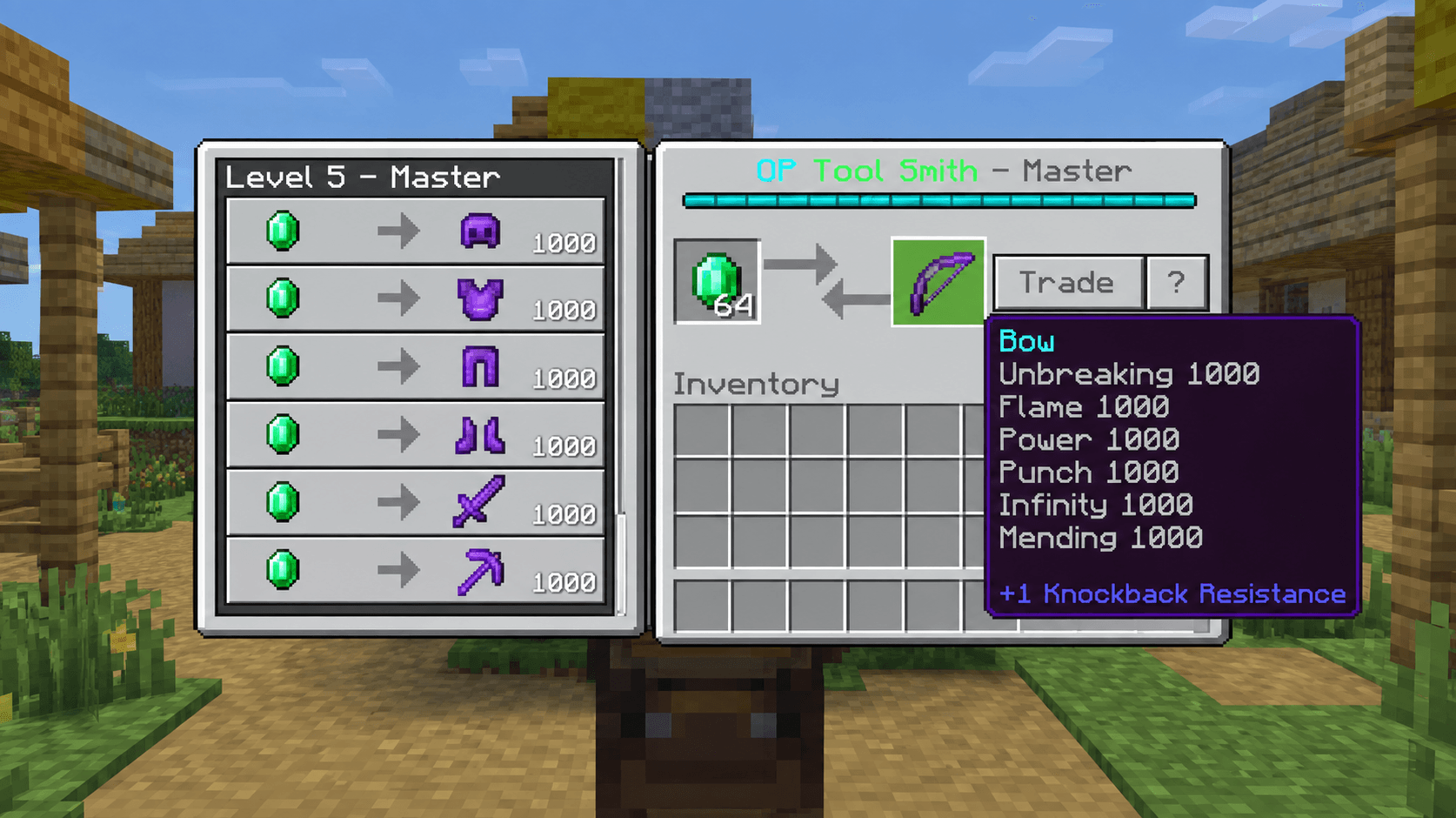
- Fully Enchanted Bow with Power 1000, Flame 1000, Infinity 1000, Punch 6, Unbreaking 1000, and Mending
- Power 1000: Arrows deal 1000x normal damage
- Flame 1000: Arrows ignite targets with extreme fire damage
- Infinity 1000: Never run out of arrows—only need 1 arrow in inventory
- Perfect for one-shotting enemies from range
Ultimate Weapon - Trident (New):
- Netherite Trident with 7 POWERFUL ENCHANTMENTS at level 1000:
- Sharpness 1000: Base melee damage increased exponentially
- Fire Aspect 1000: Ignites targets with devastating fire damage
- Impaling 1000: Instant kills on water creatures and aquatic mobs
- Loyalty 1000: Automatically returns from any distance
- Channeling 1000: Summons lightning strikes on every hit
- Unbreaking 1000: Extreme durability, almost never breaks
- Mending 1000: Auto-repairs from XP collection
This is the most dangerous single-target weapon in the entire game.
Safety Features:
Certain enchantments are intentionally capped for gameplay balance:
- Punch: Level 6 (prevents players from being launched into the void)
- Fortune: Level 12 (prevents massive item lag on low-end devices)
All other enchantments are at level 1000 for maximum power and destruction.
Compatibility:
- Works on Minecraft Bedrock 1.26.40+ and Pocket Edition
- Requires Beta APIs enabled in experimental settings
- Completely safe—only adds an NPC with specialized trades
- Can be used alongside Part 1 (no conflicts)
Perfect For:
- Creative world building and testing
- Speedrun preparation and practice
- One-shot testing against mobs and bosses
- PvP practice worlds
- Survival world progression
- Testing combat mechanics at extreme enchantment levels
- Farming and resource collection
- Combat demonstrations
🔧 INSTALLATION & SETUP
Step 1: Enable Required Settings in Minecraft
- Open Minecraft Bedrock Edition or Pocket Edition
- Create or open a world in Creative or Survival mode
- Navigate to World Settings → Cheats → Toggle ON ✓
- Navigate to Experiments → Enable Beta APIs → Toggle ON ✓
- Save the world and reload it
Step 2: Import the Addon
- Download the file:
OP_Tool_Villager_PART_2_1000.mcaddon - On PC/Windows: Double-click the file or right-click and select "Open with Minecraft Launcher"
- On Mobile (Android/iOS): Download the file, locate it in your file manager, tap it, and select "Open with Minecraft"
- On Console (Xbox/Switch): Use a PC to import first, then sync to console via Game Pass
- Minecraft will automatically detect and import the behavior pack
Step 3: Apply the Pack to Your World
- Open your world in Minecraft
- Go to Settings → Behavior Packs
- Find OP Tool Villager - PART 2 [1000] in the available packs list
- Select it and move to Active (right side) using the arrow
- Confirm changes and let the world reload
✅ The addon is now ready to use!
👤 HOW TO SUMMON THE VILLAGER
Method 1: Command (Easiest Way)
- Open Chat:
- PC: Press T key
- Mobile: Tap the chat button (speech bubble)
- Console: Open chat menu
- Type the command:
.villager- Press Enter to execute
The villager will spawn at your current location.
Method 2: Structure Command (Alternative)
Open chat and type:
/structure load "506172745f325f4f505f546f6f6c5f536d697468" ~~~This loads the structure 3 blocks forward from your position.
💰 COMPLETE TRADE CATALOG
Item List & Enchantments:
| # | Item | Enchantments | Key Feature |
|---|---|---|---|
| 13 | Netherite Sword | Sharpness 1000, Smite 1000, Bane of Arthropods 1000, Fire Aspect 1000, Looting 1000, Knockback 1000, Unbreaking 1000, Mending | One-shot kills on most mobs |
| 14 | Netherite Pickaxe | Efficiency 1000, Fortune 12, Unbreaking 1000, Mending | Instant mining + massive ore drops |
| 15 | Netherite Hoe | Efficiency 1000, Fortune 12, Unbreaking 1000, Mending | Farm at extreme speed |
| 16 | Fully Enchanted Bow | Power 1000, Flame 1000, Infinity 1000, Punch 6, Unbreaking 1000, Mending | One-shot arrows, unlimited ammo, fire damage |
| 17 | 🔱 LEGENDARY TRIDENT | Sharpness 1000, Fire Aspect 1000, Impaling 1000, Loyalty 1000, Channeling 1000, Unbreaking 1000, Mending | MOST POWERFUL WEAPON - Returns to you, summons lightning, destroys everything |
Cost & Trading:
All items cost: 1 Emerald each (recipes 13-17)
How to Get Emeralds:
Trade with the villager to convert items into emeralds:
| Item | Amount | Trade |
|---|---|---|
| Coal | 15 pieces | 1 Emerald |
| Flint | 24 pieces | 1 Emerald |
| Iron Ingot | 4 pieces | 1 Emerald |
| Diamond | 1 piece | 1 Emerald |
| Other Mobs Drops | Various | 1 Emerald |
Tip: Mine coal near the surface, farm flint by breaking gravel, or collect from mobs to quickly accumulate emeralds.
🏹 FULLY ENCHANTED BOW GUIDE
Enchantment Breakdown:
Power 1000
- Arrows deal 1000x normal damage
- One arrow = instant kill to most mobs
- Even wither can be defeated in a few shots
Flame 1000
- Arrows set targets on fire
- Fire damage at level 1000 is devastating
- Combines with Power 1000 for massive total damage
Infinity 1000
- You never use arrows
- Only need 1 arrow in inventory
- Shoot infinitely without replenishing
Punch 6 (Capped)
- Knockback effect
- Capped at 6 to prevent launching into void
- Balanced for gameplay
Unbreaking 1000
- Bow lasts virtually forever
- Extreme durability
- Never wears out
Mending 1000
- Auto-repairs when you collect XP
- Always at full durability in survival mode
How to Use the Bow:
- Equip the bow in your hand
- Ensure you have at least 1 arrow in your inventory (Infinity means you won't consume it)
- Hold Right-Click (or hold on mobile) to draw the bow
- Aim at your target
- Release to shoot
- Watch the arrow deal 1000x damage + fire damage
Combat Strategies:
Against Single Mobs:
- Shoot once from distance = instant kill
- Safe range: 50+ blocks away
Against Groups:
- Arrows spread fire to nearby mobs
- Chain reactions of fire damage
- Perfect for crowd control
Against Bosses:
- Multiple shots = overwhelming damage
- Fire spreads, creating additional DOT
- Stay at safe distance
In Water:
- Arrows still work underwater
- Fire doesn't extinguish
- Excellent for aquatic combat
Pro Tips:
✓ Power 1000 is so strong that you can one-shot nearly everything ✓ Flame 1000 creates chain reactions with fire spread ✓ Infinity means you need 0 arrow drops—just aim and shoot ✓ Use at range for zero risk combat ✓ Fire spreads to wood structures—be careful in villages ✓ Combine with other weapons for variety
🌾 NETHERITE HOE GUIDE
Enchantments & Effects:
Efficiency 1000
- Tilling soil happens instantly
- Breaking blocks is nearly instant
- Fastest farming tool in the game
Fortune 12
- Crops drop 12x more resources
- Potatoes, carrots, wheat multiply dramatically
- Worth the emerald investment
Unbreaking 1000
- Never breaks
- Extreme durability
- Lasts forever
Mending 1000
- Auto-repairs from XP
- Never needs replacement
- Always ready to use
How to Use for Farming:
- Equip the hoe
- Right-click on grass/dirt blocks to till them
- Plant seeds
- Hoe will remain intact forever (Unbreaking + Mending)
- Harvest with Efficiency 1000 = instant crops
- Fortune 12 = massive drops
Farming Strategy:
Step-by-Step Farming:
- Clear large area of grass/dirt
- Right-click with hoe to till the entire area (happens instantly)
- Plant seeds (wheat, potatoes, carrots, beetroot)
- Wait for crops to grow (or use bone meal)
- Harvest with hoe again
- Fortune 12 multiplies your yield dramatically
Yield Examples:
- Normal wheat: 1 seed → 1 wheat
- Fortune 12 hoe: 1 seed → ~12 wheat
- 100 crops → 1,200 crops!
Pro Tips:
✓ Build a massive farm—Efficiency 1000 makes tilling instant ✓ Fortune 12 means less space needed for same yield ✓ Use bone meal to speed up growth ✓ Hoe also breaks grass, dirt, farmland instantly ✓ Perfect for survival mode resource gathering ✓ Mending means you never need another hoe
⛏️ NETHERITE PICKAXE GUIDE
Enchantments & Effects:
Efficiency 1000
- Instant mining on stone/ore
- Break blocks at lightning speed
- Never waste time mining again
Fortune 12
- Ore drops multiply
- 1 diamond ore = ~12 diamonds
- Extremely valuable for mining runs
Unbreaking 1000
- Never breaks
- Mines thousands of blocks
Mending 1000
- Auto-repairs from XP
- Always ready
Mining Strategy:
Mining Diamonds:
- Navigate to Y-level 16 and below (diamond level)
- Mine with the pickaxe
- 1 diamond ore block = ~12 diamonds (Fortune 12)
- Collect 64 diamonds in less than 10 blocks
Mining Netherite:
- Go to Nether (Y-level 8-22)
- Mine netherite ore with pickaxe
- Smelt in furnace (ore drops netherite scrap)
- Craft netherite ingots
- Fortune 12 increases scrap drops
Efficiency 1000 Benefits:
- Mine entire caves in seconds
- Stone/cobblestone drops instantly
- No delays between blocks
- Fastest mining possible
Pro Tips:
✓ Use for mining runs to quickly gather diamonds ✓ Fortune 12 = 12x more valuable ores ✓ Efficiency 1000 mines faster than you can walk ✓ Perfect for survival mode progression ✓ Mending = never need replacement ✓ Combine with good fortune to get rich fast
🔱 LEGENDARY TRIDENT GUIDE
What Makes the Trident Special:
The Trident is the most dangerous single-target weapon in the game. Unlike swords and bows, it combines melee and ranged combat with unique enchantment effects.
All 7 Enchantments at Level 1000:
Sharpness 1000
- Melee base damage increased exponentially
- Close-range attack damage
- Only applies when hitting with melee range
Fire Aspect 1000
- Targets ignite with extreme fire
- Continuous fire damage at level 1000
- Burning is devastating at this level
- Targets take fire damage even in water
Impaling 1000
- Specialized for water and aquatic creatures
- Underwater mobs take 1000x extra damage
- Aquatic creatures: Dolphins, Squids, Guardians, Drowned, etc. DIE IN 1 HIT
- Most powerful underwater weapon
Loyalty 1000
- Trident automatically returns to your hand
- Works from any distance (even opposite side of world)
- Returns in seconds
- Instant recall—no retrieving needed
Channeling 1000
- Summons lightning strike on EVERY hit
- Works on any mob, any condition
- Lightning damages the target and nearby enemies
- Creates thunderstorm effect visually
Unbreaking 1000
- Extreme durability
- Mines thousands of blocks without breaking
- Lasts essentially forever
Mending 1000
- Auto-repairs from XP collection
- Always at full durability
- Never breaks in survival mode
How to Use the Trident:
Basic Attack:
- Hold the trident in your hand
- Right-click to throw it at a target
- It launches at the target with high velocity
- Lightning strikes on impact (Channeling 1000)
- Trident automatically returns (Loyalty 1000)
- Catch it and throw again
Melee Attack (Close Range):
- Approach enemy closely
- Left-click to attack with melee
- Sharpness 1000 + Fire Aspect 1000 applies
- Enemy takes devastating damage
Water Combat:
- Throw trident at underwater creatures
- Impaling 1000 applies underwater
- Aquatic mobs die instantly
Combat Effectiveness:
| Situation | Damage Source | Result |
|---|---|---|
| Single Mob (Land) | Channeling Lightning | 1 Hit Kill |
| Aquatic Mob | Impaling 1000 | Instant Death |
| Boss Fight | Sharpness 1000 | Massive Damage |
| Multiple Enemies | Lightning AOE | Group Damage |
| Fire Spread | Fire Aspect 1000 | Continuous DOT |
Advanced Combat Strategies:
Strategy 1: Ranged Spam
- Throw trident
- It returns automatically
- Throw again immediately
- Each hit = lightning + fire + damage
- No cooldown, just keep throwing
Strategy 2: Underwater Farming
- Farm guardians/drowned easily
- Impaling 1000 = instant kills
- Safe farming of water biomes
- No equipment takes damage
Strategy 3: Boss Battles
- Keep distance, throw trident
- Loyalty brings it back
- Channeling lightning damages boss
- Fire Aspect burns boss
- Sustained damage over time
Strategy 4: Melee at Close Range
- For when you're in close
- Sharpness 1000 applies
- Fire Aspect burns target
- Massive single-hit damage
Pro Tips:
✓ Throw and let it return - most efficient combat ✓ Lightning summons on every hit - stuns nearby mobs ✓ Fire damage is continuous - lethal at level 1000 ✓ Impaling makes water content easy - fastest way to farm aquatic resources ✓ Loyalty works at any range - throw across the world safely ✓ Channeling works anytime - even in desert, even with mobs immune to lightning ✓ Never runs out of durability - Unbreaking + Mending = forever ✓ Use in PvP for style points - most intimidating weapon
Why Trident is OP:
- Ranged weapon that returns automatically
- Lightning on every hit for crowd control
- Massive melee damage with Sharpness 1000
- Fire damage for additional threat
- Instant aquatic kills with Impaling 1000
- Never breaks with Unbreaking + Mending
- Recovers instantly with Loyalty 1000
Result: Most dangerous weapon in the game.
⚠️ IMPORTANT WARNINGS & SAFETY
Extreme Enchantment Levels:
⚠ Level 1000 is FAR BEYOND VANILLA LIMITS
- Items behave unusually—this is intentional
- Damage values are exponential at this level
- Some effects may appear "broken"—they're not, they're just extremely powerful
Weapon-Specific Warnings:
⚠ Bow with Power 1000:
- Arrows deal massive damage from range
- One arrow can kill most mobs
- Fire spreads to wooden structures
- Use carefully near villages and wooden buildings
⚠ Trident with Channeling 1000:
- Lightning strikes constantly
- Can be visually intense on low-end devices
- May cause temporary lag on weak hardware
- Safe but processor-intensive
⚠ Fire Aspect 1000 Effects:
- Fire spreads aggressively
- Avoid using in wooden structures
- Forest fires possible if not careful
- Water nearby will help control spread
Performance & Device:
⚠ Low-End Devices (Old Phones, Weak Tablets):
- May experience lag when using extreme weapons
- Close background applications before using
- Reduce render distance if needed
- Effects may look less smooth but still work
⚠ Fire Spread:
- Flame 1000 + Fire Aspect 1000 = aggressive fire
- Do NOT use near important builds
- Test in creative world first
- Use in open areas for best results
Multiplayer Considerations:
⚠ Only Works On:
- Single-player worlds
- Realm worlds (with Beta APIs enabled)
- Locally hosted servers
- Does NOT work on official servers
- Requires cheats to be enabled
✅ VERIFICATION CHECKLIST
Before Using:
- ✓ Cheats are enabled in World Settings
- ✓ Beta APIs enabled in Experiments
- ✓ Addon imported successfully
- ✓ Behavior pack applied to world
When Summoning Villager:
- ✓ Chat is open and accessible
- ✓ Command typed correctly:
.villager - ✓ Enter key pressed to execute
- ✓ Villager appears at your location
When Trading:
- ✓ Right-click on villager
- ✓ Trade menu opens showing all items
- ✓ Have emeralds ready
- ✓ Click item to trade
When Using Weapons:
- ✓ Item equipped in hand
- ✓ Have targets to test on
- ✓ Enough space (no nearby structures)
- ✓ Ready to witness extreme power
📱 PLATFORM COMPATIBILITY
✅ Minecraft Bedrock Edition (PC/Windows)
- Full support, all features work
- Best performance on modern PCs
✅ Minecraft Pocket Edition (Android/iOS)
- Full support on modern devices
- May lag on older phones
- Recommend closing background apps
✅ Xbox One/Series X|S
- Works via Game Pass sync
- Requires PC import first
- Full feature support
✅ Nintendo Switch
- Limited support
- Requires PC import first
- May have performance issues
✅ PlayStation 5
- Limited support
- Requires PC import first
- May have performance issues
🐛 TROUBLESHOOTING
Problem: Villager Won't Spawn
Solution:
- Verify Beta APIs are enabled in Experiments
- Verify Cheats are ON in World Settings
- Close and reopen the world
- Try the command again:
.villager
Problem: Command Not Recognized
Solution:
- Check Cheats are ON (World Settings)
- Type command correctly:
.villager(with period) - Make sure chat is fully open
- Press Enter after typing
Problem: Addon Not Showing in List
Solution:
- Manually import the
.mcaddonfile through Minecraft - Go to Settings → Behavior Packs
- Refresh the list (exit and re-enter world)
- Check if "OP Tool Villager - PART 2" appears
Problem: Items Not Appearing in Trades
Solution:
- Close and reopen the world
- Reload the addon
- Restart Minecraft completely
- Reinstall addon if issues persist
Problem: Weapons Deal No Damage
Solution:
- Make sure addon applied successfully
- Check that you're in Creative or Survival (not Adventure)
- Verify Beta APIs are still enabled
- Reload the world
Problem: Game Lags When Using Weapons
Solution:
- Close background applications
- Reduce render distance
- Lower graphics settings
- Use on high-end device if possible
- Avoid using many weapons simultaneously
Problem: Trident Doesn't Return
Solution:
- Ensure you threw it (right-click)
- It returns after 1-2 seconds
- If stuck in block, reload world
- Reinstall addon if issue persists
🚀 FREQUENTLY ASKED QUESTIONS
Q: Can I use Part 1 and Part 2 addons together? A: Yes! They're compatible. You can have both villagers in the same world—no conflicts. Part 1 trades armor, Part 2 trades weapons and tools.
Q: Which weapon is best? A: Depends on situation:
- Sword: Best for sustained melee combat
- Bow: Best for ranged safety and crowd control
- Trident: Best for single-target damage and underwater combat
- Hoe: Best for farming and resource gathering
Q: Is the Trident better than the Sword? A: Different weapons for different situations:
- Sword: Higher damage per hit, better for sustained combat
- Trident: Lightning on hit, water advantage, returns to hand, more versatile
Q: Can I use these in Survival mode? A: Yes! Cheats must be ON to summon the villager, but after spawning, you can disable cheats if desired.
Q: Why are Punch and Fortune capped? A: For gameplay balance:
- Punch 6: Prevents launching into void from knockback
- Fortune 12: Prevents massive item lag on low-end devices
- All other enchantments are level 1000 for maximum power
Q: Does the Bow use arrows? A: No! Infinity 1000 means you only need 1 arrow in inventory—you'll never run out.
Q: What happens if I lose the weapon? A: Just trade for another emerald's worth. Emeralds are easy to get from basic items (coal, flint, etc.).
Q: Can I enchant my own items to level 1000? A: Not in vanilla Survival. Only possible with this addon or using commands. This addon is the only legitimate way to get level 1000 items.
Q: Does the addon work on official servers? A: No. Only on single-player, Realms, or private servers where you control settings and enable Beta APIs.
Q: What Minecraft version do I need? A: Minimum 1.26.40. The newer, the better. Works on latest versions.
Q: Is this addon safe? A: 100% safe. It's a behavior pack—doesn't modify game files, just adds NPCs and trading. Completely clean.
Q: Do I need to buy anything? A: No. The addon is completely free. Works with base game.
Q: Can I use on Console (Switch/Xbox)? A: Yes, but you must import on PC first, then sync via Game Pass or game pass cloud.
💡 PRO TIPS & TRICKS
Tip 1: Emerald Farming Strategy
- Establish a coal/flint farm
- Trade bulk items for emeralds quickly
- Stock up 50+ emeralds for weapon variety
Tip 2: Weapon Rotation
- Keep all 5 weapons equipped
- Use sword for melee
- Use bow for groups
- Use trident for single-target
- Use hoe for farming
- Use pickaxe for mining
Tip 3: One-Shot Testing
- Trident can one-shot most mobs
- Perfect for testing mob health values
- Bow can also one-shot
- Use in creative world for testing
Tip 4: PvP Practice
- Set up a practice arena
- Use trident and bow for combat
- Lightning provides visual feedback
- Fire spreads for strategy consideration
Tip 5: Speedrun Preparation
- Use bow for mob clearing (fast)
- Use sword for boss damage (high)
- Use pickaxe for mining efficiency
- Stock up emeralds before run
Tip 6: Farming Efficiency
- Use hoe to till massive farm area
- Fortune 12 means less space = same yield
- Establish automatic XP farm for Mending
- Hoe never breaks (Unbreaking + Mending)
Tip 7: Water Content
- Trident dominates water
- Impaling 1000 = instant underwater kills
- Perfect for gathering aquatic resources
- Fastest way to farm water biomes
Tip 8: Lightning Shows
- Channeling 1000 summons lightning
- Dramatic visual effect
- Fun for building or testing
- Use in creative for light shows
🎮 GAMEPLAY SCENARIOS
Scenario 1: Fighting Wither Boss
- Weapons: Bow (range) + Trident (finishing)
- Strategy: Shoot arrows from 50+ blocks away, dodge attacks, finish with trident
- Result: Boss dies in <1 minute
Scenario 2: Farming Resources
- Tool: Netherite Hoe
- Setup: Large farm area
- Process: Till, plant, harvest
- Result: 1000s of crops from small area
Scenario 3: Mining Diamonds
- Tool: Netherite Pickaxe
- Location: Y-level 16 and below
- Strategy: Mine diamonds, Fortune 12 multiplies drops
- Result: 64 diamonds from 5-10 blocks
Scenario 4: Clearing Mob Grinder
- Weapon: Bow
- Strategy: Stand at safe distance, shoot mobs as they fall
- Effect: Power 1000 kills mobs instantly
- Result: Fast farm output, no personal risk
Scenario 5: Water Temple Raiding
- Weapon: Trident
- Enemy: Guardians
- Strategy: Throw trident at guardians
- Effect: Impaling 1000 + Channeling lightning = instant kills
- Result: Safe guardian farm
Scenario 6: Ender Dragon Fight
- Weapon: Trident + Bow
- Strategy: Throw trident from distance, dodge attacks
- Effect: Lightning + Sharpness = massive damage per hit
- Result: Dragon defeated quickly
Scenario 7: PvP Arena Fight
- Weapon: Trident (for style)
- Strategy: Throw to damage, retrieve with Loyalty
- Effect: Lightning intimidates opponent
- Result: Dominant combat advantage
📊 DAMAGE COMPARISON
Power Ranking (Most to Least):
- 🔱 Trident - 1000+ base + 1000 fire + lightning per hit
- 🏹 Bow - 1000 power arrow damage + flame
- ⚔️ Sword - 1000 sharpness + fire + knockback
- ⛏️ Pickaxe - Instant mining (not for combat)
- 🌾 Hoe - Instant farming (not for combat)
🔄 UPDATE HISTORY
Version 2.0 (Current)
- ✅ All enchantments upgraded to Level 1000
- ✅ Bow added with Power 1000, Flame 1000, Infinity 1000
- ✅ Hoe added with Efficiency 1000, Fortune 12
- ✅ Trident added with 7 enchantments at Level 1000
- ✅ Full documentation created
- ✅ Tested and verified working
Version 1.0 (Part 1)
- Basic sword and pickaxe at Level 256
- Armor with Level 256 enchantments
👨💻 CREDITS & ATTRIBUTION
Created By: Mod_Master
- Current version (Level 1000 upgrades)
- Bow addition and configuration
- Hoe addition and configuration
- Trident addition and implementation
📞 SUPPORT & FEEDBACK
For Issues:
- Review this guide first
- Check troubleshooting section
- Verify all settings are enabled correctly
- Try reloading your world
- Backup world and reinstall addon if needed
For Suggestions:
- Test thoroughly before use
- Report any bugs or issues
- Provide feedback on balance
- Share combat videos/screenshots
🎯 FINAL CHECKLIST
Before diving into gameplay:
- ✅ Downloaded
OP_Tool_Villager_PART_2_1000.mcaddon - ✅ Cheats enabled in World Settings
- ✅ Beta APIs enabled in Experiments
- ✅ Addon imported successfully
- ✅ Behavior pack applied to world
- ✅ World reloaded after applying pack
- ✅ Read this documentation
- ✅ Ready to use
.villagercommand
🌟 CONCLUSION
OP Tool Villager - PART 2 [1000] brings unprecedented power to Minecraft. With five legendary weapons and tools, each enchanted to level 1000, you have everything needed to dominate the game.
Whether you're exploring creative possibilities, preparing for speedruns, or testing combat mechanics, this addon delivers extraordinary power in every category:
- Bow: Ranged one-shot capability
- Sword: Melee devastation
- Pickaxe: Instant mining
- Hoe: Extreme farming
- Trident: The ultimate all-in-one weapon
Enjoy the power, use wisely, and have fun!
Master the Legends. Control Minecraft. 🎮⚡🔱
Last Updated: September 17, 2026 Version: 2.0 (Level 1000 - Full Arsenal) Author: Mod_Master
- Edition: Minecraft Bedrock
- File type: .mcworld
- Minecraft versions listed: 1.21.100, 26.0
- How to install: Download the .mcworld file. → Open it — Minecraft imports it as a new world. → Find it in your Worlds list and play.
- Where to get it: Opens on CurseForge — not every file is mirrored on our own servers.
Install steps are the general flow for this file type — How to install Minecraft Bedrock maps walks through it step by step.
- Pack type: .mcaddon — behaviour and resource pack in one file
- Manifest requires Minecraft 1.26.40 or newer
- Needs Beta APIs switched on in the world settings
- Complete pack — everything it depends on is inside the file
- Download size: 580 KB
- Download link checked 18 Sept 2026 — working
These come from our own check of the pack file, not from the source page.