Outlined Ores (26+, 1.21) – MCPE/Bedrock Texture Pack
Bedrock texture pack listed for Minecraft 1.21. File opened and checked on 22 Sep 2026; installs from the MC Bedrock Mods app on Android.
⬇ Download
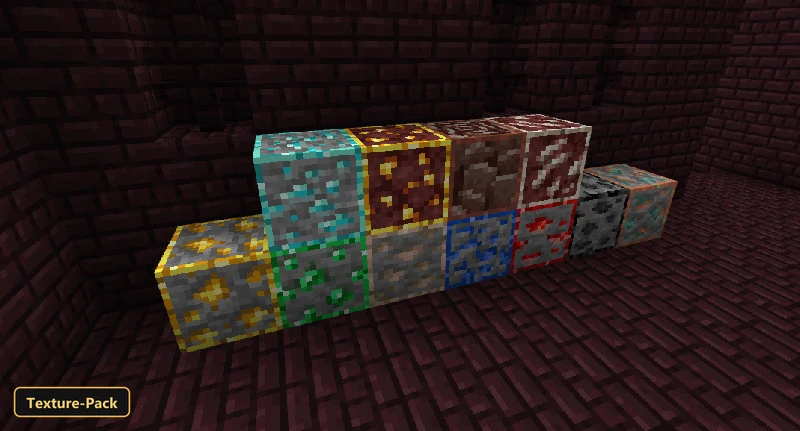
Outlined Ores draws distinct outlines around ore blocks so they stand out against the surrounding stone and are easier to find while mining.
The retexture covers ancient debris, coal, copper, diamond, emerald, gold, iron, lapis, nether gold, quartz and redstone ores, including the deepslate variants. It keeps the familiar 16x resolution of the default textures. This texture pack also brings UI tweaks, custom block models and custom menu splashes, so a few screens look a little different too. Players who spend long sessions searching for valuable resources will notice the difference most.
Requirements:
- MCPE/Bedrock 1.21.100 – 1.21.101
all 2 versions1.21.101, 1.21.100
Features:
- Retextures blocks at 16x resolution
- Ore textures changed: ancient debris, coal ore, copper ore, diamond ore, emerald ore, gold ore, iron ore, lapis ore, nether gold ore, quartz ore, redstone ore (plus deepslate variants)
- Also includes custom UI tweaks, custom block models, custom menu splashes
Screenshots:
- Edition: Minecraft Bedrock
- File type: .mcpack
- Minecraft version listed: 1.21
- How to install: Download the .mcpack. → Open it — Minecraft imports it under Resource Packs. → Activate it in Global Resources, or for one world under Resource Packs → Available.
- Where to get it: In MCModsHub, or directly above on this page.
Install steps are the general flow for this file type — How to install Minecraft Bedrock texture packs walks through it step by step.
- Pack type: .mcaddon — behaviour and resource pack in one file
- Manifest requires Minecraft 1.21.60 or newer
- Complete pack — everything it depends on is inside the file
- Download link checked 22 Sept 2026 — working
- Mirrored on our own servers — the download does not depend on the original host
These come from our own check of the pack file, not from the source page.