Texture packsBedrock
Solmere Shaders
Solmere Shaders reimagines Minecraft Bedrock with cinematic HDR skies, punchy true-to-life lighting, dense volumetric fog, and physically accurate water…
⬇ Download on CurseForgeThe author built this one for Minecraft 26.50. On other versions it may install and then do nothing.
🌅 Solmere Shaders ( VWS )
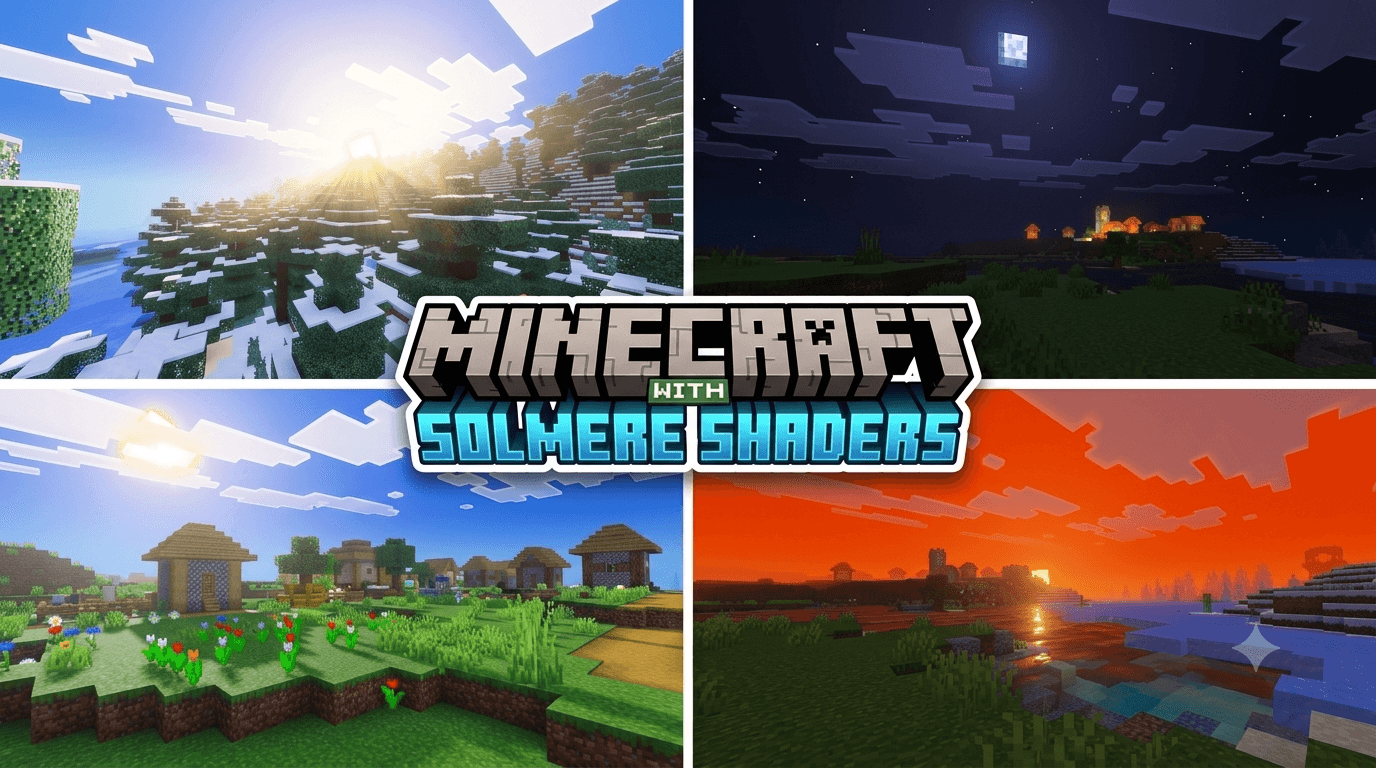
Solmere Shaders completely reworks Minecraft Bedrock's lighting, color grading, and water visuals with a cinematic ACES tone-mapped look — richer sunrises, deeper sunsets, and punchier colors across every biome.
No shaders toggle, no experimental features, no FPS drops — just a pure vanilla-compatible visual overhaul that runs on any device.
-------------------------------------------------------------------
📸 Showcase


-------------------------------------------------------------------
✨ Features
- 🎨 Enhanced ACES color grading — extra contrast, richer saturation, and warmer gain in shadows, midtones, and highlights.
- ☀️ Rebuilt sun & moon lighting curves with brighter peak illuminance for dramatic, realistic sunrises and sunsets.
- 🌊 Upgraded water & caustics — deeper underwater glow, livelier waves, and stronger distortion for a more alive ocean.
- 🌫️ Denser volumetric fog and a richer violet-blue ambient tint for a moodier, more atmospheric world.
- 🌌 Boosted sky rayleigh & mie scattering — deeper zenith blues and more dramatic sunset horizons.
- 💎 Tuned PBR fallback values for shinier blocks, items & actors with punchier emissive glow.
- 🗺️ 45 vanilla biomes overridden with unique fog, water, and lighting identifiers.
- ⚙️ Pure data-driven shader — no scripting, no experimental toggles, fully lightweight.
-------------------------------------------------------------------
🎁 What's Enhanced
- Global Lighting (brighter sun peak, richer ambient & sky intensity)
- Color Grading (punchier shadows, midtones, highlights & temperature)
- Water Appearance (richer caustics, livelier waves, deeper underwater glow)
- Biome Atmospherics (deeper sky blues, more dramatic sunsets across every biome)
- PBR Materials (shinier blocks, items & actors with tuned emissive glow)
- Tone Mapping (cinematic ACES operator for realistic contrast)
-------------------------------------------------------------------
📥 Installation
- 1️⃣ Download the .mcpack file.
- 2️⃣ Open it with Minecraft (Bedrock Edition) to import automatically.
- 3️⃣ Activate the Solmere Shaders ( VWS ) resource pack on your world.
- 4️⃣ Enjoy the new lighting, colors, and water — no extra settings needed.
-------------------------------------------------------------------
📌 Compatibility
- ✔ Minecraft Bedrock Edition 1.21+
- ✔ No scripting or experimental toggles required
- ✔ Works on all devices, including mobile & consoles
- ✔ Compatible with Survival and Creative worlds
- ✔ Singleplayer and private servers
- 🔜 More biome coverage & RTX-style version in development
-------------------------------------------------------------------
Give your world a cinematic makeover — download Solmere Shaders and see Minecraft in a whole new light.
Quick facts
- Edition: Minecraft Bedrock
- File type: .mcpack
- Minecraft version listed: 26.50
- How to install: Download the .mcpack. → Open it — Minecraft imports it under Resource Packs. → Activate it in Global Resources, or for one world under Resource Packs → Available.
- Where to get it: Opens on CurseForge — not every file is mirrored on our own servers.
Install steps are the general flow for this file type — How to install Minecraft Bedrock texture packs walks through it step by step.
Verified by MCModsHub
- Pack type: .mcpack — a single pack
- Manifest requires Minecraft 1.21.0 or newer
- Complete pack — everything it depends on is inside the file
- Download size: 2.5 MB
- Download link checked 21 Sept 2026 — working
These come from our own check of the pack file, not from the source page.