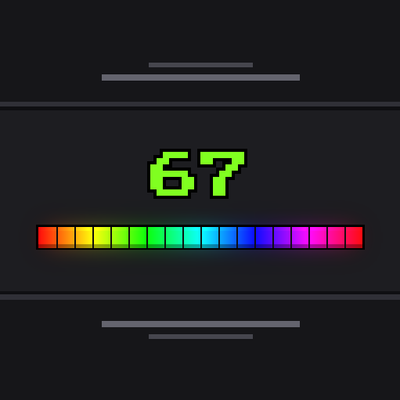
XP BAR RGB
Bedrock texture pack listed for Minecraft 1.21–26.x. Download on the author's site.
Smooth animated RGB experience bar for Minecraft Bedrock. Vibrant 15 FPS neon chromatic cycle, authentic vanilla HUD pixel design, zero scripts, and 100%…
⬇ Download on CurseForge🌈 XP BAR RGB
Minecraft Bedrock 1.21.0 – 1.26.x+ | Smooth 15 FPS Neon | Xbox Achievements Compatible
Bored of the standard static green experience bar?
XP BAR RGB is a lightweight, clean, and ultra-optimized Resource Pack for Minecraft Bedrock Edition that transforms the vanilla experience bar into an eye-catching, smooth animated chromatic RGB rainbow.
Designed specifically to maintain the authentic Minecraft vanilla aesthetic while adding modern neon aesthetics, it cycles through the full color spectrum smoothly at 15 FPS without any screen distraction.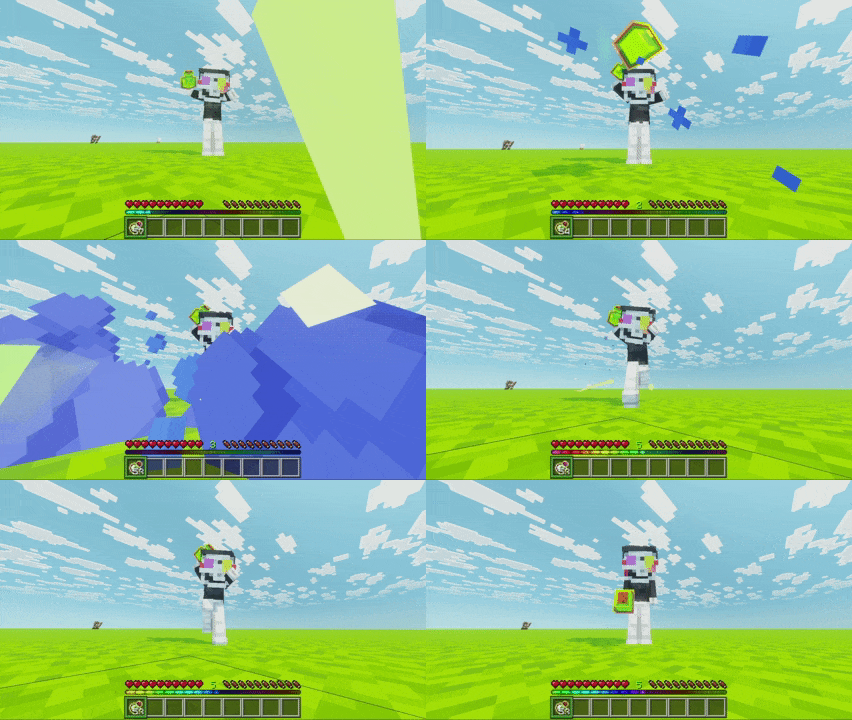
🌟 Key Features
- 🌈 Fluid 15 FPS Chromatic Animation: Perfectly calibrated at 15 FPS (1.2-second full spectrum rotation). Smooth, relaxing, and aesthetic without distracting from combat or building.
- 🛡️ 100% Pure Resource Pack: Zero Behavior Packs, zero commands, zero scripts.
- 🏆 Xbox Achievements Compatible: Achievements and trophies remain 100% active in survival worlds, multiplayer, and Realms!
- ⚙️ Native Bedrock JSON UI Engine: Uses lightweight flipbook texture animation (
182 x 5 px) with zero performance impact or FPS drop. - 📊 Dynamic Experience Clipping: The rainbow bar fills dynamically in real-time based on your current experience progress (
#exp_progress->#clip_ratio), keeping the ambient shimmer on the empty bar and vibrant neon on the filled portion. - 🎯 Authentic Vanilla Aesthetics: Preserves the official Minecraft font for the experience level counter, the 18 notch dividers, and the native HUD layout.
- 🔌 Plug & Play: Zero subpack configuration needed. Activate the pack in Global Resources or World Settings and enjoy immediately.
- 📱 Cross-Platform Friendly: Perfectly scaled for mobile touch devices (Android / iOS), Nintendo Switch, PlayStation, Xbox, and Windows PC.
- 🌐 Multi-Language Support: English (
en_US), Spanish (es_ES/es_MX), Portuguese (pt_BR), and Russian (ru_RU).
🎮 How It Works
Once installed and activated in Global Resources or your World Resource Packs, your experience bar will automatically display the animated RGB rainbow cycle.
- Empty Progress Bar: Displays a subtle, low-opacity ambient shimmer so the bar shape remains visible in the dark.
- Full Progress Bar: Glows with vibrant, high-saturation neon colors clipped dynamically to your current experience points.
- Experience Level: Remains clean, sharp, and centered directly above the bar in classic green Minecraft typography.
📦 How to Install
- Download the
XP_Bar_RGB_v1.0.0.mcpackfrom the Files tab. - Double-click or open the file to automatically import it into Minecraft Bedrock.
- Go to Settings > Global Resources (or your World Settings > Resource Packs).
- Activate XP BAR RGB.
- Enjoy your new smooth RGB experience bar!
📜 Terms of Use & Licensing
- ✅ Allowed: Using this pack in your singleplayer worlds, multiplayer servers, and Realms.
- ✅ Allowed: Featuring this pack in YouTube, Twitch, TikTok, or other media streams (crediting Ebone16 is appreciated!).
- ✅ Allowed: Including this pack in public Bedrock modpacks with proper attribution.
- ❌ Prohibited: Re-uploading this pack or texture assets to monetized shorteners or third-party websites without direct authorization.
Developed with care by Ebone16 | Discord: Ebone_16
- Edition: Minecraft Bedrock
- File type: .mcpack
- Minecraft versions listed: 1.21, 26.40, 26.50
- How to install: Download the .mcpack. → Open it — Minecraft imports it under Resource Packs. → Activate it in Global Resources, or for one world under Resource Packs → Available.
- Where to get it: Opens on CurseForge — not every file is mirrored on our own servers.
Install steps are the general flow for this file type — How to install Minecraft Bedrock texture packs walks through it step by step.
XP BAR RGB is a free Minecraft Bedrock texture pack. Compatible with Minecraft 1.21, 26.40, 26.50. Downloaded 157 times (via CurseForge). Download it and open it directly in the game.