![Glowing Ore[Vibrant Visual]](https://media.forgecdn.net/avatars/2068/715/639259001114265284.png)
Glowing Ore[Vibrant Visual]
The author built this one for Minecraft 26.50. On other versions it may install and then do nothing.
![Glowing Ore[Vibrant Visual] — screenshot 1](https://media.forgecdn.net/attachments/1973/901/1000079577-jpg.jpg)
![Glowing Ore[Vibrant Visual] — screenshot 2](https://media.forgecdn.net/attachments/1973/902/1000078781-jpg.jpg)
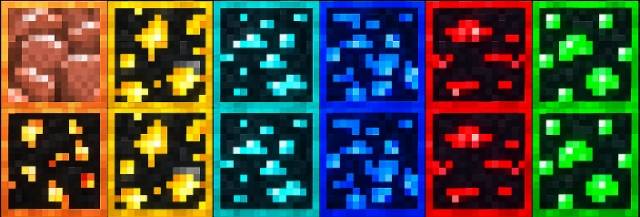
Glowing Ore - Vibrant Visual
Make your ores stand out with vibrant, emissive visuals designed specifically for Minecraft Bedrock’s Vibrant Visuals. This pack enhances ore visibility while keeping the clean, vanilla Minecraft aesthetic.
✨ Features
• Vibrant glowing ore textures
• Supports Overworld and Deepslate ores
• Separate textures for Deepslate ores
• Designed specifically for Vibrant Visuals
• Clean vanilla-style appearance
• Lightweight and optimized
⚠️ Requirement: Vibrant Visuals must be enabled for the glowing effects to work correctly.
📥 Installation
1. Download the Glowing Ores – Vibrant Visuals ".mcpack" file.
2. Open the ".mcpack" file with Minecraft Bedrock.
3. Minecraft will automatically import the resource pack.
4. Go to Settings → Global Resources or your world's Resource Packs.
5. Activate Glowing Ores – Vibrant Visuals.
6. Make sure Vibrant Visuals is enabled in your video/graphics settings.
7. Enter your world and enjoy the glowing ores! ✨
Made by AyonPlayz
- Edition: Minecraft Bedrock
- File type: .mcpack
- Minecraft version listed: 26.50
- How to install: Download the .mcpack. → Open it — Minecraft imports it under Resource Packs. → Activate it in Global Resources, or for one world under Resource Packs → Available.
- Where to get it: Opens on CurseForge — not every file is mirrored on our own servers.
Install steps are the general flow for this file type — How to install Minecraft Bedrock texture packs walks through it step by step.
- Pack type: .mcpack — a single pack
- Manifest requires Minecraft 1.21.120 or newer
- Complete pack — everything it depends on is inside the file
- Download size: 136 KB
- Download link checked 28 Sept 2026 — working
These come from our own check of the pack file, not from the source page.