Texture packsBedrock
SYCURE UI
Bedrock texture pack listed for Minecraft 1.21–26.x. File opened and checked on 30 Sep 2026; installs from the MC Bedrock Mods app on Android.
⬇ Download on CurseForge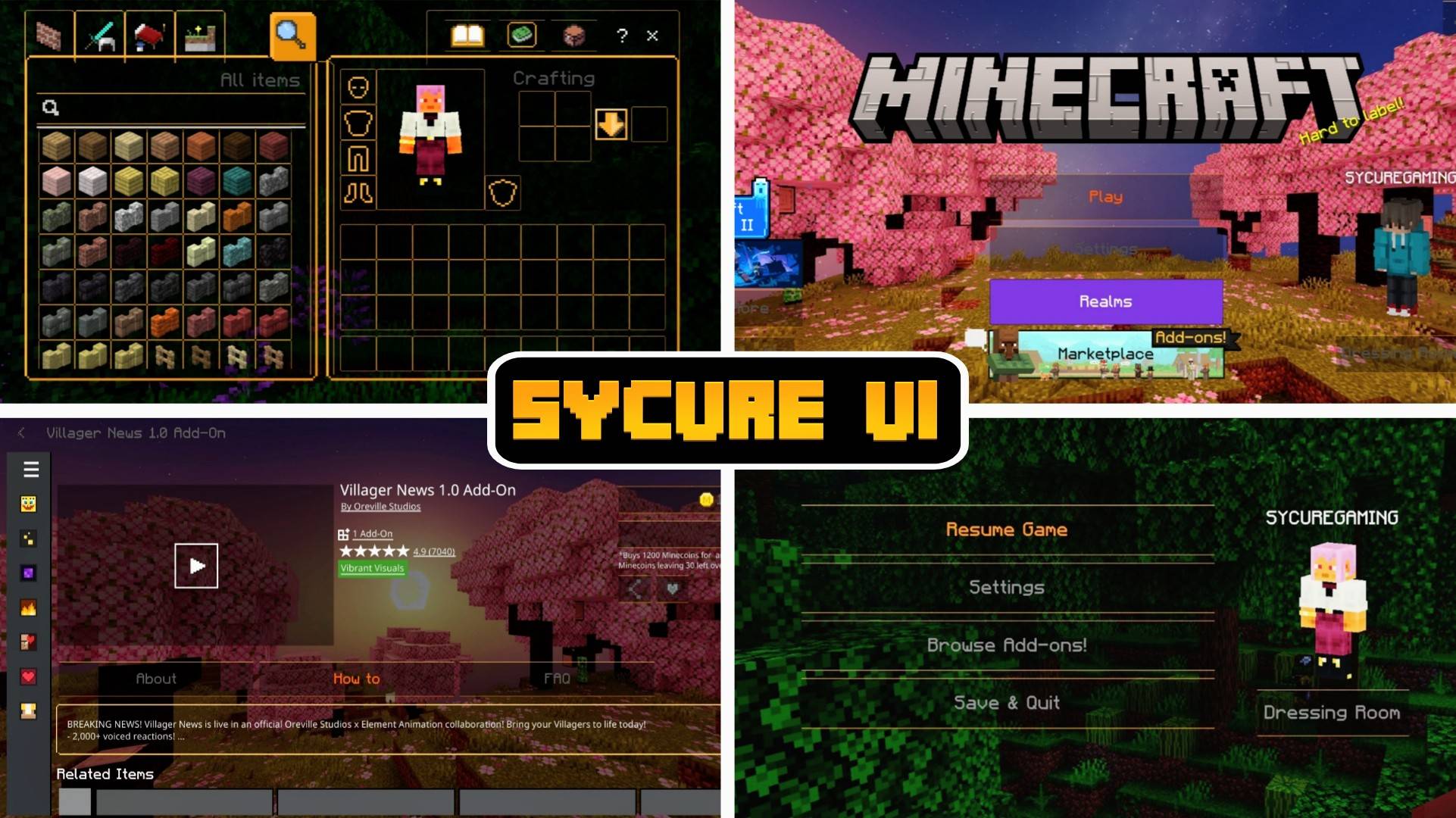
SYCURE UI
Upgrade your Minecraft Bedrock experience with SYCURE UI, a sleek, orange-themed user interface designed for players who value performance and efficiency. We stripped away the bloat and useless features to bring you a lightweight UI that focuses strictly on what matters: clean visuals, faster gameplay, and an optimized user experience.✨ Core Features:
- Vibrant Orange Aesthetic: A modern, unified orange color scheme that gives your menus and HUD a fresh, energetic look without being harsh on the eyes.
- Pure & Lightweight: Zero clutter. SYCURE UI is strictly optimized for performance, removing unnecessary features to ensure smooth navigation and maximum FPS.
- Autocraft Button: Save precious time during survival gameplay or intense PvP matches. The built-in autocraft button allows you to instantly craft items with a single tap.
- Chat Quick-Send: No more retyping commands or messages. The overhauled chat interface allows you to easily access, select, and resend previous messages instantly.
- Breathtaking Home Screen: Boot up your game to a stunning, custom panorama featuring the beautiful, pink-petaled Cherry Biome.
📥 Installation Guide
- Download the SYCURE UI
.mcpackfile. - Tap (or double-click) the downloaded file. Minecraft will automatically open and begin importing the pack.
- Once the import is successful, go to Settings > Global Resources from the main menu.
- Open the My Packs tab, find "SYCURE UI", and tap Activate.
- Ensure SYCURE UI is at the very top of your Active packs list to prevent other texture packs from overwriting the UI elements.
- Exit the settings menu to let the game load the new UI. Enjoy!
⚠️ Terms of Use & Copyright
© 2026 SycureGaming. All Rights Reserved. By downloading and using SYCURE UI, you agree to the following terms:- Content Creators: You are highly encouraged to showcase this UI in your YouTube, TikTok, or other video content! However, you must link directly to the original download page (MCPEDL, your official site, etc.). Do not provide direct MediaFire or third-party download links.
- Modification: You may modify this UI for your own personal, private use.
- Redistribution: You are strictly prohibited from re-uploading this pack to other websites, apps, or discords.
- Asset Theft: Do not steal, extract, or repurpose code, textures, or layouts from this pack to use in your own published projects without explicit permission from SycureGaming.
Quick facts
- Edition: Minecraft Bedrock
- File type: .mcpack
- Minecraft versions listed: 26.20, 26.30, 26.40
- How to install: Download the .mcpack. → Open it — Minecraft imports it under Resource Packs. → Activate it in Global Resources, or for one world under Resource Packs → Available.
- Where to get it: Opens on CurseForge — not every file is mirrored on our own servers.
Install steps are the general flow for this file type — How to install Minecraft Bedrock texture packs walks through it step by step.
File checked by MCModsHub
- Pack type: .mcpack — a single pack
- Manifest requires Minecraft 1.21.0 or newer
- Complete pack — everything it depends on is inside the file
- Download size: 10.7 MB
- Download link checked 30 Sept 2026 — working
These come from our own check of the pack file, not from the source page.