Brewing Potions Guide (26+) – MCPE/Bedrock Texture Pack
Bedrock texture pack listed for Minecraft 1.21. File opened and checked on 3 Oct 2026; installs from the MC Bedrock Mods app on Android.
⬇ Download
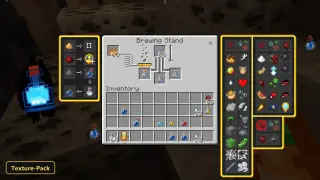
A recipe guide sits right inside the brewing screen with Brewing Potions Guide, a texture pack that retextures the UI. It shows brewing information much like crafting recipes are shown, so nobody needs to check an outside site or memorize combinations.
The pack includes visual aids for all the essential potions. They explain how to make each potion, how to extend its duration and how to turn it into a splash potion. That suits new players as well as anyone who just wants a quick reminder, and everything stays readable inside the brewing interface. A few custom UI tweaks are included too.
Requirements:
- MCPE/Bedrock 26.10 – 26.40
all 7 versions26.40, 26.30, 26.20, 26.13, 26.12, 26.11, 26.10
Features:
- Retextures the UI
- Also includes custom UI tweaks
Screenshots:
- Edition: Minecraft Bedrock
- File type: .mcpack
- How to install: Download the .mcpack. → Open it — Minecraft imports it under Resource Packs. → Activate it in Global Resources, or for one world under Resource Packs → Available.
- Where to get it: In MCModsHub, or directly above on this page.
Install steps are the general flow for this file type — How to install Minecraft Bedrock texture packs walks through it step by step.
- Pack type: .mcpack — a single pack
- Manifest requires Minecraft 1.21.100 or newer
- Complete pack — everything it depends on is inside the file
- Download link checked 3 Oct 2026 — working
- Mirrored on our own servers — the download does not depend on the original host
These come from our own check of the pack file, not from the source page.