FINAL (26+) – MCPE/Bedrock Shader
Bedrock shader pack for the Vibrant Visuals mode listed for Minecraft 1.20. Installs from the MC Bedrock Mods app on Android.
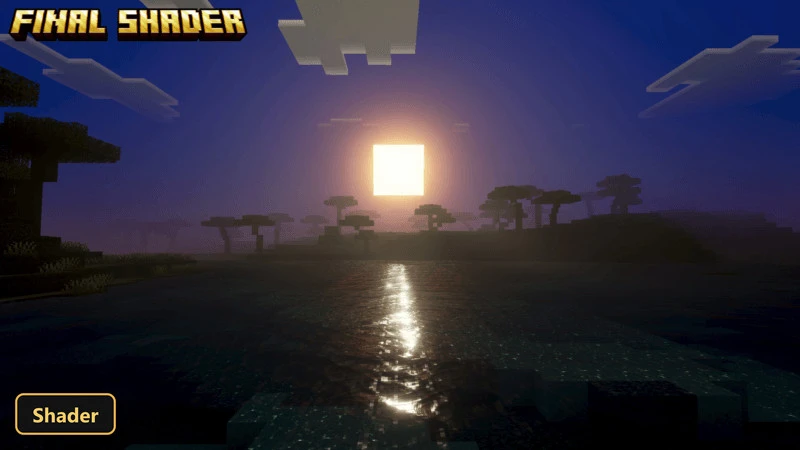
A fantasy mood fills every scene with FINAL, a shader that brings custom atmosphere, fog, water, shadows, color grading and lighting.
⬇ Download


A fantasy mood fills every scene with FINAL, a shader that brings custom atmosphere, fog, water, shadows, color grading and lighting. It only shows its effects when Vibrant Visuals is turned on in the video settings.
Water is drawn with animated caustics and gentle waves, and soft shadows fall across the environment. ACES tone mapping with 1 color-grading profile gives the picture a unique, magical tone. Color and fog are tuned per biome across 84 biomes, so different areas keep their own look. The shader is built around Vibrant Visuals on Bedrock and does not work without it.
Requirements:
- MCPE/Bedrock 26.30
- Built for Minecraft Bedrock's Vibrant Visuals mode — its effects only show with Vibrant Visuals enabled in the video settings
Features:
- Vibrant Visuals shader with custom atmosphere, fog, water, shadow, color-grading, lighting
- Soft shadows
- Water with animated caustics and waves
- ACES tone mapping with 1 color-grading profile
- Per-biome color and fog tuning for 84 biomes
Screenshots:
- Edition: Minecraft Bedrock
- File type: .mcpack
- How to install: Download the .mcpack. → Open it — Minecraft imports it under Resource Packs. → Activate it in Global Resources, or for one world under Resource Packs → Available.
- Where to get it: In MCModsHub, or directly above on this page.
Install steps are the general flow for this file type — How to install Minecraft Bedrock texture packs walks through it step by step.
- Save it as 525926.mcaddon before opening — it downloads as .mcpack, but it is a .mcaddon pack
- Manifest requires Minecraft 1.20.30 or newer
- Complete pack — everything it depends on is inside the file
- Download size: 255 KB
- Download link checked 13 Oct 2026 — working
- Mirrored on our own servers — the download does not depend on the original host
These come from our own check of the pack file, not from the source page.