Lumina Realism
Bedrock texture pack listed for Minecraft 1.21–26.x. Installs from the MC Bedrock Mods app on Android.
built Lumina Realism as a Bedrock Vibrant Visuals pack with lighting, sky, volumetric fog, water, shadows, PBR fallbacks and coulor grading, and after…
⬇ Download on CurseForge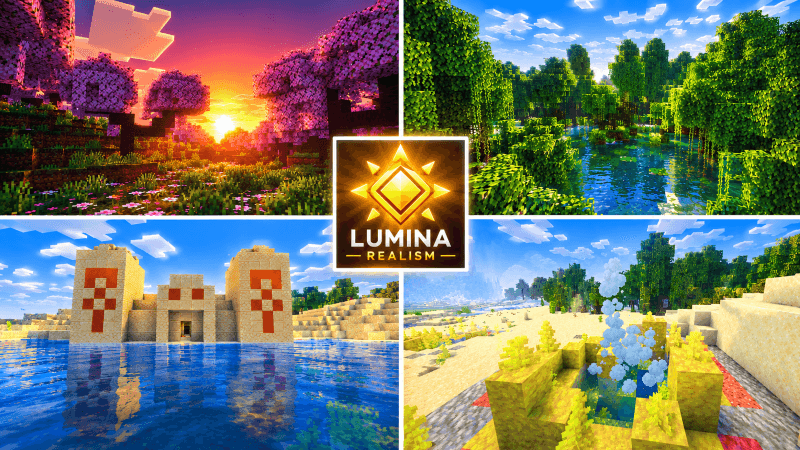
Lumina Realism
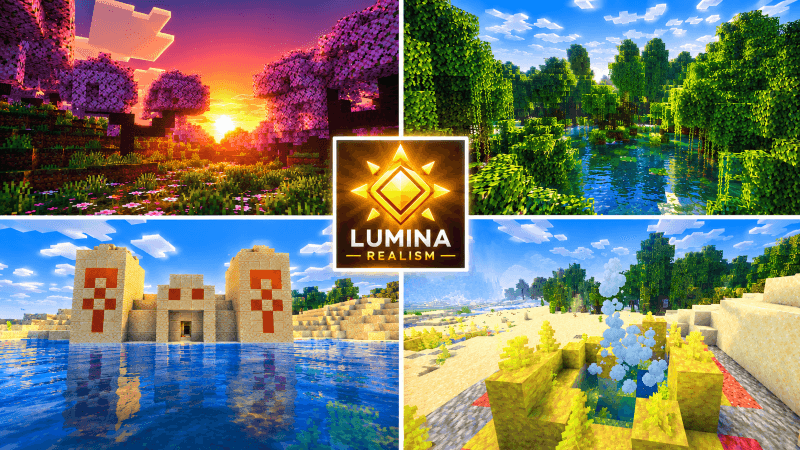
A cinematic, photoreal lighting pack for Minecraft Bedrock Vibrant Visuals.
Lumina Realism reworks how your world is lit, colored and atmospherically shaded. It doesn't change blocks or gameplay. It tunes Vibrant Visuals through the game's own supported settings, so it needs no mods, no external tools and no custom shader files.
Features
Golden-hour lighting. The sun is neutral white at noon, warms to amber in the late afternoon, and sinks into deep orange and rose at dusk. Sunrise mirrors it. The moon casts a cool blue light, and the sun's path is tilted slightly so shadows stretch and rotate more naturally through the day.
Atmospheric sky. Rayleigh and Mie scattering are retuned for a deeper blue zenith, glowing horizons, and a soft sun glare that swells at sunrise and sunset. Night skies are dark navy rather than flat black.
Volumetric fog. Five fog profiles cover different climates:
• Default: soft, clean distance haze.
• Ocean and coast: cool, slightly denser haze over water and beaches.
• Dry (desert, mesa, savanna): warm, dusty tones.
• Forest and jungle: damp, green-tinted mist.
• Cold: pale, blue-white haze.
Each one has its own air color and scattering, plus separate underwater fog.
Water. Animated image-based waves, caustics on the seabed, and tuned water optics. Open ocean is clearer and bluer, while rivers and inland water are slightly more tinted.
Shadows and PBR. Soft shadows by default, plus a fallback roughness for blocks, mobs, particles and items that don't have their own PBR maps. This gives surfaces a subtle sheen without custom textures.
Warmer local lights. Torches, lanterns, candles and end rods become point lights with warmer colors. Soul torches and lanterns stay cyan, and redstone torches stay red.
Cinematic color grading. A split-tone look with slightly cool, saturated shadows, boosted mid-tone contrast and warm highlights, using the game's built-in tone mapping.
Coverage
It applies to the overworld biomes (81 biome definitions). The Nether and the End are left untouched so they keep their vanilla look.
Requirements
• Minecraft Bedrock Edition 1.21.120 or newer
• A device that supports Vibrant Visuals
• Vibrant Visuals turned on under Settings → Video
Installation
- Open
Lumina_Realism.mcpackto import it into Minecraft. - Go to Settings → Global Resources and activate Lumina Realism.
- Turn on Vibrant Visuals under Video settings.
- On older builds, enable the "Render Dragon Features for Creators" experiment first.
If you're updating from an older version, remove the previous copy first so Minecraft doesn't reuse a cached one.
Notes
- This is a Vibrant Visuals configuration, not custom shader code. Bedrock doesn't accept custom shaders from packs, so it can only adjust what the game exposes.
- It doesn't replace block textures or add per-block PBR maps.
- Fog density, sun brightness and surface sheen can all be tuned by editing the pack's JSON files.
- I haven't tested it in the game, so the first version may need tuning. If something looks wrong, such as overexposure or heavy fog, tell me what you see and I'll adjust it.
- Edition: Minecraft Bedrock
- File type: .mcpack
- Minecraft versions listed: 1.21.120, 1.21.122, 1.21.121
- How to install: Download the .mcpack. → Open it — Minecraft imports it under Resource Packs. → Activate it in Global Resources, or for one world under Resource Packs → Available.
- Where to get it: Opens on CurseForge — not every file is mirrored on our own servers.
Install steps are the general flow for this file type — How to install Minecraft Bedrock texture packs walks through it step by step.
- Pack type: .mcpack — a single pack
- Manifest requires Minecraft 1.21.120 or newer
- Complete pack — everything it depends on is inside the file
- Download size: 291 KB
- Download link checked 13 Oct 2026 — working
These come from our own check of the pack file, not from the source page.