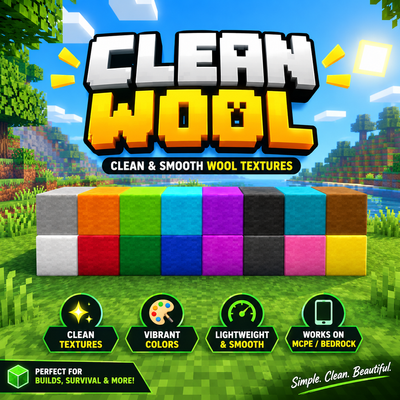
Cleaner Wool
Bedrock texture pack listed for Minecraft 1.20–26.x. File opened and checked on 27 Oct 2026; installs from the MC Bedrock Mods app on Android.
Clean Wool Texture Pack | Minecraft PE & Bedrock Clean Wool is a Minecraft Bedrock Edition texture pack designed to give wool blocks a clean, vibrant, and…
⬇ Download on CurseForge

Clean Wool Texture Pack | Minecraft PE & Bedrock
Clean Wool is a Minecraft Bedrock Edition texture pack designed to give wool blocks a clean, vibrant, and visually appealing look. Whether you're building colorful structures, decorating your world, or creating PvP arenas, this pack is made for players who love simple and colorful Minecraft textures.
✨ Features
🎨 Vibrant wool colors for colorful builds.
🧱 Clean-looking wool block textures.
🏗️ Great for building, decoration, and creative projects.
⚔️ Suitable for PvP arenas and wool-based builds.
📱 Made for Minecraft Bedrock Edition and MCPE.
🌍 Enjoy a fresh visual style in your Minecraft worlds.
📱 Compatibility
Game: Minecraft Bedrock Edition / Minecraft PE
Pack type: Texture Pack / Resource Pack
Name: Clean Wool
📥 How to Install
1. Download the Clean Wool resource pack.
2. Open the `.mcpack` file with Minecraft.
3. Wait for the import to complete.
4. Open your world settings.
5. Navigate to Resource Packs → My Packs.
6. Activate Clean Wool and enjoy!
Give your Minecraft world a cleaner, more colorful wool style with Clean Wool!**
Created by JustGamerzYT.
- Edition: Minecraft Bedrock
- File type: .mcpack
- Minecraft versions listed: 26.0.02, 26.0, 26.3
- How to install: Download the .mcpack. → Open it — Minecraft imports it under Resource Packs. → Activate it in Global Resources, or for one world under Resource Packs → Available.
- Where to get it: Opens on CurseForge — not every file is mirrored on our own servers.
Install steps are the general flow for this file type — How to install Minecraft Bedrock texture packs walks through it step by step.
- Pack type: .mcaddon — behaviour and resource pack in one file
- Manifest requires Minecraft 1.20.30 or newer
- Complete pack — everything it depends on is inside the file
- Download size: 14 KB
- Download link checked 27 Oct 2026 — working
These come from our own check of the pack file, not from the source page.