Texture packsBedrock
AD FPS Booster Pack (26.x, 1.21) – MCPE/Bedrock
Bedrock texture pack listed for Minecraft 1.21–26.x. File opened and checked on 29 Sep 2026; installs from the MC Bedrock Mods app on Android.
⬇ DownloadAD FPS Booster Pack is an advanced resource pack designed to maximize performance in Bedrock Edition using intelligent AI-driven optimizations. Whether you’re gaming on a mobile device, console, or low-end PC, this pack enhances smoothness, speed, and overall immersion for a superior experience.
Features:
- AI Smart Rendering: Dynamic render adjustments based on player movement.
- AI Texture Optimization: Auto-scales textures to balance visual quality and FPS.
- AI Frame Interpolation: Predicts smoother frames for consistent gameplay.
- AI Entity Culling: Hides off-screen and unneeded entities to save resources.
- AI Dynamic Lighting: Reduces lighting updates to boost speed.
- Adaptive Chunk Loading: Prioritizes chunks you’re heading toward.
- Smart Particle Reduction: Limits excessive particles and effects.
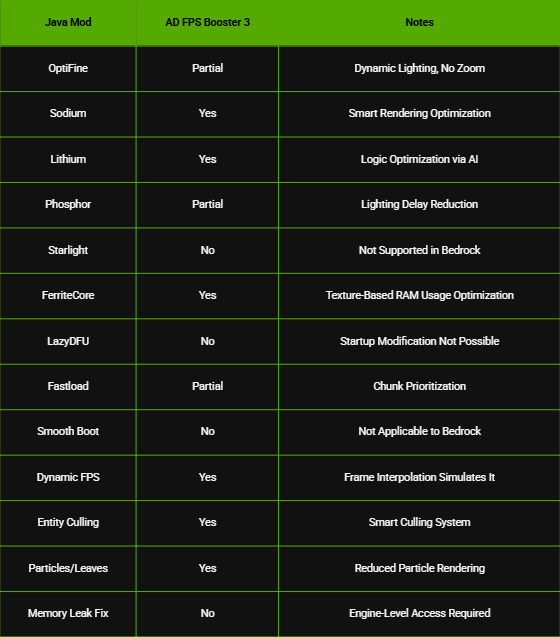
Comparison with Popular Java Mods:
AD FPS Booster Pack Download Links
Quick facts
- Edition: Minecraft Bedrock
- File type: .mcpack
- Minecraft version listed: 1.21
- How to install: Download the .mcpack. → Open it — Minecraft imports it under Resource Packs. → Activate it in Global Resources, or for one world under Resource Packs → Available.
- Where to get it: In MCModsHub, or directly above on this page.
Install steps are the general flow for this file type — How to install Minecraft Bedrock texture packs walks through it step by step.
File checked by MCModsHub
- Pack type: .mcaddon — behaviour and resource pack in one file
- Manifest requires Minecraft 1.26.0 or newer
- Complete pack — everything it depends on is inside the file
- Download size: 165 KB
- Download link checked 22 Jul 2026 — working
- Mirrored on our own servers — the download does not depend on the original host
These come from our own check of the pack file, not from the source page.