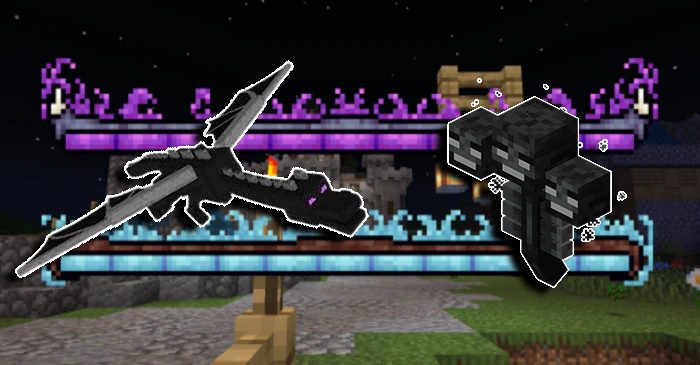
Ender Dragon & Wither Health Bars Texture Pack (1.21, 1.20) – MCPE/Bedrock
Bedrock texture pack listed for Minecraft 1.13–1.21. File opened and checked on 21 Sep 2026; installs from the MC Bedrock Mods app on Android.
Ender Dragon & Wither Health Bars Texture Pack exclusively revamps the health bars of the Ender Dragon and Wither, offering a fresh, new look while…
⬇ Download

Ender Dragon & Wither Health Bars Texture Pack exclusively revamps the health bars of the Ender Dragon and Wither, offering a fresh, new look while keeping the rest of the game unchanged. Ideal for players seeking a customized visual experience during battles with these iconic bosses!
Features:
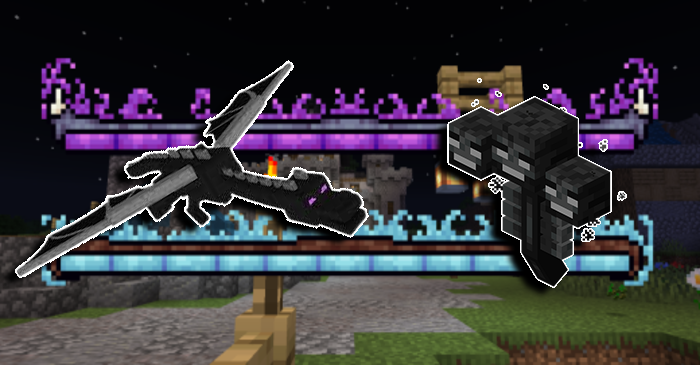
Enhance your boss battles with this specialized texture pack that completely overhauls the health bars for the Ender Dragon and Wither. This pack introduces a sleek, modern design, making the health bars more visually appealing and easier to read during intense combat.
The Ender Dragon’s health bar now boasts a vibrant, dynamic look that complements the mystique of the End. The Wither’s health bar features a darker, more menacing aesthetic, reflecting the chaotic nature of this formidable foe. These changes are subtle enough to preserve the game’s original feel but impactful enough to elevate your overall gameplay experience.
This pack does not alter any other game elements, ensuring that the core Minecraft visuals remain intact while adding a touch of flair to these epic encounters. It’s perfect for players who appreciate attention to detail and want to add a bit of personal style to their Minecraft adventures.
Screenshots:


Installation Note:
1. Windows 10 (PC)
1. Download the Texture Pack:
- Download the .mcpack or .zip file of the texture pack you want to install.
2. Locate the File:
- If the file is in .zip format, extract it to a folder. If it’s a .mcpack file, you can skip to step 4.
3. Convert the File (if necessary)
- If you extracted a .zip file, move the contents to a new folder and rename it to `.mcpack` so that Minecraft can recognize it.
4. Install the Pack:
- Double-click the .mcpack file. This will automatically open Minecraft and import the texture pack.
- You will see a message saying “Successfully Imported” once the process is complete.
5. Activate the Pack:
- In the main menu, go to Settings > Global Resources > My Packs.
- Find the newly imported texture pack and click on it to activate it.
2. Android/iOS (Mobile Devices)
1. Download the Texture Pack:
- Download the .mcpack file directly to your device.
2. Locate the File:
- After downloading, open the file. On Android, you might need a file manager like “ES File Explorer”. On iOS, the file can be found in the “Files” app.
3. Install the Pack:
- Tap the .mcpack file and select “Open with Minecraft.”
- Minecraft will open, and the texture pack will be automatically imported. You will see a “Successfully Imported” message.
4. Activate the Pack:
- In the main menu, go to Settings > Global Resources> My Packs.
- Tap the newly imported texture pack to activate it.
3. Xbox One/PlayStation
Note: Installing custom texture packs on Xbox One and PlayStation 4 is more complicated due to the limitations of these platforms. Below are basic methods, but they may not work in all cases as they rely on third-party tools and unofficial methods.
Xbox One:
1. Download and Extract the Pack
- Download the texture pack on a computer and extract the files.
2. Use Microsoft Edge:
- On Xbox One, open the Microsoft Edge browser and download the texture pack.
3. File Manager:
- Use an app like “My Files Explorer” (available on the Microsoft Store) to access the downloaded pack.
4. Transfer to Minecraft:
- Move the texture pack files to the Minecraft resource pack folder (/localState/games/com.mojang/resource_packs).
5. Activate the Pack:
- Open Minecraft, go to Settings > Global Resources > My Packs, and activate the pack.
PlayStation 4:
- Unfortunately, there is no official method to install custom texture packs on PlayStation 4. The most viable option is to use packs available in the in-game store.
Nintendo Switch:
- Similar to PlayStation 4, installing custom texture packs is not officially supported on the Nintendo Switch. Texture packs need to be purchased directly from the in-game store.
Final Tips:
- Compatibility: Always check if the texture pack is compatible with the version of Minecraft you are using.
- Backup: Make backups of your worlds before activating new texture packs to avoid potential compatibility issues.
Ender Dragon & Wither Health Bars Texture Pack Download Links
For Minecraft PE/Bedrock 1.21, 1.20
mcpack: Download from server 1 – Download from server 2
- Edition: Minecraft Bedrock
- File type: .mcpack
- Minecraft versions listed: 1.21, 1.20
- How to install: Download the .mcpack. → Open it — Minecraft imports it under Resource Packs. → Activate it in Global Resources, or for one world under Resource Packs → Available.
- Where to get it: In MCModsHub, or directly above on this page.
Install steps are the general flow for this file type — How to install Minecraft Bedrock texture packs walks through it step by step.
- Pack type: .mcaddon — behaviour and resource pack in one file
- Manifest requires Minecraft 1.13.0 or newer
- Complete pack — everything it depends on is inside the file
- Download size: 3.2 MB
- Download link checked 17 Jun 2026 — working
- Mirrored on our own servers — the download does not depend on the original host
These come from our own check of the pack file, not from the source page.