
One Block Wars -The Ultimate PvP Skyblock Map-
Bedrock map listed for Minecraft 1.21–26.x. Needs Beta APIs. File opened and checked on 5 Nov 2026; installs from the MC Bedrock Mods app on Android.
Welcome to One Block Wars, a thrilling PvP minigame map where survival meets strategy! Inspired by the classic One Block challenge and Bedwars mechanics.
⬇ Download on CurseForgeThe author built this one for Minecraft 26.50. On other versions it may install and then do nothing.


Welcome to One Block Wars, a PvP skyblock where each player starts on a floating island with one regenerating block. Mine it, sell the loot, buy gear, and be the last player standing.
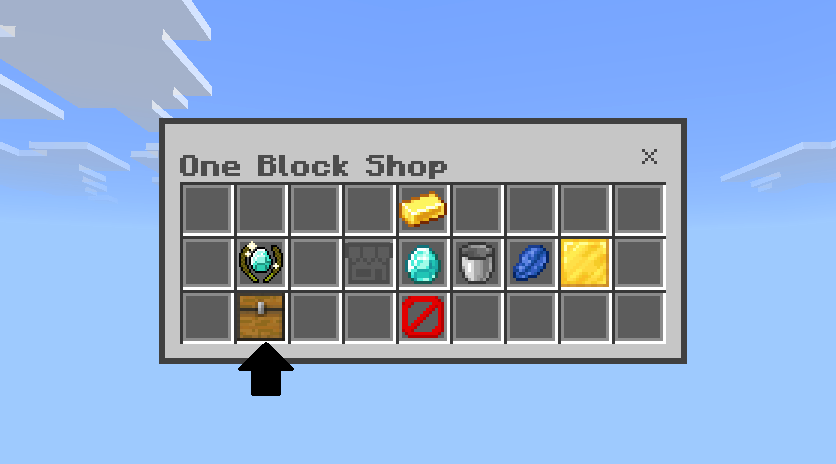
The shop looks like a chest. That is the normal shop in V3.8. The Chest UI button in the shop switches to the classic menu.
Features
- 🏝️ One block, your whole base — break it for resources, then upgrade it for better loot
- 🛒 Chest shop — the shop opens as a chest. Switch back to the classic menu from the shop itself
- ⚔️ Four phases — Preparation, War, Elimination, Sudden Death. Phase 1–3 timers are adjustable (default 10 / 10 / 5 min)
- ⚡ Blitz — phase timers ÷5, One Block drops ×5, shop 25% off (movement items 50% off)
- 💰 Gold and lapis — sell resources, bulk-sell, and spend lapis on passive buffs
- 🎯 Kill bonus — take 35% of the victim’s gold (max $750)
- 💣 Utility kit — Fireball, Bridge Egg, Elytra Strike, Phantom Block, Smoke Bomb, Invisibility Potion, and more
- 📖 Rule book — English, 日本語, Español, Português
- 👥 2–16 players on one world
How to use
- Each player spawns on a floating island with a Home One Block.
- Break it. It comes back, and the drops get better when you upgrade it (Iron, Diamond, Netherite, and more).
- Build out the island and hold the emerald Shop Menu. The shop opens as a chest. Gold comes from selling what you mine.
- From the shop you can buy gear, sell, upgrade the One Block, spend lapis, or turn the chest shop off and use the classic menu.
- Operators start the match from chat or with slash commands. Everyone hears the countdown, and movement is locked until the islands load so nobody walks off at the start.
Phases
| Phase | Default | What happens |
|---|---|---|
|
1 Preparation
|
10 min
|
PvP off · keep inventory · mid mining off
|
|
2 War
|
10 min
|
PvP on · items lost on death (armor kept) · mid mining on
|
|
3 Elimination
|
5 min
|
Death eliminates you (no respawn)
|
|
4 Sudden Death
|
—
|
Every Home One Block is destroyed
|
!settings or /obw:settings (operators) changes phase times, resets them, switches language, and can start the match.
Blitz: !start_b or /obw:start_blitz
Lapis
- Home teleport scroll — 8 (once per match)
- Absorption — 16
- Haste — 10
- Jump Boost I — 12
- Speed I — 12
Special items
| Item | Effect |
|---|---|
|
Auto Miner
|
Mines your One Block on a timer
|
|
Generator
|
Passive gold
|
|
Fireball
|
Explosive projectile
|
|
Bridge Egg
|
Lays a wool bridge
|
|
Knockback Sword
|
Low damage, high knockback
|
|
Silverfish Egg
|
Spawns a distraction
|
|
Elytra Strike
|
Launch and glide
|
|
Tracker Compass
|
Direction and distance to the nearest enemy
|
|
Phantom Block
|
Planks that vanish when an enemy steps on them
|
|
Smoke Bomb
|
Smoke cloud that slows nearby enemies
|
|
Invisibility Potion
|
Invisibility for 16 seconds
|
|
Ender Chest
|
Personal storage
|
Commands
| Command | Action |
|---|---|
!start / /obw:start |
Normal
|
!start_b / /obw:start_blitz |
Blitz
|
!stop or !reset / /obw:stop |
Stop and reset
|
!settings / /obw:settings |
Phase timers (operator)
|
Required / Notes
- Minecraft Bedrock 26.40+ (this build: V3.8)
- Beta APIs must be on under Experiments. Achievements stay off while that experiment is on
- The world already includes the behavior pack and the resource pack. Load both
- Multiplayer on one world, 2–16 players. A Realm or dedicated server needs Beta APIs enabled
- Another pack that replaces
ui/server_form.jsonwill break the chest shop. Use the classic shop button in that case, or remove the conflicting UI pack - The chest is a shop screen. Items in those slots are not items you can take
Feel free to share our videos however you like! We'd really appreciate it if you could link to our YouTube channel!
- Edition: Minecraft Bedrock
- File type: .mcworld
- Minecraft version listed: 26.50
- How to install: Download the .mcworld file. → Open it — Minecraft imports it as a new world. → Find it in your Worlds list and play.
- Where to get it: Opens on CurseForge — not every file is mirrored on our own servers.
Install steps are the general flow for this file type — How to install Minecraft Bedrock maps walks through it step by step.
- Pack type: .mcworld — a ready-made world
- Manifest requires Minecraft 1.21.50 or newer
- Needs Beta APIs switched on in the world settings
- Complete pack — everything it depends on is inside the file
- Download size: 7.0 MB
- Download link checked 1 Nov 2026 — working
These come from our own check of the pack file, not from the source page.


