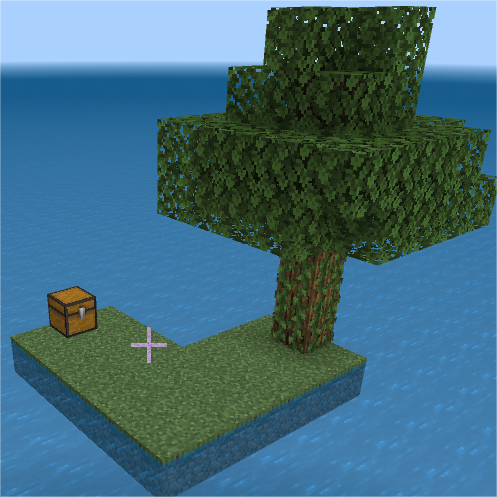
WATER BLOCK
It's basically Skyblock, but instead of sky, it's water. I've also hidden some chests in certain locations. You can access the Nether and the End in this…
⬇ Download on CurseForgeThis is my first time making something like this.
I got inspired by Skyblock, obviously, but decided to put a twist on it.
Minecraft Bedrock just released a new update about flat worlds, so I wanted to try surviving in a water world. But it turned out to be really difficult—especially because I kept spawning at the bottom of the ocean!
So, I made this custom water world.
I've hidden some chests in different places, and I also placed some obsidian around. You can access the End, but first you’ll need to go to the Nether to get the coordinates (it’ll make sense once you're in the Nether—trust me). You’ll also need blaze rods for the End portal.
That’s about it!
Unfortunately, I’m still a beginner, so you can’t make this truly hardcore since I used Creative mode while building the world.
(If anyone knows how to reset player data without resetting the chests, please let me know!)
- Edition: Minecraft Bedrock
- File type: .mcworld
- Minecraft version listed: 1.21.80
- How to install: Download the .mcworld file. → Open it — Minecraft imports it as a new world. → Find it in your Worlds list and play.
- Where to get it: Opens on CurseForge — not every file is mirrored on our own servers.
Install steps are the general flow for this file type — How to install Minecraft Bedrock maps walks through it step by step.
- Manifest requires Minecraft 1.21.21 or newer
- Complete pack — everything it depends on is inside the file
- Download size: 110.7 MB
- Download link checked 26 Aug 2026 — working
These come from our own check of the pack file, not from the source page.