
Texture packsBedrock
PVP Essentials+
Bedrock texture pack listed for Minecraft 26.x. File opened and checked on 27 Aug 2026; installs from the MC Bedrock Mods app on Android.
Low shield, quick craft, minimal fog and durability viewer everything you need to stay focused and win fights.
⬇ Download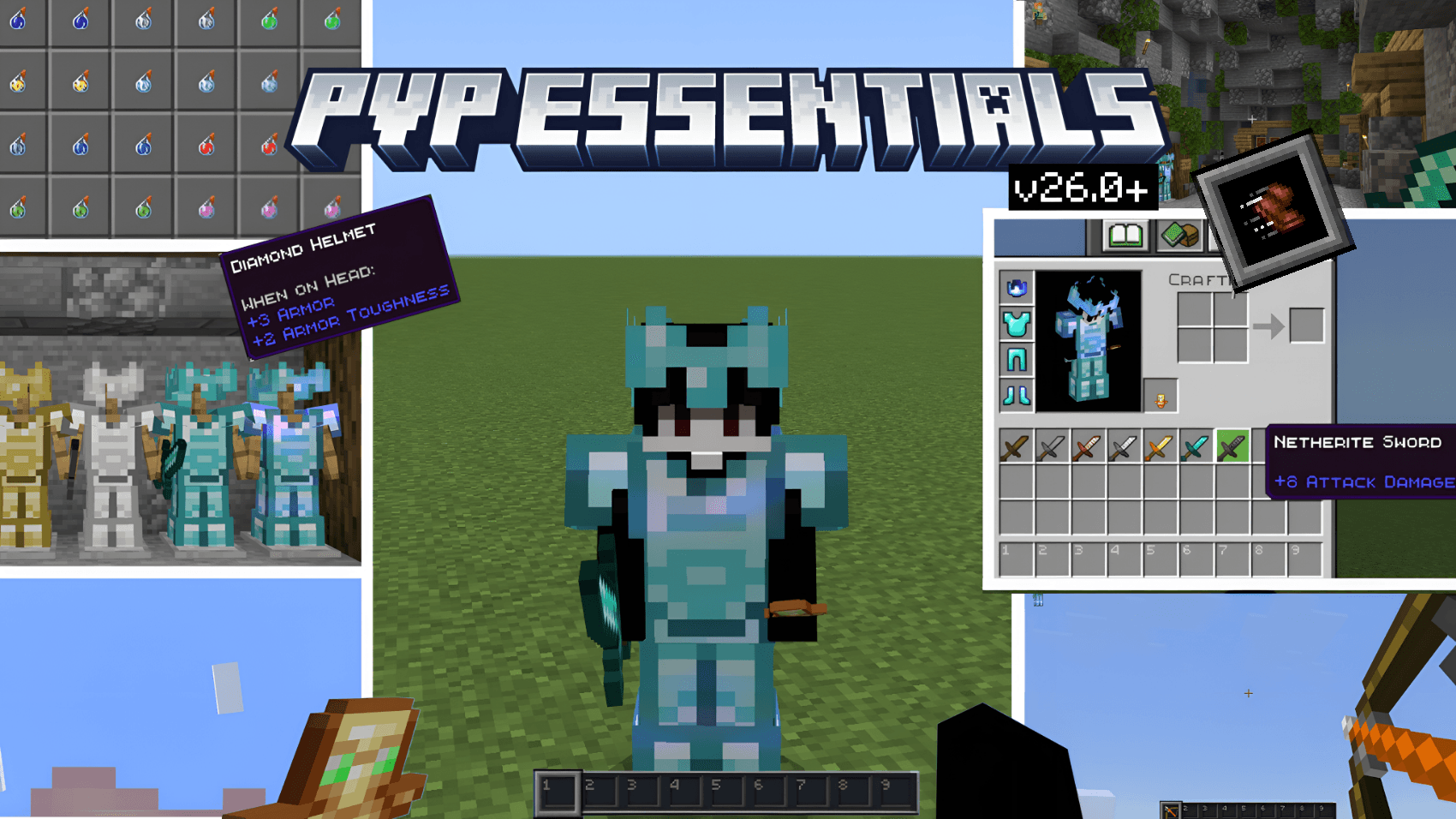
PVP Essentials
A Bedrock resource pack built for competitive players.
No fluff. No distractions. Every texture decision exists to give you an edge.
Features
- Clear Glass — Plain glass is almost entirely see-through, and all 16 stained colours are cut to roughly half opacity. Enough tint left to read the colour, not enough to hide behind.
- Ore Highlighting — High-contrast retextures for all 10 overworld and nether ores plus all 8 deepslate variants.
- Vibrant Visuals Ready — 20 PBR texture sets with metalness/emissive/roughness maps, so ores stay readable with VV switched on.
- Distinct Potions — 63 potion textures. Every drinkable and splash potion has its own readable colour.
- Minimal Fog — All 89 biomes individually remapped, plus 8 direct overrides of vanilla's own fog identifiers. Air, water and weather fog all pushed past 1000 blocks, so underwater visibility is instant. None of the 102 fog definitions carry a volumetric block, so the expensive raymarched fog under Vibrant Visuals never runs.
- Numbered Hotbar — Slot numbers on your hotbar for instant inventory reads under pressure.
- Durability Viewer — Durability on the HUD, in your inventory, in hover text, in chests and on armor. No behaviour pack needed.
- Clean Weapons & Armor — All 7 sword tiers retextured, plus both layers of all 6 armor model sets (chain, copper, iron, gold, diamond, netherite) for fast identification of what your opponent is wearing.
- Shield Rework — Custom shield geometry and a low-shield animation that keeps the shield out of your sightline while blocking. Both override the assets vanilla already loads, so no attachable setup is needed.
- Quick Craft — One-tap output collection on the crafting table, stonecutter and villager trading. All six screens covered, desktop and pocket.
- Optimized HUD — Chat, inventory and status effect icons tuned for competitive play. Help buttons removed throughout.
- 177 particle types stripped — Only the eight that carry real combat information are kept — potion swirls, splash bursts, tipped arrow trails, cauldrons, witch and evoker magic — and those are trimmed so they never bury the fight.
Subpack Options
Two crosshair modes. Tap the pack after activating and pick from the subpack list:
- Default Crosshair — vanilla crosshair
- PVP Crosshair — high-contrast crosshair, plus flattened clouds and weather textures
📥 Installation
- Download the
.mcpackfile - Open it, Minecraft imports it automatically
- Activate in Global Resources or World Settings
- Tap the pack to pick your crosshair subpack
🛠 Compatibility
- Minecraft Bedrock Edition 1.26.0+
- Android, iOS/iPadOS, Windows 10/11, Xbox, PlayStation
- Works in single-player, on servers and on Realms
- No experimental features required
Quick facts
- Edition: Minecraft Bedrock
- File type: .mcpack
- Minecraft versions listed: 26.0.02, 26.0, 26.3
- How to install: Download the .mcpack. → Open it — Minecraft imports it under Resource Packs. → Activate it in Global Resources, or for one world under Resource Packs → Available.
- Where to get it: In MCModsHub, or directly above on this page.
Install steps are the general flow for this file type — How to install Minecraft Bedrock texture packs walks through it step by step.
File checked by MCModsHub
- Pack type: .mcpack — a single pack
- Complete pack — everything it depends on is inside the file
- Download size: 466 KB
- Download link checked 25 Aug 2026 — working
These come from our own check of the pack file, not from the source page.


