Texture packsBedrock
Aetheris Visuals
Bedrock texture pack listed for Minecraft 1.21–26.x. File opened and checked on 15 Oct 2026; installs from the MC Bedrock Mods app on Android.
Aetheris sets a new bar for mobile graphics. Experience cinematic color grading, crystal-clear water, and dynamic lighting. Optimized for performance and…
I don't know my version
Open Minecraft and look at the bottom-left corner of the main screen — the version is printed there, like v1.26.30.
The game writes a 1. in front; the buttons above leave it off. v1.26.30 in the game is 26.30 here.
Aetheris: The Ultimate Atmospheric Experience
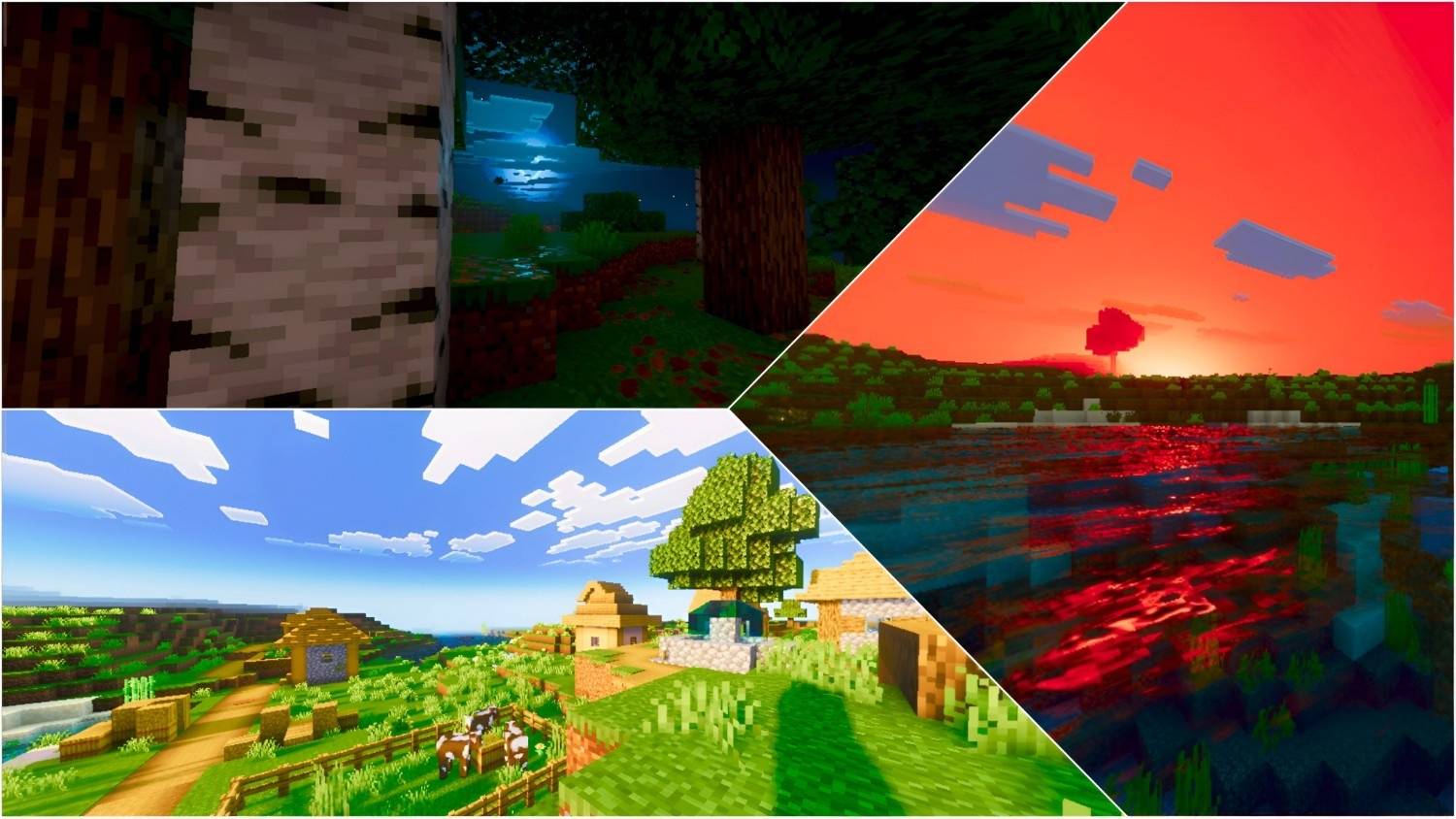
Aetheris is a high-fidelity shader designed to transform your world into a cinematic masterpiece. Built with precision, this shader focuses on professional color science, realistic atmospheric scattering, and advanced lighting techniques to ensure every frame looks like a render.
✨ Key Features:
🌅 Cinematic Color Grading:
Utilizing an optimized ACES tone-mapping operator, Aetheris delivers vibrant yet natural colors. The custom-tuned highlights and midtones provide deep contrast without losing detail.
🌤️ Advanced Atmosphere:
A fully overhauled Rayleigh and Mie scattering system. Experience deeper blue skies during the day and rich, golden-hour sunsets that feel truly immersive.
💧 Crystal-Clear Water:
Enhanced water transparency with custom particle concentrations. The wave physics have been fine-tuned for a calm, realistic flow that reflects the world beautifully.
🌙 Dynamic Night Lighting:
Nights are no longer just dark. Aetheris introduces a "silver-glow" moonlight effect with balanced ambient lighting, ensuring visibility while maintaining a moody atmosphere.
🛠️ PBR Support:
Optimized fallback settings for blocks and items, giving metallic and smooth surfaces a realistic sheen and depth.
Image Preview: 👇👇


💬 Join Our Discord Server!
● Be a part of the Aetheris journey! By joining our Discord community, you get:
● 🚀 Early Access: Get beta versions of new updates before anyone else.
● 🛠️ Support: Get help with installation or report any bugs directly.
● 📸 Showcase: Share your best Aetheris screenshots and get featured.
● 🎁 Exclusives: Exclusive sneak peeks at upcoming projects and add-ons.
[ Click Here To Join Our Discord community ]
Quick facts
- Edition: Minecraft Bedrock
- File type: .mcpack
- Minecraft versions listed: 26.20, 26.10, 26.3
- How to install: Download the .mcpack. → Open it — Minecraft imports it under Resource Packs. → Activate it in Global Resources, or for one world under Resource Packs → Available.
- Where to get it: Opens on CurseForge — not every file is mirrored on our own servers.
Install steps are the general flow for this file type — How to install Minecraft Bedrock texture packs walks through it step by step.
File checked by MCModsHub
- Save it as Aetheris Visuals [ v2.3 ].mcaddon before opening — it downloads as .mcpack, but it is a .mcaddon pack
- Manifest requires Minecraft 1.21.0 or newer
- Complete pack — everything it depends on is inside the file
- Download size: 2.8 MB
- Download link checked 5 Oct 2026 — working
These come from our own check of the pack file, not from the source page.
