Music Player UI Lite
Bedrock texture pack listed for Minecraft 26.x. File opened and checked on 11 Oct 2026; installs from the MC Bedrock Mods app on Android.
⬇ Download on CurseForge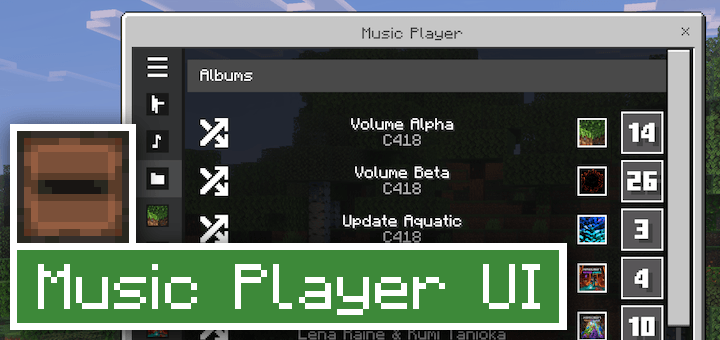
This pack allows you to play any song from Minecraft in any situation using a music player tab in the emote menu. If you enjoy certain Minecraft songs and want to be able to hear them whenever you want, this pack is for you!
Check out Music Plus for an in-depth music resource pack which includes this same music player.
Creator: AgentMindStorm, Bluesky Account, YouTube Channel
Special thanks to Snowstorm for creating the sidebar JSON UI and QuazChick for finding a stop button technique.
Translations by Netongas NG (Mexican Spanish), moi (France French), Alex PNG (German), and 世界拒绝的惜忆 (Mainland Chinese).
Music Player
Music Player UI Lite adds an in-game music player to the emote screen. This menu allows you to play any song in Minecraft with the press of a button. It works in Survival and Creative Mode on any world, even without cheats enabled.
The music player works best after muting the default game music by setting the Music slider to 0. Using the music player while the default game music is turned up could cause multiple songs to play at once.
Selecting multiple songs from the music player will cause them to play at the same time. If you select an album, the game will play one random song from that album. You can stop any song by selecting the stop button next to the individual song entry.
Music player volume is controlled by the Musical blocks audio slider.

Custom Music
Music Player UI Lite also has support for custom music added by the player with the Custom Music Container pack. Custom songs can be played from the music player. Follow the tutorial below to learn how to add custom music to Music Player UI Lite.

Make sure to apply Custom Music Container above Music Player UI Lite.
If you're downloading an update to Music Player UI Lite, do not redownload Custom Music Container. Custom Music Container will never need an update, which keeps your custom songs safe.
- Edition: Minecraft Bedrock
- File type: .mcpack
- Minecraft version listed: 26.30
- How to install: Download the .mcpack. → Open it — Minecraft imports it under Resource Packs. → Activate it in Global Resources, or for one world under Resource Packs → Available.
- Where to get it: Opens on CurseForge — not every file is mirrored on our own servers.
Install steps are the general flow for this file type — How to install Minecraft Bedrock texture packs walks through it step by step.
- Pack type: .mcpack — a single pack
- Manifest requires Minecraft 1.26.30 or newer
- Complete pack — everything it depends on is inside the file
- Download size: 505 KB
- Download link checked 5 Oct 2026 — working
These come from our own check of the pack file, not from the source page.


