Texture packsBedrock
Dynamic Crosshair
Bedrock texture pack listed for Minecraft 1.21–26.x. File opened and checked on 24 Oct 2026; installs from the MC Bedrock Mods app on Android.
I don't know my version
Open Minecraft and look at the bottom-left corner of the main screen — the version is printed there, like v1.26.30.
The game writes a 1. in front; the buttons above leave it off. v1.26.30 in the game is 26.30 here.
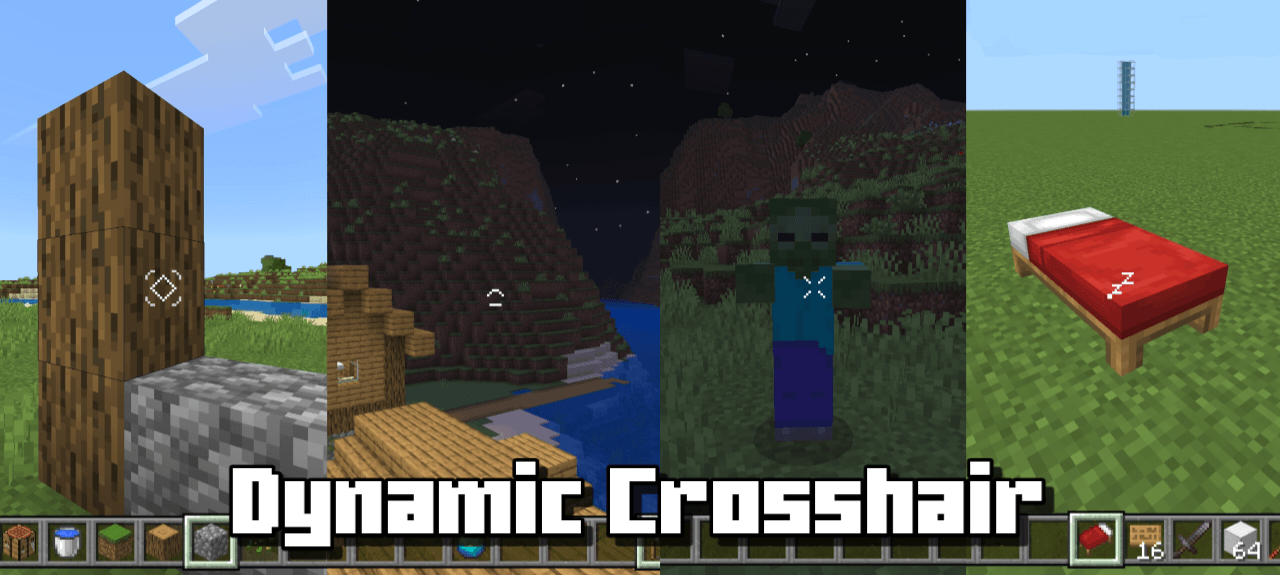
Dynamic Crosshair is a resource pack for Minecraft Bedrock to hide or change your crosshair depending on the context.
Showcase
Features
- Hides the crosshair when not looking at anything and not holding any items.
- The crosshair will change or hide depending on the context you are looking at.
- Change the crosshair style for various situations.
- highly compatible with other packs.
Reference: https://modrinth.com/mod/dynamiccrosshair
Terms Of Use:
You are ALLOWED to:
- Modify this pack only for personal uses.
- Make a review about this pack, as long as you put original download link in description (Curseforge or Mcpedl).
You are NOT ALLOWED to:
- Distribute the modified pack to public.
- Redistribute this pack to other sites (9minecraft, modbay and etc.)
- Share links that are not from original sources (Curseforge or Mcpedl).
Quick facts
- Edition: Minecraft Bedrock
- File type: .mcpack
- Minecraft versions listed: 26.30, 1.21.101, 1.21.100
- How to install: Download the .mcpack. → Open it — Minecraft imports it under Resource Packs. → Activate it in Global Resources, or for one world under Resource Packs → Available.
- Where to get it: In MCModsHub, or directly above on this page.
Install steps are the general flow for this file type — How to install Minecraft Bedrock texture packs walks through it step by step.
File checked by MCModsHub
- Pack type: .mcpack — a single pack
- Complete pack — everything it depends on is inside the file
- Download size: 44 KB
- Download link checked 25 Aug 2026 — working
These come from our own check of the pack file, not from the source page.