Colourful Containers BE: Java
Bedrock texture pack listed for Minecraft 1.21–26.x. File opened and checked on 23 Oct 2026; installs from the MC Bedrock Mods app on Android.
Say goodbye to boring inventories. Colourful Containers BE: Java gives Minecraft Bedrock vibrant, block-themed GUIs with a more accurate UI port of the…
I don't know my version
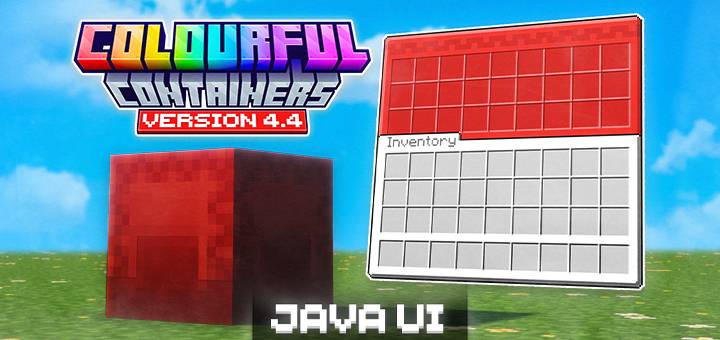



Colourful Containers BE is a resource pack ported for Minecraft Bedrock Edition that replaces the default boring, grey container GUIs with vibrant themed interfaces! Every menu gets a unique texture inspired by the block or entity it's from, making your UI feel like a natural part of the game.



Overhauled UI list:
| GUI | Extras |
|---|---|
| Anvil | |
| Barrel | |
| Beacon | |
| Blast Furnace | MIXED ONLY — Recipe Book |
| Brewing Stand | COMPAT — VDX Brewing Guide |
| Cartography Table | ANIMATED |
| Chest | |
| Chest Boats | NEW — Wood-type specific textures |
| Chest Hoppers | |
| Chest Minecarts | NEW |
| Chest Raft | NEW |
| Coloured Shulker Boxes | NEW |
| Copper Chest | NEW |
| Crafter | REACTIVE TEXTURES |
| Crafting Table | |
| Dispenser | |
| Dropper | |
| Enchanting Table | ANIMATED |
| Ender Chest | ANIMATED |
| Furnace | MIXED ONLY — Recipe Book |
| Grindstone | |
| Hopper | |
| Loom | |
| Mount UI | REVAMPED |
| Recipe Book | JAVA UI ONLY |
| Shulker Box | |
| Smithing Table | |
| Smoker | MIXED ONLY — Recipe Book |
| Stonecutter | |
| Villagers | NEW — Profession-based textures |
| Wandering Villagers |
Colourful Containers BE is avaliable in dark mode as well:
Previous Update Videos;
- v4.0~v4.3:
- v1, v2, v3;

To use the Coloured Shulker Boxes & Wood Type Chest Boats feature, you can either:
- Use the Colourful Containers BE: Script pack!
- Rename the items in an Anvil!

This texture pack is made to be used with Colourful Containers BE: Script, as it enables the automation of renaming items such as the Chest Boats or Shulker Boxes so you can use Coloured Shulker Boxes or Wood-Type Specific Chest Boat textures seamlessly!
Or
If you want to use the Anvil method, simply remove the empty space at the end of the item name!
- Colour Codes for Chest Boats and Coloured Shulkers:
-> Shulkers:
Display Prefix Color Name
Default (nothing) Purple
§f§r White
§p§r Orange
§5§r Magenta
§b§r Light Blue
§e§r Yellow
§a§r Lime
§d§r Pink
§8§r Gray
§7§r Light Gray
§3§r Cyan
§u§r Purple
§9§r Blue
§n§r Brown
§2§r Green
§c§r Red
§0§r Black
-> Chest Boats:
Display Prefix Color Name
Default (nothing) Purple
§f§r White
§p§r Orange
§5§r Magenta
§b§r Light Blue
§e§r Yellow
§a§r Lime
§d§r Pink
§8§r Gray
§7§r Light Gray
§3§r Cyan
§u§r Purple
§9§r Blue
§n§r Brown
§2§r Green
§c§r Red
§0§r Black
-> Villager Professions (Hard coded, only for info purposes):
aq Armorer
bq Butcher
cq Cartographer
dq Cleric
eq Farmer
fq Fisherman
gq Fletcher
hq Leatherworker
iq Librarian
jq Shepherd
kq Tool Smith
lq Weapon Smith
mq Stone Mason
nq Wandering Trader


Colourful Containers BE is recommended to play with the following packs:
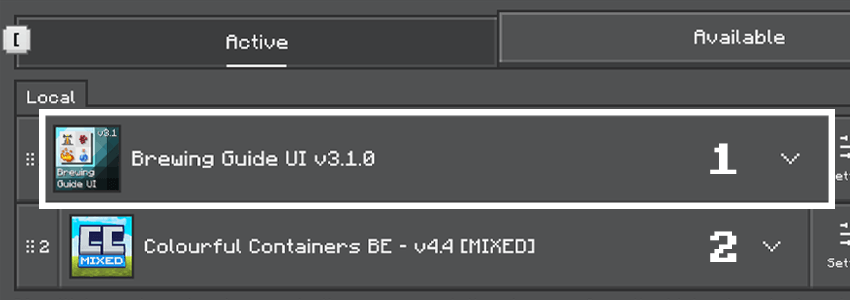
- VDX Brewing Guide UI
- Christmas Chests
- Cat Villagers (Linked in the files tab)

Credits:
Original creator of Colourful Containers:
XENO: https://www.planetminecraft.com/member/chris_xeno/
The pack's code is based off:
CrisXolt: https://www.curseforge.com/members/crisxolt/projects
Original chest boat and minecart textures:
Vi_Tul: https://www.curseforge.com/members/vi_tul/projects
Helped create the villager profession system:
Joao Pedro: https://x.com/IjoaopedroAnd
Dark mode theme based on:
Vanilla Tweaks: https://vanillatweaks.net/
Bedrock Tweaks: https://bedrocktweaks.net/

Frequently Asked Questions & Support:
Will you add compatibility for Pocket UI?
No, I'll be soley focused on the classic UI mode.
Tips if the pack is not working:
- Make sure you have your 'gui' settings to 'classic' (NOT 'POCKET')
- If dark mode is not working. Try restarting your game after activating the subpack!

Term of Use:
You may:
- Use the pack in your own worlds and servers,
- Showcase the pack in videos as long as you credit me, Xeno and CrisXolt with the link to this page,
- Edit the pack for private use.
You cannot:
- Share the pack with your own download links,
- Edit the pack and say it's your own,
- Sharing the edited pack without permission.
- Edition: Minecraft Bedrock
- File type: .mcpack
- Minecraft versions listed: 26.20, 1.21.120, 1.21.122
- How to install: Download the .mcpack. → Open it — Minecraft imports it under Resource Packs. → Activate it in Global Resources, or for one world under Resource Packs → Available.
- Where to get it: In MCModsHub, or directly above on this page.
Install steps are the general flow for this file type — How to install Minecraft Bedrock texture packs walks through it step by step.
- Pack type: .mcpack — a single pack
- Complete pack — everything it depends on is inside the file
- Download size: 5.0 MB
- Download link checked 3 Aug 2026 — working
These come from our own check of the pack file, not from the source page.