
Newb Glow Legacy | Now compatible with 26.50+
Bedrock texture pack listed for Minecraft 26.x. File opened and checked on 22 Oct 2026; installs from the MC Bedrock Mods app on Android.
I don't know my version
Version 14 for Android, IOs and Windows supports versions 26.50+
This shader pack only works with the specific version of Minecraft and its corresponding loader and installation method.
This shader only provides the glow feature on blocks and minerals.
This pack doesn't add much more due to its minimalist approach and you won't find any spectacular shadow effects.
The tool links are marked in colored text: red means it doesn't work, and green means it does.
some photos
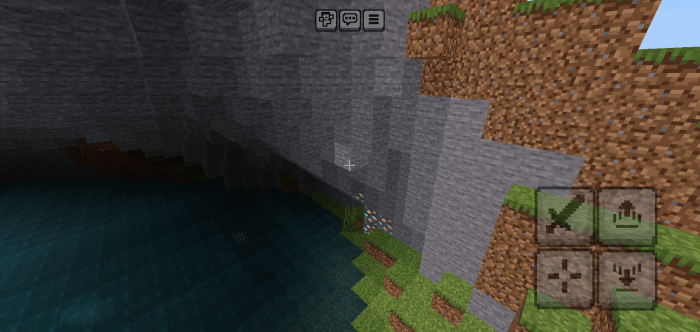
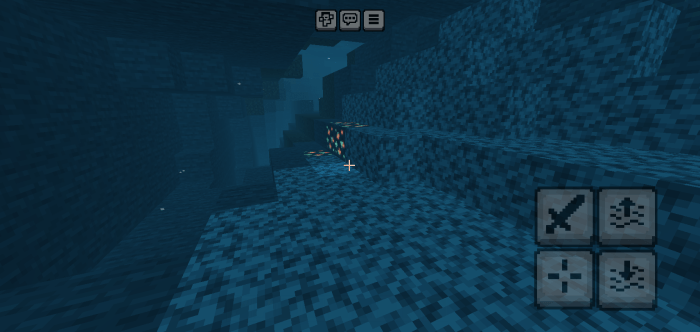
This variant makes unique use of one of the newb's features.
Worked to make the least use of resources this shader will only have the characteristic of the bright ores.
Frequently Asked Questions
Can I use Newb Glow on my server?
Yes.
Can I use Newb Glow in my videos/streams?
Yes. The link should redirect to this post.
Can I put newb glow in my addondpack?
Yes.
Textures compatible with Newb Glow
Barebone.

Easyblock.

Dandelion X

Faithful 32

Faithful 64

Pixel perfection legacy bedrock

Multipixel

John Smith Legacy and John Smith Legacy Jim Stone Craft(in the next update)
Credits
Ale Graphics. (for the help in the discord)
Deven (creator Newb Shader).
installation guide
On Android
- MB Loader and a copy or original of the game on your phone. this is needed to support RenderDragon shaders.
How to use MB Loader
- Search for MB Loader on the Play Store.
- Install MB Loader.
- Open MB loader.
- Grant the required permissions.
- Import the package using MB loader.
- Launch Minecraft from the MB loader.
- Enable the shader in the global resource packs (never in the world packs).
- Play.
On Windows
formerly it was used BetterRenderDragon and the matject tool on Windows, but due to constant changes in the file code, these methods stop working; now I present a new tool for loading shaders on Windows. Wyvern is a new shader loader made by mcbegamer in collaboration with loddingglue for windows, it works in a near non version dependent way that allows it to work on more minecraft versions without updates, keep in mind you need to add your shaders into global resource packs or else it wont work, it also contains a simple gui so you can inject the loader into minecraft windows.
How to use wyvern
- Install
- Open Minecraft
- Run Wyvern
- Apply GR shader (Global Resources)
- Play
On iOS
- Need IPA File in iOS.
- rename .mcpack file to .zip
- extract the contents of the renderer folder
- Make a copy of the 'renderer' folder from the Minecraft IPA.
- Place the shader's `renderer` folder into the Minecraft IPA.
- install the modified IPA
- export the texture and place it in the RG
- play
- If you want to revert the changes made before the shader step, place the renderer folder from the backup into the modified IPA.
my social media
My Discord
List of important changes
Compatibility update with 26.30+
- Edition: Minecraft Bedrock
- File type: .mcpack
- Minecraft versions listed: 26.50, 26.30
- How to install: Download the .mcpack. → Open it — Minecraft imports it under Resource Packs. → Activate it in Global Resources, or for one world under Resource Packs → Available.
- Where to get it: In MCModsHub, or directly above on this page.
Install steps are the general flow for this file type — How to install Minecraft Bedrock texture packs walks through it step by step.
- Pack type: .mcpack — a single pack
- Complete pack — everything it depends on is inside the file
- Download size: 5.2 MB
- Download link checked 3 Aug 2026 — working
These come from our own check of the pack file, not from the source page.
