
GUI Retextures BE
Bedrock texture pack listed for Minecraft 1.18–1.21. File opened and checked on 30 Oct 2026; installs from the MC Bedrock Mods app on Android.
Makes GUI and HUD fancier with dark mode included. This is an unofficial «GUI Retextures» port, originally made by frugbug for Java.
⬇ Download
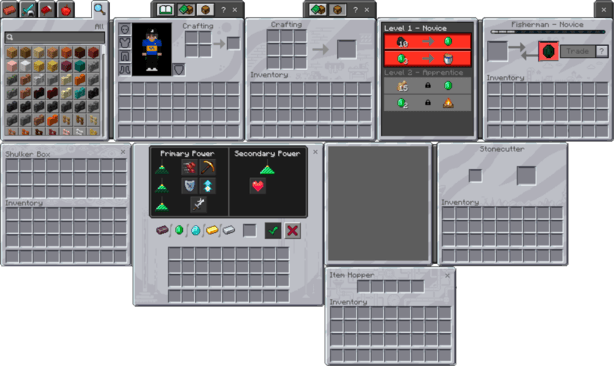
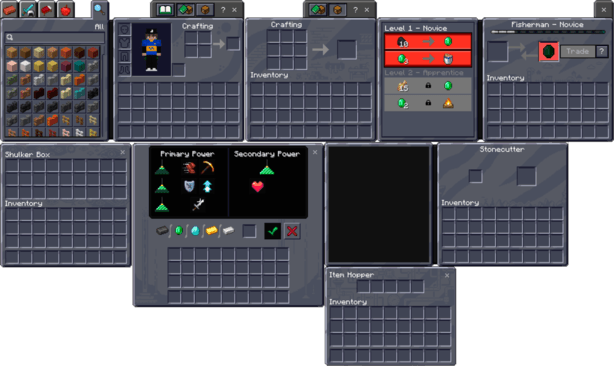
This is a small pack made to make Minecraft's GUIs and some UI elements look a bit more vibrant and interesting. Includes Dark Mode.
Requires at least version 1.18. You MUST use Classic UI if you want to see all the custom GUIs.
Modified textures and GUIs:
Modified textures and GUIs with Dark Mode:
Assets originally made by frugbug for Java. Ported by me.
- Edition: Minecraft Bedrock
- File type: .mcpack
- Minecraft versions listed: 1.18, 1.19, 1.20
- How to install: Download the .mcpack. → Open it — Minecraft imports it under Resource Packs. → Activate it in Global Resources, or for one world under Resource Packs → Available.
- Where to get it: In MCModsHub, or directly above on this page.
Install steps are the general flow for this file type — How to install Minecraft Bedrock texture packs walks through it step by step.
- Pack type: .mcpack — a single pack
- Complete pack — everything it depends on is inside the file
- Download size: 324 KB
- Download link checked 25 Aug 2026 — working
These come from our own check of the pack file, not from the source page.