
Java Subtitles animations
Bedrock texture pack listed for Minecraft 1.21. File opened and checked on 19 Sep 2026; installs from the MC Bedrock Mods app on Android.
This Java Subtitles texture pack changes the appearance of Minecraft 26.0.25 from the usual to look like Java and adds animation when it appears.
⬇ Download on CurseForge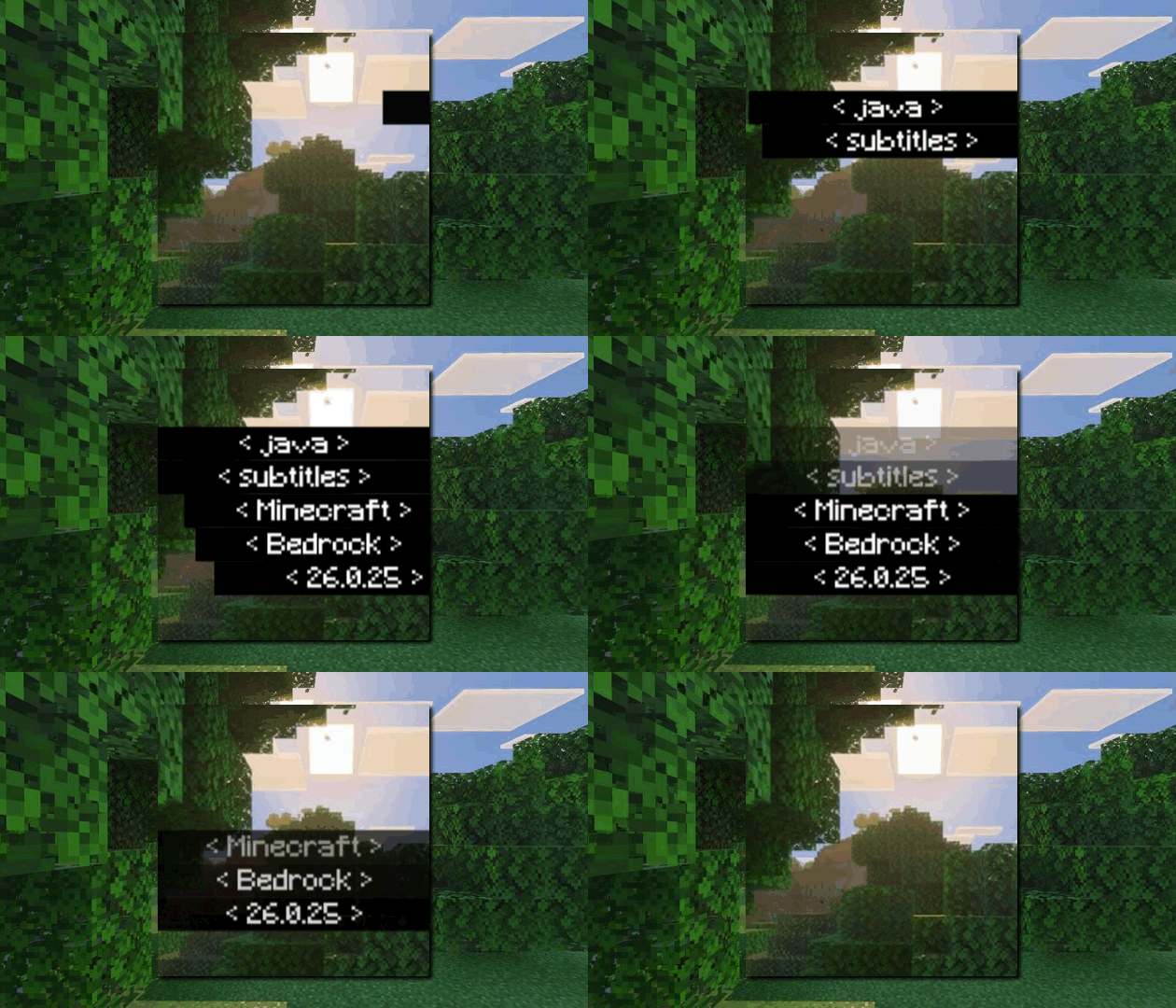

Java-Style Subtitles this texture pack repositions the Closed Caption feature recently added in Minecraft Preview 26.0.5 and moves it to the bottom left corner, similar to Minecraft Java.
This resource pack brings the Minecraft Java Edition subtitle style to Minecraft Bedrock Edition.
From the bottom-right position, text style, to the subtitle appearance animation, everything is designed to be as close as possible to the Java version.
With this pack, subtitles no longer appear stiff on the middle-right of the screen. Instead, they look cleaner, more modern, and more comfortable to use during gameplay.
✨ Perfect for players who want:
A Bedrock experience closer to Java Edition
A cleaner and more professional UI
Informative subtitles without blocking gameplay
📖 Features Explanation
🔹 Java-Style Subtitle Position
Subtitles are moved from the middle-right of the screen to the bottom-right corner, preventing them from covering gameplay and making them feel more natural—just like in Minecraft Java Edition.
🔹 Smooth Subtitle Animation
Each subtitle appears smoothly, rather than popping in instantly. This adds a modern and polished feel to the UI.
🔹 Comfortable & Informative
Subtitles remain easy to read and help players detect sound directions (such as footsteps, explosions, or mob sounds) without distracting from gameplay.
⚠️ Notes
This resource pack only changes the subtitle UI appearance and does not add new gameplay features.
Compatible with Minecraft Bedrock Update 26.0.25+.
Make sure Subtitles are enabled in the sound settings for the best experience.
- Edition: Minecraft Bedrock
- File type: .mcpack
- Minecraft version listed: 1.21.130
- How to install: Download the .mcpack. → Open it — Minecraft imports it under Resource Packs. → Activate it in Global Resources, or for one world under Resource Packs → Available.
- Where to get it: Opens on CurseForge — not every file is mirrored on our own servers.
Install steps are the general flow for this file type — How to install Minecraft Bedrock texture packs walks through it step by step.
- Pack type: .mcpack — a single pack
- Manifest requires Minecraft 1.21.110 or newer
- Complete pack — everything it depends on is inside the file
- Download size: 112 KB
- Download link checked 26 Oct 2026 — working
These come from our own check of the pack file, not from the source page.