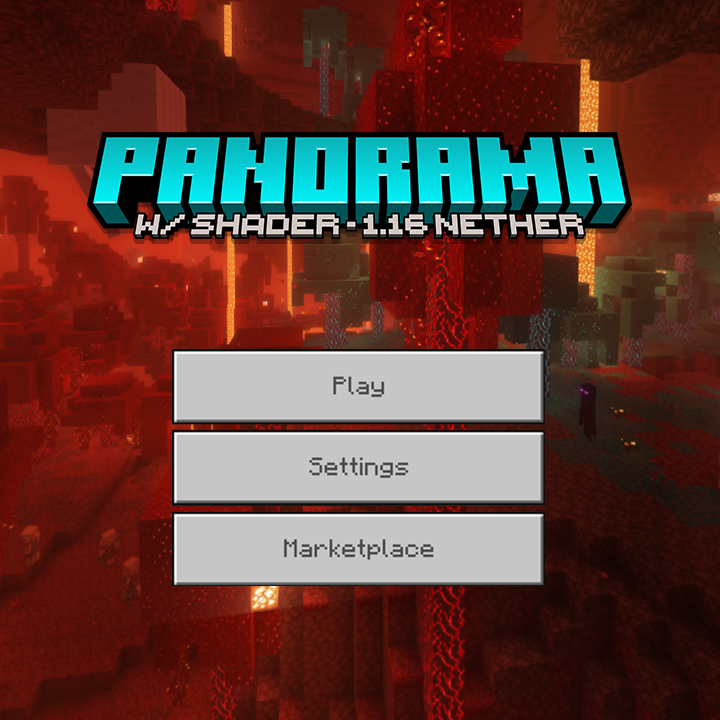

1.16 Nether Update Panorama with Shader - Bedrock Edition
📃 Description
This pack makes the default Minecraft 1.16 Nether Update panorama look nicer by applying shaders! This is taken in the same world as the original panorama.

🔴 Note
This is not a shader and does not include one; this is a resource pack to just change the panorama/background to those shown in the screenshots.
This pack should work on almost any version of Minecraft; you can ignore warnings. If your Minecraft version is too old, you might have to edit the manifest.json file of this pack.
ℹ️ Credits & Info
![]()
Complementary Reimagined - Shader used to take this panorama
Website • Github • Curseforge
![]()
MinecraftAtHome - found the panorama seed
Website • YouTube • Panorama seed
⚠️ Reupload Warning
My packs are only available on Curseforge and MCPEDL. A lot of people are stealing my packs, so don't download from any other websites. Here is a list of websites that you should avoid, I even found malware once while testing on them. If you see someone coping this texture pack or giving direct download link to the file instead of MCPEDL, please report them at giptala6@gmail.com
❔ Help
Here’s a guide if you need help installing: https://adib3700.notion.site/ThreeSeven0Zero-Minecraft-Resource-Pack-Installation-tutorial-1ac9ff516372807ca61cf8ad8afd5339
giptala6@gmail.com - If you need any help, you can email me (say that you need help with 1.16 Shader Panorama for Bedrock)
☕ Java
This is for Minecraft Bedrock edition; Java version soon.
Also known as the 1.16 shader panorama, 1.16 Panorama with shaders or Nether Update shader panorama
- Edition: Minecraft Bedrock
- File type: .mcpack
- Minecraft versions listed: 1.20.40, 1.21.30, 1.21.50
- How to install: Download the .mcpack. → Open it — Minecraft imports it under Resource Packs. → Activate it in Global Resources, or for one world under Resource Packs → Available.
- Where to get it: Opens on CurseForge — not every file is mirrored on our own servers.
Install steps are the general flow for this file type — How to install Minecraft Bedrock texture packs walks through it step by step.
- Pack type: .mcpack — a single pack
- Manifest requires Minecraft 1.19.0 or newer
- Complete pack — everything it depends on is inside the file
- Download size: 7.6 MB
- Download link checked 25 Aug 2026 — working
These come from our own check of the pack file, not from the source page.


