
New Armor Stand Revamped
Bedrock texture pack listed for Minecraft 1.21. File opened and checked on 24 Sep 2026; installs from the MC Bedrock Mods app on Android.
New BETTER armor stands! with different nametag textures featuring Default, YouTuber and Player Submitted Skins!
I don't know my version


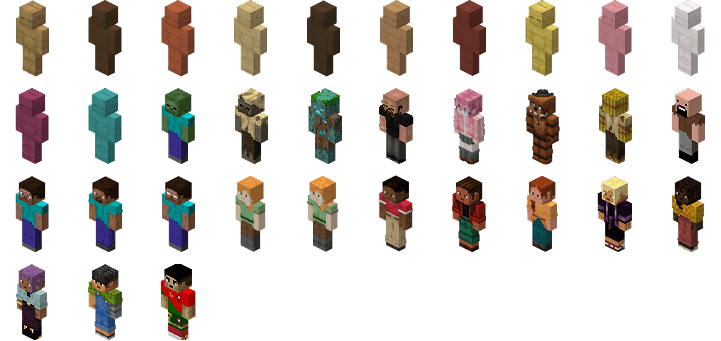
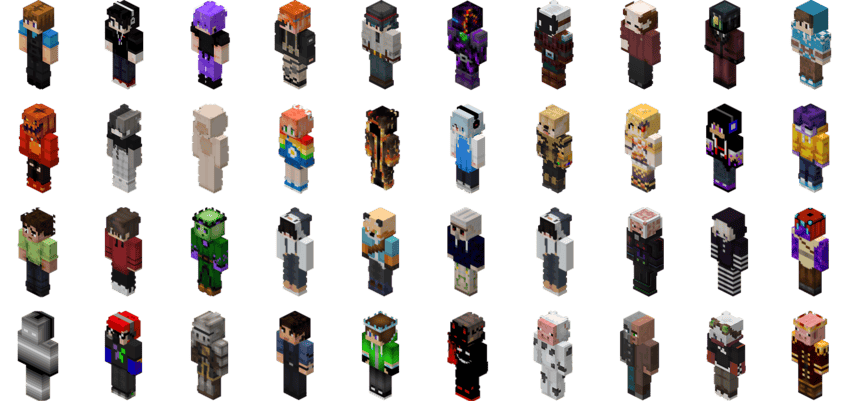
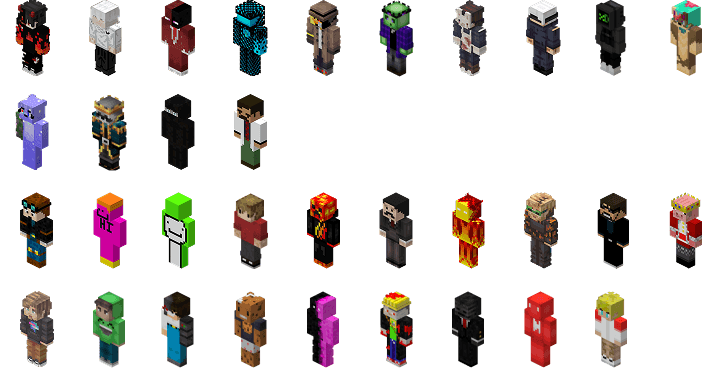
Upgrade your boring skinny armor stand to a player model armor stand with different textures!. This pack is based on Java Edition's "New Armor Stand" by moro2610 and was ported by me to Bedrock.
NAMETAGS:
Oak Texture as Default Texture
"Birch", "Spruce", "Dark Oak", "Jungle", "Acacia", "Warped", "Crimson", "Mangrove", "Cherry", "Bamboo", "Pale Oak"
Male
"New Steve", "Kai", "Noor", "Sunny", "Zuri"
Female
"New Alex", "Ari", "Efe", "Makena"
"Mr Beast", "Technoblade", "Dream", "Grian", "Mumbo Jumbo", "Wattles", "Phoenix SC", "Pewdiepie", 'Camman18', 'Camman18YT', 'DanTDM', 'Dantdm', 'Jelly', 'Prestonplayz', 'Ssundee', 'Bionic', 'aCookiegod', 'DaquavisMC', 'GrayStillSlays', 'Grox', 'Skip the Tutorial', 'TommyInnit'
"Herobrine", "Steve", "Alex", "Notch", "Dummy", "Drowned", "Husk", "Zombie", "Freddy Fazbear", "Hitori Bocchi", "Andrew Tate", 'Cristiano Ronaldo'
Join my Discord Server if you want yours to be added in the next update
"Yoshiro", "Ghost", "Drake027", "Sheep", "Fluffball", "MakoQuest940", "AyanoCraft", "DEDEImc64", "pillagerzane", "StylaxGaming793", "OBSIDILITH_123", "DDR4", "Deita", "Dista", "Titi", "Zaczin", "UncleJeff10", "Wizard Craft Tamil", "Yozora Mel", "Mnidanishcraft", "Sawr", "Adeybo", "Slimeking280", "ktnabil55", "Dani52", "TyingPlum345", "ktnabil552", "BigBrainPlays207", "Puppet5285", "anon", "K4N3K1", "The Blue Phoenix", "megalodon700", "Batman", "Creed401", "xTiXeRx22", "Jpam1051", "villadicator", "melloluis1018", "ShinBane", "JuanLucass1407", "Theken95", "DemonKnight0304", "4intGoddune", "Milka901YT", "Slimeking1000", "Yuuwop", "Satoru Gojo", 'daisy', 'Dally_Apple', 'racoonYT', 'Ramjielhunter', 'Switchgelb'


For the original Java Version:
New Armor Stand | moro2610's Profile
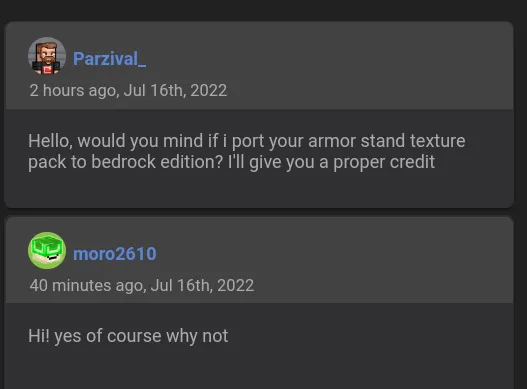
Owner's Permission:
- Edition: Minecraft Bedrock
- File type: .mcpack
- Minecraft versions listed: 1.21.130, 1.21.131, 1.21.132
- How to install: Download the .mcpack. → Open it — Minecraft imports it under Resource Packs. → Activate it in Global Resources, or for one world under Resource Packs → Available.
- Where to get it: In MCModsHub, or directly above on this page.
Install steps are the general flow for this file type — How to install Minecraft Bedrock texture packs walks through it step by step.
- Pack type: .mcpack — a single pack
- Complete pack — everything it depends on is inside the file
- Download size: 707 KB
- Download link checked 15 Sept 2026 — working
These come from our own check of the pack file, not from the source page.