Texture packsBedrock
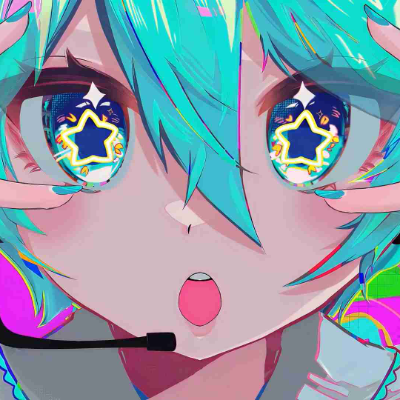
Animated Menu: Hatsune Miku Star Eyes
Light up your game with "Hatsune Miku Star Eyes!" Replace the boring panorama with a vibrant, neon animated background of the iconic virtual idol…
⬇ Download on CurseForge
Animated Menu: Hatsune Miku Star Eyes
Step into the spotlight with the Hatsune Miku Star Eyes resource pack. Bring the world's most famous virtual idol and her electrifying energy to your Minecraft main menu.
Key Features:
- Vibrant Neon Animation: Replaces the boring default panorama with a high-energy animated scene featuring Miku’s iconic star-shaped eyes and neon glitched aesthetic.
- Cyber-Pop UI: A clean, modern, and colorful user interface that perfectly matches the futuristic and musical vibe of Vocaloid.
- Ultra-Smooth Visuals: Highly optimized animations and bright particle effects designed to give your game a premium, concert-like feel.
Turn up the volume and let Miku take over your start screen!
Quick facts
- Edition: Minecraft Bedrock
- File type: .mcpack
- Minecraft version listed: 26.10
- How to install: Download the .mcpack. → Open it — Minecraft imports it under Resource Packs. → Activate it in Global Resources, or for one world under Resource Packs → Available.
- Where to get it: Opens on CurseForge — not every file is mirrored on our own servers.
Install steps are the general flow for this file type — How to install Minecraft Bedrock texture packs walks through it step by step.
Verified by MCModsHub
- Pack type: .mcpack — a single pack
- Manifest requires Minecraft 1.21.0 or newer
- Complete pack — everything it depends on is inside the file
- Download size: 4.4 MB
- Download link checked 25 Aug 2026 — working
These come from our own check of the pack file, not from the source page.