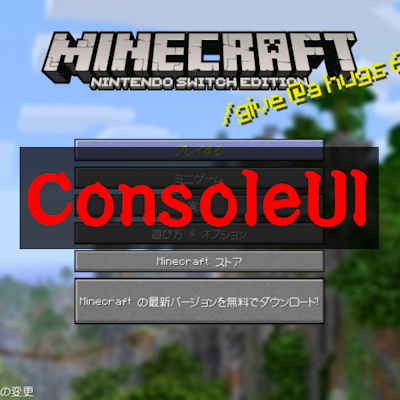

Minecraft Wii U Edition-style UI!
Have you ever played Minecraft Console Edition?
This resource pack changes the appearance of Minecraft Bedrock Edition to resemble the look of Console Edition (Wii U, PS3, PS4, Xbox 360, Xbox One)!
Before using! Settings you should change!
When using this resource pack, please lower the GUI zoom adjustment!
If the GUI is too large, parts of the screen may be cut off, or text may overlap!
Compatible Screens
This resource pack gives the following screens a look similar to the console edition!
Start Screen

World Screen (※)

Create new world Screen (※)

Progress Screen

HUD

Inventory

Dimension Loading Screen

Pause Screen

To display screens marked with (※), ForseCloseOreUI is required!
ForseCloseOreUI is an external tool! Use at your own risk!
https://github.com/QYCottage/ForceCloseOreUI/releases
Others
- Items renamed on the Anvil will now appear orange!
- The hint text displayed when loading worlds will be the same as on Wii U! (English and Japanese only)
- Damage sounds, fall damage sounds, skeleton damage sounds, and Anvil usage sounds will now have a console-style feel!
Console-style gamma
You can turn on console-style gamma from this resource pack's settings screen!


Turning "コンソール風ガンマ" ON makes the entire screen appear whitish!
This is merely a reproduction, so it may differ from the actual display!
- Edition: Minecraft Bedrock
- File type: .mcpack
- Minecraft version listed: 1.21.130
- How to install: Download the .mcpack. → Open it — Minecraft imports it under Resource Packs. → Activate it in Global Resources, or for one world under Resource Packs → Available.
- Where to get it: Opens on CurseForge — not every file is mirrored on our own servers.
Install steps are the general flow for this file type — How to install Minecraft Bedrock texture packs walks through it step by step.
- Pack type: .mcpack — a single pack
- Manifest requires Minecraft 1.13.0 or newer
- Complete pack — everything it depends on is inside the file
- Download size: 1.4 MB
- Download link checked 25 Aug 2026 — working
These come from our own check of the pack file, not from the source page.