
Simplified Shield
Bedrock texture pack listed for Minecraft 1.21–26.x. File opened and checked on 8 Oct 2026; installs from the MC Bedrock Mods app on Android.
I don't know my version


WHAT IS SIMPLIFIED SHIELD?
Simplified Shield is a minimalist shield Resource Pack for Minecraft Bedrock Edition. It replaces the default shield model with a more compact and clean design, while providing multiple shield shapes and outline effect options.
LATEST UPDATE CHANGELOG :

- Added 4 new shield models: Rectangle, Rounded, Wakel, and Kite
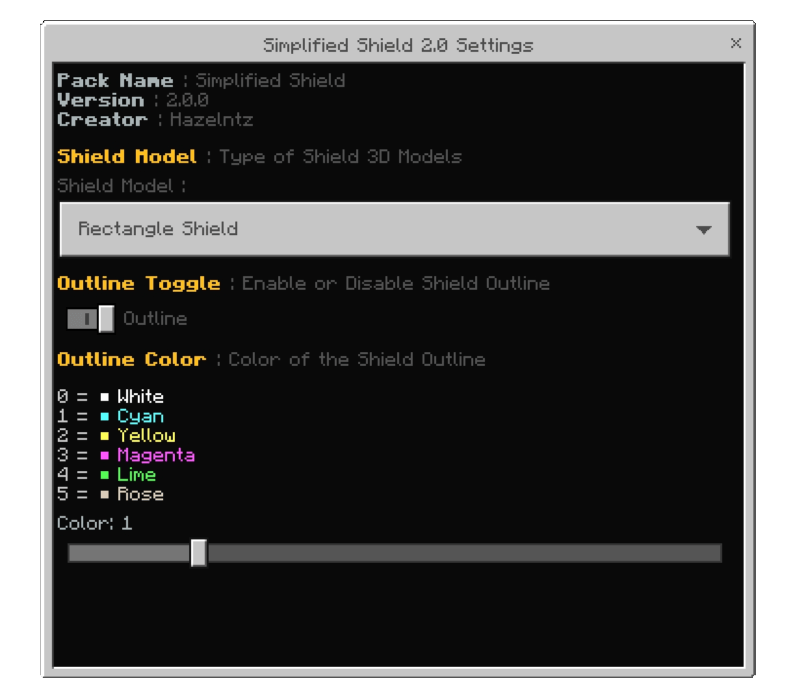
- Added 5 outline effects: White, Cyan, Yellow, Magenta, and Rose
- Shield Model, Outline, and Outline Color can be changed through Pack Settings
FEATURES :
- Compact and minimalist shield models
- Can be combined with other texture packs. Simply place Simplified Shield above your favorite texture pack in the Resource Pack list
- Compatible with Actions & Stuff animations
- Multiple shield models and outline customization options
Below here are a few examples using texture packs I personally use. And yes — it also works with other texture packs you have! : (Check on "Gallery" tab if you're on Curseforge)
FOLLOW US :
- Join Discord : https://discord.gg/7QM47sgdHV
- Youtube 1 : https://youtube.com/@iamhazel_?si=42vKN2vEMl-Ho3C9
- Youtube 2 : https://youtube.com/@hazelismproduction?si=eS1zV-cTQV7q4Tia
THANKS FOR DOWNLOADING
- Edition: Minecraft Bedrock
- File type: .mcpack
- Minecraft versions listed: 26.0.02, 26.0, 26.3
- How to install: Download the .mcpack. → Open it — Minecraft imports it under Resource Packs. → Activate it in Global Resources, or for one world under Resource Packs → Available.
- Where to get it: In MCModsHub, or directly above on this page.
Install steps are the general flow for this file type — How to install Minecraft Bedrock texture packs walks through it step by step.
- Pack type: .mcpack — a single pack
- Complete pack — everything it depends on is inside the file
- Download size: 286 KB
- Download link checked 5 Oct 2026 — working
These come from our own check of the pack file, not from the source page.