Classic Foods
Bedrock texture pack listed for Minecraft 1.21–26.x. File opened and checked on 9 Oct 2026; installs from the MC Bedrock Mods app on Android.
I don't know my version
Classic Foods - The Legacy Collection
Ever feel like the new food textures lost that original Minecraft charm?
Classic Foods is a lightweight resource pack for Bedrock Edition (MCPE) that brings back the iconic, high-contrast food sprites from the early days of Minecraft. This pack replaces the modern, blended textures with the sharp, vibrant designs that veterans know and love.
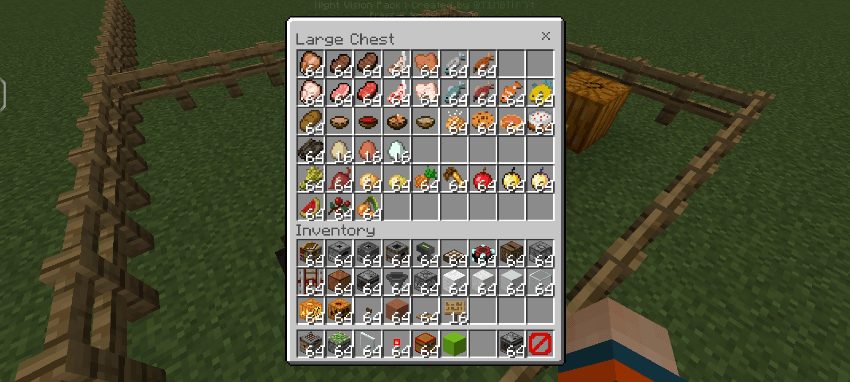
🍎 Features:
-
Original Sprites: Restores all food items (Golden Apples, Steaks, Breads, Melons, etc.) to their pre-v1.14 legacy look.
-
Better Visibility: The classic designs feature sharper edges and higher saturation, making them easier to identify in your hotbar during PvP or survival.
-
Zero Lag: Optimized specifically for Bedrock/Mobile. It’s a very small file size and won't affect your FPS.
-
Clean UI: Perfectly fits with other "Classic" or "Faithful" texture packs.
🛠 How to Use:
-
Download the
.mcpackfile. -
Open it to import it into Minecraft.
-
Go to Settings > Global Resources.
-
Activate "Classic Foods" and make sure it is at the top of your active packs list.
- Edition: Minecraft Bedrock
- File type: .mcpack
- Minecraft versions listed: 1.21.30, 1.21.50, 1.21.2
- How to install: Download the .mcpack. → Open it — Minecraft imports it under Resource Packs. → Activate it in Global Resources, or for one world under Resource Packs → Available.
- Where to get it: Opens on CurseForge — not every file is mirrored on our own servers.
Install steps are the general flow for this file type — How to install Minecraft Bedrock texture packs walks through it step by step.
- Save it as Classic Foods v2.mcaddon before opening — it downloads as .mcpack, but it is a .mcaddon pack
- Manifest requires Minecraft 1.21.0 or newer
- Complete pack — everything it depends on is inside the file
- Download size: 124 KB
- Download link checked 6 Oct 2026 — working
These come from our own check of the pack file, not from the source page.