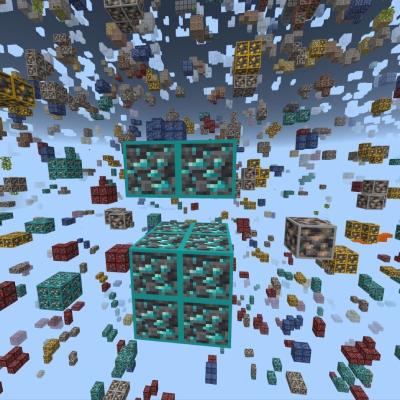


So, you probably know other textures for x-ray, but this is different, you can see the grass and dirt, gravel (so you can see where the gravel is to keep it from falling on your head). Lava is visible, so in nether you will see where is the lava and, you will see all ores. Blocks that are invisible are netherrack, stone, tuff, deepslate, andresite, granite, soul sand, soul soil, blackstone etc. You can find geodes with amethysts because they aren't invisible. And, if you turn on vibrant visuals, you will see an glowing effect to ores. So... Have fun, and don't use them in public servers, you can be banned if you use x-ray on public servers!
REMEMBER: TO BE ABLE TO SEE ORES, GET AN NIGHT VISION PACK OR SOMEONE POTION AND TURN OFF SMOOTH LIGHTING AND BEAUTIFUL SKIES, I TESTED THE PACK ON LATEST VERSION (1.21.132) WITH THESE SETTINGS OFF AND IT WORKED. 
- Edition: Minecraft Bedrock
- File type: .mcpack
- Minecraft versions listed: 1.21.30, 1.21.50, 1.21.81
- How to install: Download the .mcpack. → Open it — Minecraft imports it under Resource Packs. → Activate it in Global Resources, or for one world under Resource Packs → Available.
- Where to get it: Opens on CurseForge — not every file is mirrored on our own servers.
Install steps are the general flow for this file type — How to install Minecraft Bedrock texture packs walks through it step by step.
- Save it as X-Ray.mcaddon before opening — it downloads as .mcpack, but it is a .mcaddon pack
- Manifest requires Minecraft 1.21.0 or newer
- Complete pack — everything it depends on is inside the file
- Download size: 65 KB
- Download link checked 25 Aug 2026 — working
These come from our own check of the pack file, not from the source page.