Mob Effects Display
Bedrock texture pack listed for Minecraft 1.21–26.x. File opened and checked on 23 Oct 2026; installs from the MC Bedrock Mods app on Android.
⬇ Download on CurseForge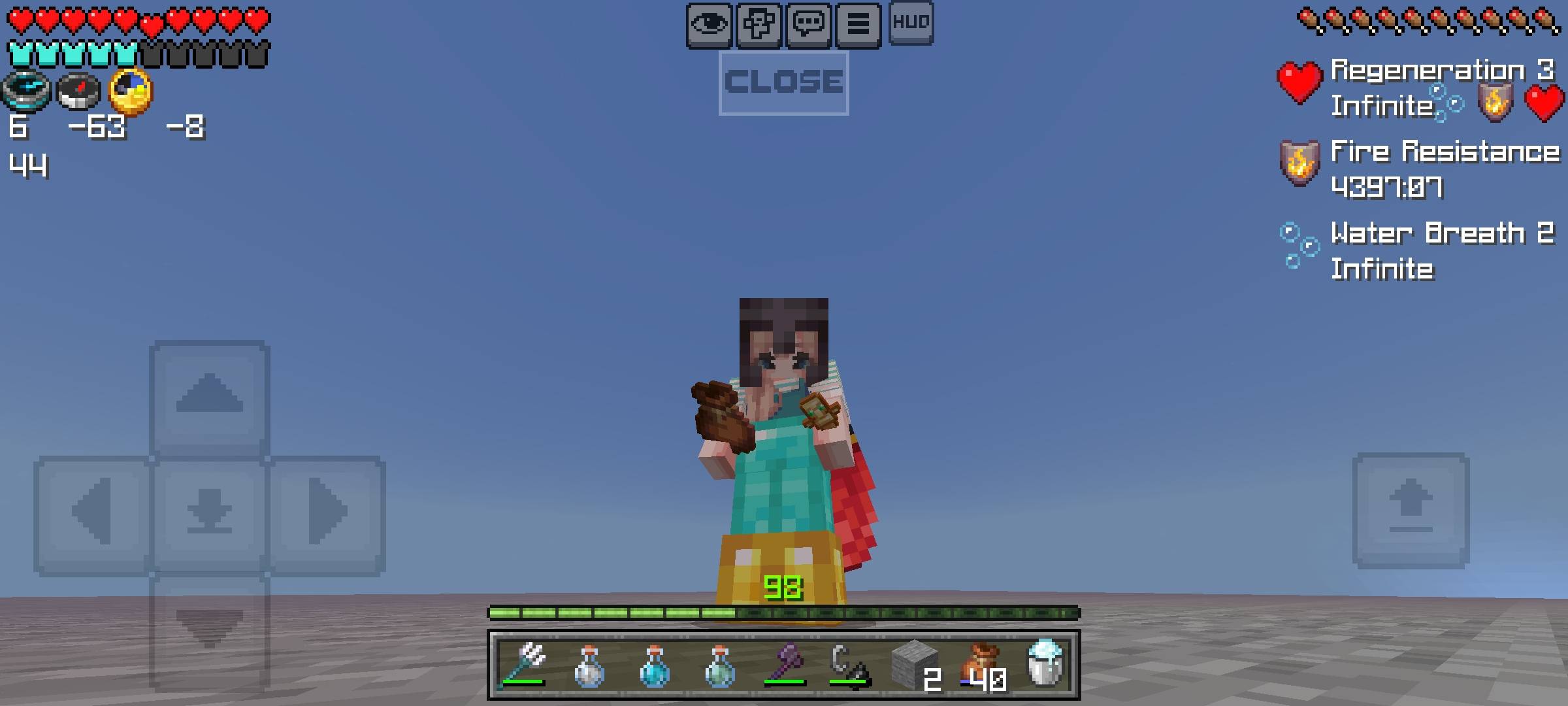
NOTE : PLEASE EDIT THE ELEMENTS OF PACK USING THE GLOBAL VARIABLES FILE IN UI FOLDER OF PACK. You Can Adjust The Anchors Offsets And Visibility Of Button Too From There.
What Is Mob Effects Display :
This Pack Adds A Stats Of Potion Like Time Left, Effect Name And It's Icon On Your HUD.
This Allows Easy Tracking Of Your Effects Which Benefits In PvP And Normal Gameplay.
You Can Now Adjust Elements Like Offset Anchors Through Global Variables.
How To Use :
Mobile : Tap The Mob Effects Icon On HUD To Open The Display (The Display Will Keep Opening When Tapped Multiple Times Which May Take You Time To Close). Closing The Screen : To Close Simply Tap The Close Button Visible On Screen As In The Image. YOU CAN ADJUST IT'S PROPERTIES FROM GLOBAL VARIABLES FILE IN UI FOLDER.
PC : Tap The Z Key To Open And Tap Again To Close Screen. In The Global Variable File Added Condition Variable When 'true' The Icons Of Effects On HUD Screen Will Not Render But Can Still Be Opened.Only For PC Not Pocket.
Console : You Can Assign Any Button To Do It Which Will Open And Close The Screen.
What You Can Do :
Share The Pack With Original Files And Download Link Of Curseforge.
You Are Allowed To Modify The Pack For Your Personal Use.
Share Modified Version With Download Link And Credits.
What You Can't Do :
Share Pack Without Link Or Credits.
Claiming My Codes As Your Own.
Not Providing Original Download Link.
Enjoy :)
- Edition: Minecraft Bedrock
- File type: .mcpack
- Minecraft versions listed: 1.21.132, 26.0.02, 26.0
- How to install: Download the .mcpack. → Open it — Minecraft imports it under Resource Packs. → Activate it in Global Resources, or for one world under Resource Packs → Available.
- Where to get it: Opens on CurseForge — not every file is mirrored on our own servers.
Install steps are the general flow for this file type — How to install Minecraft Bedrock texture packs walks through it step by step.
- Save it as Mob Effects Display.mcaddon before opening — it downloads as .mcpack, but it is a .mcaddon pack
- Manifest requires Minecraft 1.26.0 or newer
- Complete pack — everything it depends on is inside the file
- Download size: 11 KB
- Download link checked 24 Oct 2026 — working
These come from our own check of the pack file, not from the source page.