Pause Menu Fixer
Bedrock texture pack listed for Minecraft 1.20–1.21. File opened and checked on 28 Sep 2026; installs from the MC Bedrock Mods app on Android.
⬇ Download on CurseForge
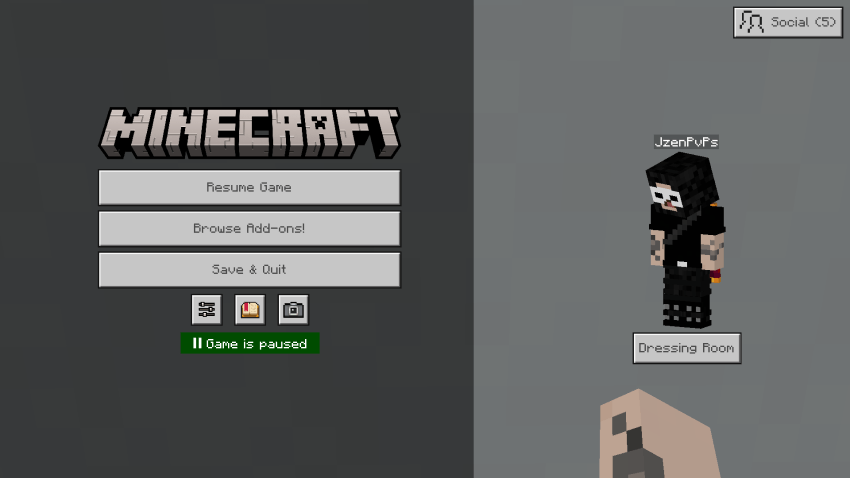
In 1.21.120, Minecraft introduced an update to the user interface of the in-game pause screen, which made the settings button smaller and removed immediate access to viewing the players in your world/server or inviting players to your world/server.
In addition to this, the marketplace button is now located where the settings button used to be, which is causing many players to accidentally open the marketplace menu when they were intending to open the settings menu due to their muscle memory.
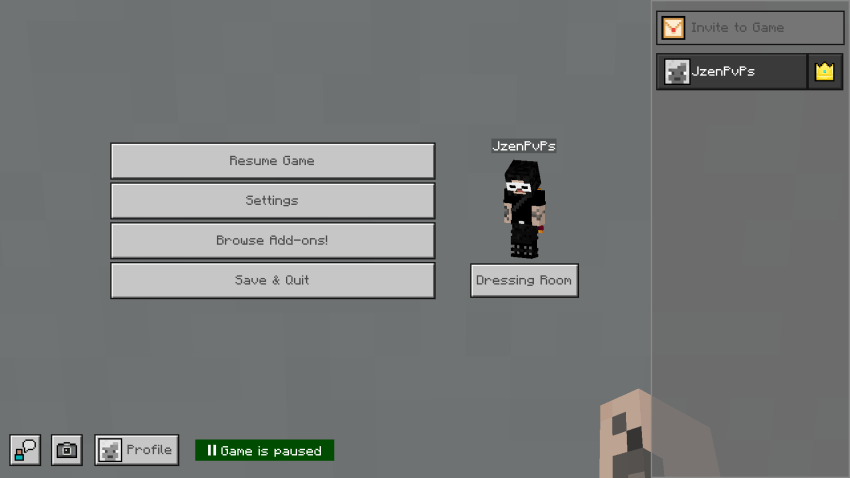
This texture pack changes the UI of the in-game pause menu to its pre 1.21.120 appearance, which fixes all of the previous issues.
Below is a comparison of the current in-game pause screen in Vanilla Minecraft versus the in-game pause screen using this texture pack.
(Vanilla)
(Using the pack)
This pack may not be compatible with other packs that rearrange the in-game pause menu, so keep this in mind if you already use UI texture packs.
- Edition: Minecraft Bedrock
- File type: .mcpack
- Minecraft versions listed: 1.21.120, 1.21.122, 1.21.121
- How to install: Download the .mcpack. → Open it — Minecraft imports it under Resource Packs. → Activate it in Global Resources, or for one world under Resource Packs → Available.
- Where to get it: Opens on CurseForge — not every file is mirrored on our own servers.
Install steps are the general flow for this file type — How to install Minecraft Bedrock texture packs walks through it step by step.
- Save it as Pause Screen Fix.mcaddon before opening — it downloads as .mcpack, but it is a .mcaddon pack
- Manifest requires Minecraft 1.20.0 or newer
- Complete pack — everything it depends on is inside the file
- Download size: 47 KB
- Download link checked 6 Oct 2026 — working
These come from our own check of the pack file, not from the source page.