
SkinsBedrock
Pirates Collection
Bedrock skin pack listed for Minecraft 1.0–1.21. File opened and checked on 21 Sep 2026; installs from the MC Skins app on Android.
I don't know my version
Open Minecraft and look at the bottom-left corner of the main screen — the version is printed there, like v1.26.30.
The game writes a 1. in front; the buttons above leave it off. v1.26.30 in the game is 26.30 here.

Pirate Skinpack
Hoist the sails and let the tides guide ye with the Pirates Skinpack. This daring trove of skins swashes the colors of twilight seas—deep royal purples, rolling blues, and shimmering greens. Whether ye be plundering buried treasure or charting unclaimed waters, these skins will have yer Minecraft self looking like the most fearsome and fabled rogue of the seven seas.
Picture of skins:
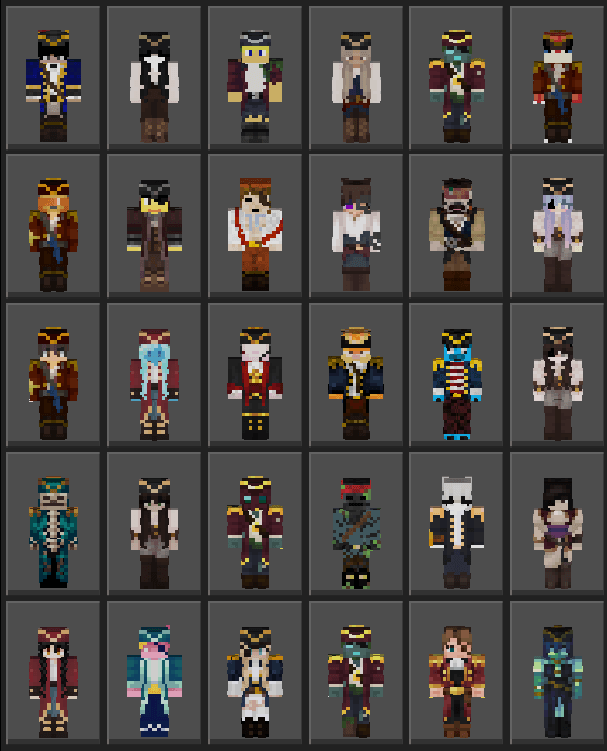
Check out my profile for other AWESOME Skinpacks!
Quick facts
- Edition: Minecraft Bedrock
- File type: .mcpack
- Minecraft versions listed: 1.21.81, 1.21.93, 1.21.73
- How to install: Download the .mcpack skin pack. → Open it — Minecraft imports it. → Open the Dressing Room and select the skin.
- Where to get it: Opens on CurseForge — not every file is mirrored on our own servers.
Install steps are the general flow for this file type — How to apply a custom Minecraft skin walks through it step by step.
File checked by MCModsHub
- Pack type: .mcpack — a single pack
- Complete pack — everything it depends on is inside the file
- Download size: 62 KB
- Download link checked 26 Oct 2026 — working
These come from our own check of the pack file, not from the source page.