
Crimson Color Fix
Bedrock texture pack listed for Minecraft 1.16. File opened and checked on 30 Sep 2026; installs from the MC Bedrock Mods app on Android.
⬇ Download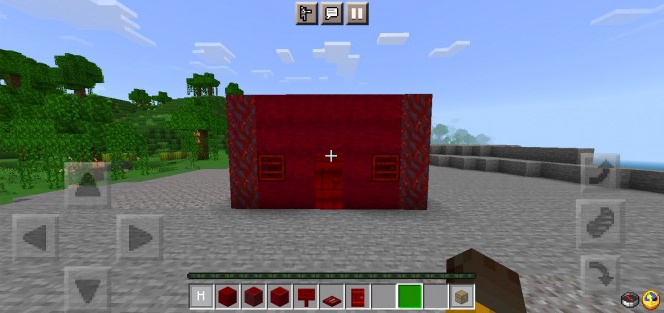

Have you ever noticed that crimson wood looks more like purple that the color crimson? I mean, it’s called crimson, but why does it look purplish? Well, we never know, but with this small texture pack, makes the crimson wood looks crimson while keeping the vanilla style!
Crimson Color Fix
List of things retextured: Crimson Planks
- Crimson Slab
- Crimson Stairs
- Crimson Door
- Crimson Trapdoor
- Crimson Fence
- Crimson Fence Gate
- Crimson Sign
- Crimson Stem
- Stripped Crimson Stem
Due new Minecraft Bedrock Preview versions, crimson hanging signs doesn’t given a new texture yet, but I’m sure it will be added soon!
how it looks in-game
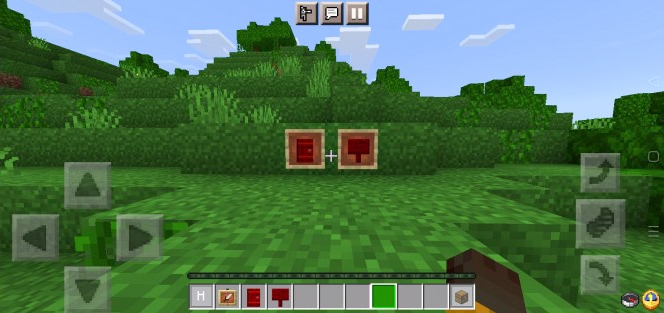
crimson sign and door item texture
Some Minecraft Texture packs you can check in Mcpeaddons.com:
- Edition: Minecraft Bedrock
- File type: .mcpack
- How to install: Download the .mcpack. → Open it — Minecraft imports it under Resource Packs. → Activate it in Global Resources, or for one world under Resource Packs → Available.
- Where to get it: In MCModsHub, or directly above on this page.
Install steps are the general flow for this file type — How to install Minecraft Bedrock texture packs walks through it step by step.
- Pack type: .mcpack — a single pack
- Manifest requires Minecraft 1.16.0 or newer
- Complete pack — everything it depends on is inside the file
- Download size: 27 KB
- Download link checked 17 Jun 2026 — working
- Mirrored on our own servers — the download does not depend on the original host
These come from our own check of the pack file, not from the source page.