Texture packsBedrock
Crownbossyt's Waypoint Texture Pack for MCPE 1.21.100
Bedrock texture pack listed for Minecraft 1.20–1.21. File opened and checked on 25 Sep 2026; installs from the MC Bedrock Mods app on Android.
Minimal waypoint texture pack—equip armor on Armor Stands to create distinct beacon beams; use a stick to mark player locations and deaths.
⬇ Downloadcrownbossyt’s Waypoint
Stop losing locations. This pack does exactly what a waypoint system should do—no fluff, no UI clutter.
What it does
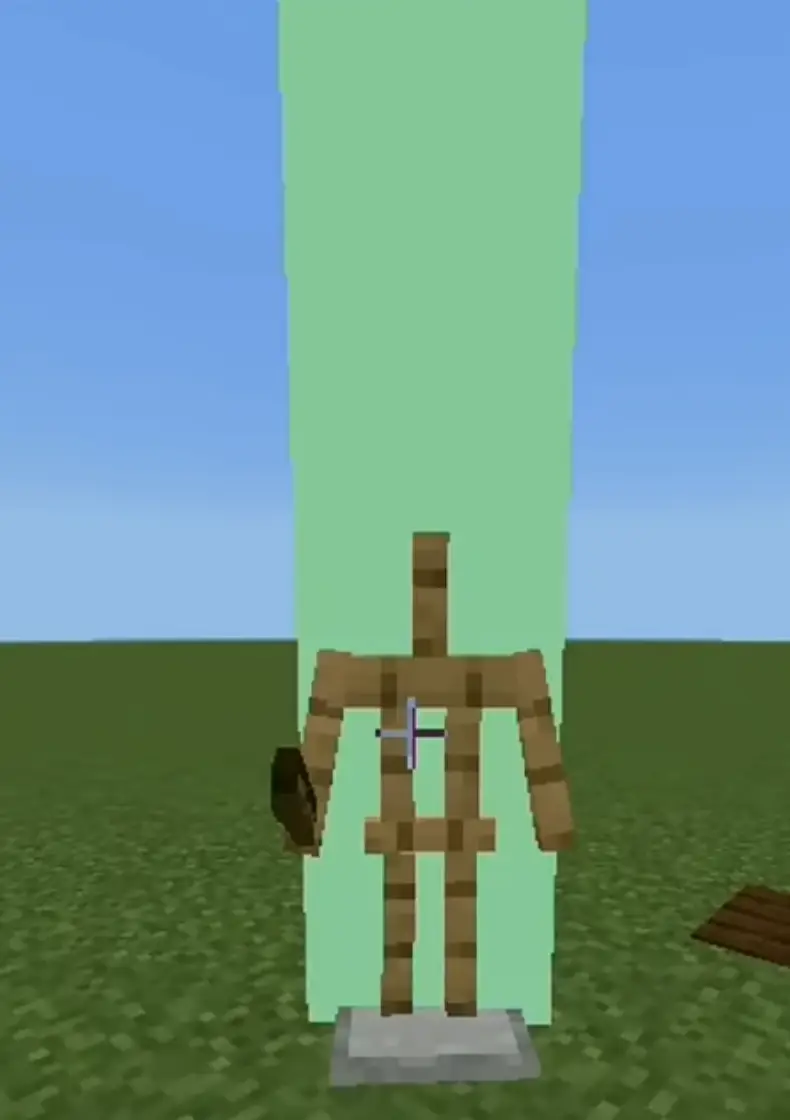
- Place an Armor Stand and equip it with any armor to summon a beam of light at that exact location.
- Different armor = different beam texture. You choose the marker by choosing the armor.
- Give the Armor Stand a stick to summon a green beam of light. Simple and clear.
Sub Pack: Player-Based Waypoints
- Sneak while holding a stick → instantly summons a green beam of light at your position.
- Player death → a beam of light spawns at the death location, so you can recover your items without guessing.
Why this pack
- No commands.
- No UI menus.
- Works naturally with gameplay.
- Lightweight and survival-friendly.
- Perfect for exploration, builds, death markers, and multiplayer servers.
Quick facts
- Edition: Minecraft Bedrock
- File type: .mcpack
- Minecraft version listed: 1.21.100
- How to install: Download the .mcpack. → Open it — Minecraft imports it under Resource Packs. → Activate it in Global Resources, or for one world under Resource Packs → Available.
- Where to get it: In MCModsHub, or directly above on this page.
Install steps are the general flow for this file type — How to install Minecraft Bedrock texture packs walks through it step by step.
File checked by MCModsHub
- Pack type: .mcpack — a single pack
- Manifest requires Minecraft 1.20.0 or newer
- Complete pack — everything it depends on is inside the file
- Download link checked 18 Jun 2026 — working
- Mirrored on our own servers — the download does not depend on the original host
These come from our own check of the pack file, not from the source page.