Fullbright Texture Pack for Minecraft Bedrock 1.21.10
Bedrock texture pack listed for Minecraft 1.21. Installs from the MC Bedrock Mods app on Android.
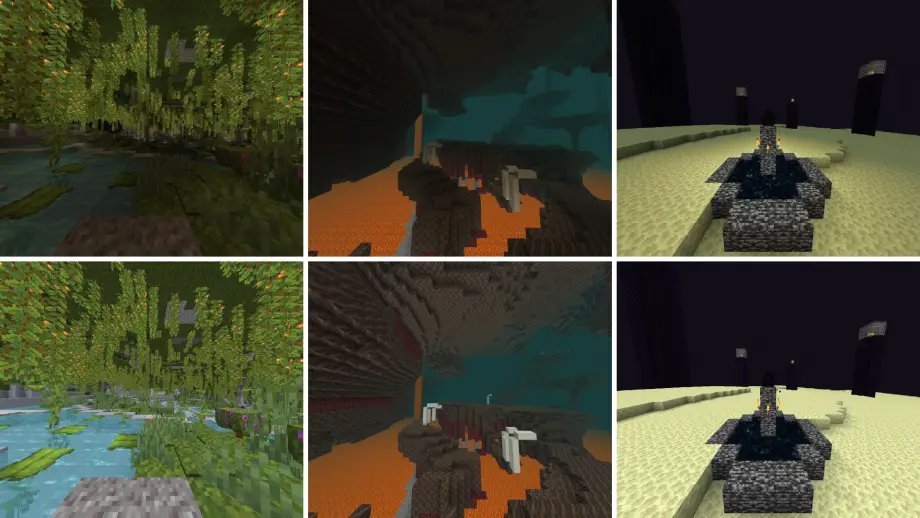
Fullbright increases Minecraft brightness so you can see clearly in caves, the Nether, and the End while remaining compatible with other resource packs.
⬇ DownloadFullbright lets you see in the dark by modifying the brightness of Minecraft. This is a useful tool which works in all Minecraft vanilla environments such as the Overworld, Nether and the End. Additionally, this Minecraft resource pack is compatible with other resource packs, so you can use the pack that you want while having Fullbright.
Information
- You can set your in-game brightness to 100% (Bright) to enhance the brightness effect.
- If you use another resource pack and it modifies "shaders", set the Fullbright resource pack to the top of the list to ensure it works.
- Edition: Minecraft Bedrock
- File type: .mcpack
- Minecraft version listed: 1.21.10
- How to install: Download the .mcpack. → Open it — Minecraft imports it under Resource Packs. → Activate it in Global Resources, or for one world under Resource Packs → Available.
- Where to get it: In MCModsHub, or directly above on this page.
Install steps are the general flow for this file type — How to install Minecraft Bedrock texture packs walks through it step by step.
Fullbright Texture Pack for Minecraft Bedrock 1.21.10 is a free Minecraft Bedrock texture pack. Compatible with Minecraft 1.21.10. Available via Modbay. Download it and open it directly in the game.