Enchantment Info: Extended Texture Pack for Minecraft PE
Bedrock texture pack listed for Minecraft 1.13. File opened and checked on 3 Oct 2026; installs from the MC Bedrock Mods app on Android.
⬇ DownloadHave you ever forgotten which enchantments you can put on what gear? Well, let's take the guessing games out! Have your enchantments color-coded and iconified!
Inspired by ICantThinkOfAUsername's Java Pack, this will help you easily identify what goes on where, in full color!
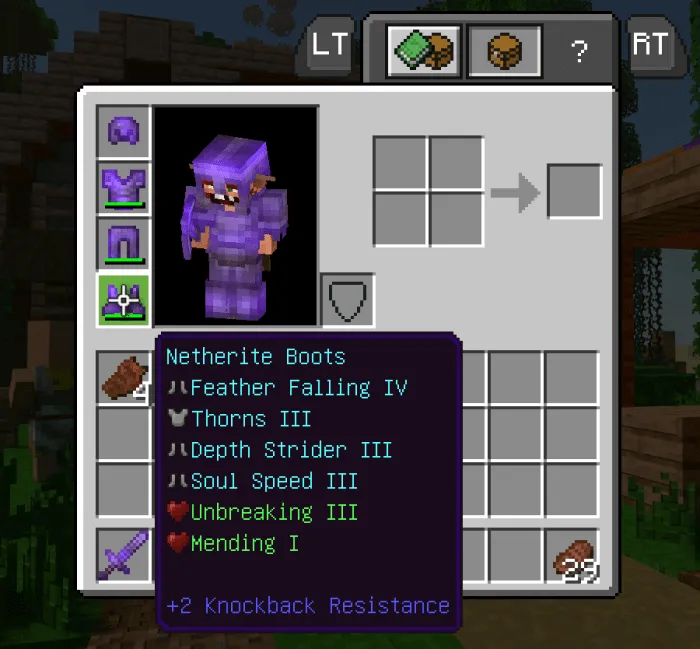
Here's a screenshot of how an item looks with this pack.
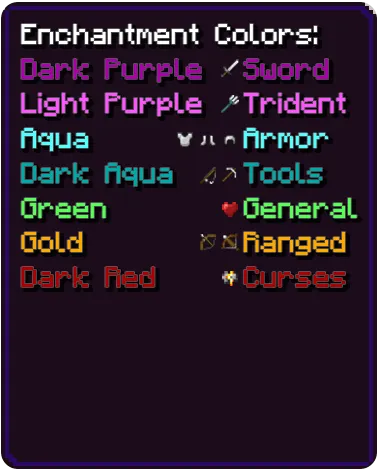
Each type of enchantment not only has an icon but is also color coded for your convenience swords are Dark Purple, tridents Light Purple, armor Aqua, tools and fishing rod are Dark Aqua, general enchantments are Green, ranged weapons are Gold and curses are Dark Red!
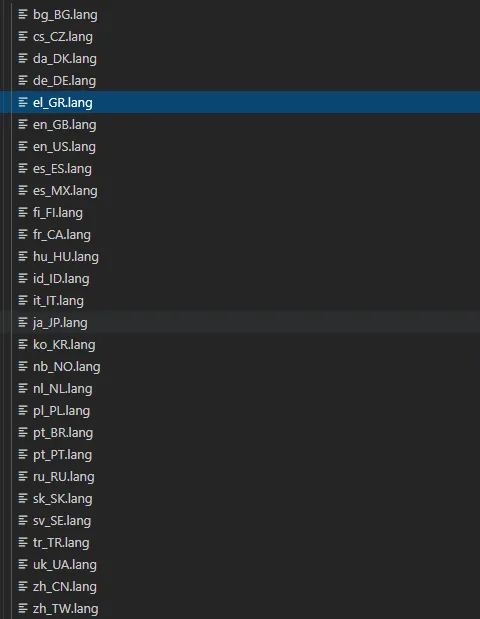
This one also comes in many languages! If there are errors in any of them, please do tell me! I will gladly update it!
Updated on November 17
EX3 [1.0.3] Change Log:
- Added fr_FR language
- Added Swift Sneak info
- Edition: Minecraft Bedrock
- File type: .mcpack
- How to install: Download the .mcpack. → Open it — Minecraft imports it under Resource Packs. → Activate it in Global Resources, or for one world under Resource Packs → Available.
- Where to get it: In MCModsHub, or directly above on this page.
Install steps are the general flow for this file type — How to install Minecraft Bedrock texture packs walks through it step by step.
- Pack type: .mcpack — a single pack
- Manifest requires Minecraft 1.13.0 or newer
- Complete pack — everything it depends on is inside the file
- Download link checked 18 Jun 2026 — working
- Mirrored on our own servers — the download does not depend on the original host
These come from our own check of the pack file, not from the source page.