Parallel UI Texture Pack for Minecraft Bedrock
Bedrock texture pack listed for Minecraft 1.13–1.19. File opened and checked on 30 Sep 2026; installs from the MC Bedrock Mods app on Android.
Minecraft's native and built-in UI being bad is a popular opinion, and thus, Parallel UI is a one of the best available solutions.
⬇ DownloadParallel UI aims to imrpove the general user experience by re-desigining the menus in-game to look prettier, more modern, and easier to navigate.
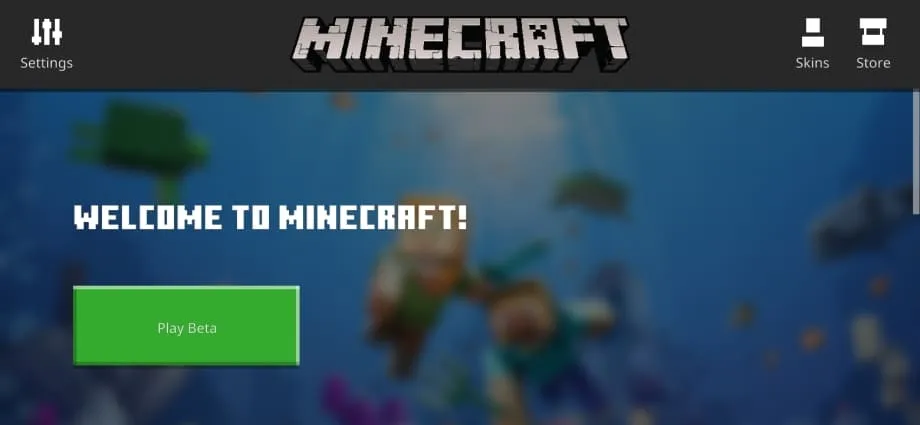
Main Menu:
This is the main page.

By scrolling down, you will find this page:

World loading/saving screen:


TERMS OF USE:
By downloading Parallel UI, you confirm that you agree to these terms:
- You are only allowed to review the pack on social media if you credit me, and my Twitter page.
- You are not allowed to re-distribute the pack anywhere else, otherwise legal action will be taken.
- You are not allowed to create modified APK/APPX with my resource pack, because said act is misleading, and I do not accept my packs being used to mislead others.
- Edition: Minecraft Bedrock
- File type: .mcpack
- Minecraft versions listed: 1.19.80, 1.19.70
- How to install: Download the .mcpack. → Open it — Minecraft imports it under Resource Packs. → Activate it in Global Resources, or for one world under Resource Packs → Available.
- Where to get it: In MCModsHub, or directly above on this page.
Install steps are the general flow for this file type — How to install Minecraft Bedrock texture packs walks through it step by step.
- Pack type: .mcaddon — behaviour and resource pack in one file
- Manifest requires Minecraft 1.13.0 or newer
- Complete pack — everything it depends on is inside the file
- Download link checked 18 Jun 2026 — working
- Mirrored on our own servers — the download does not depend on the original host
These come from our own check of the pack file, not from the source page.